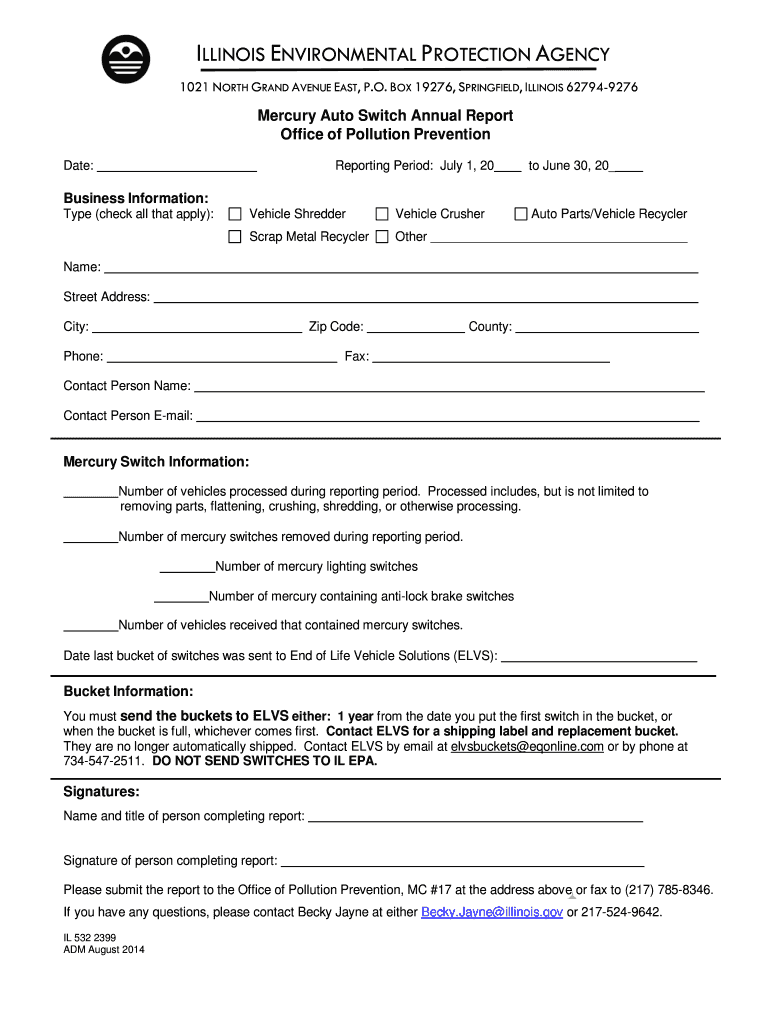
Ng Period: July 1, 20 to June 30, 20 Business Information: Type (check all that apply): Vehicle Shredder Vehicle Crusher Auto Parts/Vehicle Recycler Scrap Metal Recycler Other Name: Street Address: City: Zip Code: Phone: County: Fax: Contact Person Name: Contact Person E-mail: Mercury Switch Information: Number of vehicles processed during reporting period. Processed includes, but is not limited to removing parts, flattening, crushing.
Loading

Open form follow the instructions

Easily sign the form with your finger

Send filled & signed form or save
How to fill out the IL 532 2399 online
The IL 532 2399 form, also known as the Mercury Auto Switch Annual Report, is essential for reporting vehicle processing activities related to mercury switches. This guide will provide clear instructions on how to complete the form online efficiently.
Follow the steps to complete your Mercury Auto Switch Annual Report.
- Click ‘Get Form’ button to obtain the form and open it in your preferred editor.
- Begin by filling in the date at the top of the form, ensuring it reflects the current date of completion.
- Indicate the reporting period by providing the start and end dates in the designated section, using the format July 1, YYYY to June 30, YYYY.
- In the Business Information section, check all applicable types of business activities, including vehicle shredder, vehicle crusher, auto parts/vehicle recycler, scrap metal recycler, or other specific types.
- Fill out the name, street address, city, zip code, phone number, county, fax number, and contact person name along with their email address in the provided fields.
- In the Mercury Switch Information section, input the total number of vehicles processed, the number of mercury switches removed, and the specific counts for mercury lighting switches and anti-lock brake switches.
- Provide the number of vehicles received that contained mercury switches and include the date when the last bucket of switches was sent to End of Life Vehicle Solutions (ELVS).
- Review the Bucket Information note regarding the sending process to ELVS to ensure compliance with their requirements for handling the mercury switches.
- Complete the Signatures section by entering the name and title of the person completing the report, then provide their signature.
- Once all sections are filled out accurately, save your changes. You can download, print, or share the completed form as needed.
Start completing your IL 532 2399 form online today for a smooth submission process.
Experience a faster way to fill out and sign forms on the web. Access the most extensive library of templates available.
Related content
by ACO Silva · 2009 · Cited by 156 — The purpose of this study was to analyze the...
Our study suggests that IL-27 is a potential therapeutic target for obesity and metabolic...
Introduction. Benign prostatic hyperplasia (BPH) is a histologic diagnosis that refers to...
Get answers to your most pressing questions about US Legal Forms API.
How to fill an e-file?
Filling an e-file for your Illinois tax return using IL 532 2399 is streamlined and user-friendly. Start by gathering all necessary tax documents and information, then access the e-file portal on the Illinois Department of Revenue site. Follow the prompts to input your data, ensuring all fields are completed accurately. If you encounter any difficulties, uslegalforms offers reliable assistance in navigating the e-filing process.
Where to file IL?
You can file your IL 532 2399 tax return online through the Illinois Department of Revenue’s e-File program. Alternatively, for those preferring paper forms, you can file by mailing your return to the address specified for your situation. Make sure to check the Illinois Department of Revenue website for any updates or changes related to where to file your return. Taking the correct step ensures a smooth filing process.
How to mail an Illinois tax return?
To mail your Illinois tax return, first ensure you have completed the necessary forms correctly. Place your completed IL 532 2399 return in an envelope, and address it to the appropriate taxation office. You can find the right mailing address on the Illinois Department of Revenue website, depending on whether you are including payment or expecting a refund. Finally, add sufficient postage and drop it in the mail.
Use professional pre-built templates to fill in and sign documents online faster. Get access to thousands of forms.
If you believe that this page should be taken down, please follow our DMCA take down process here.