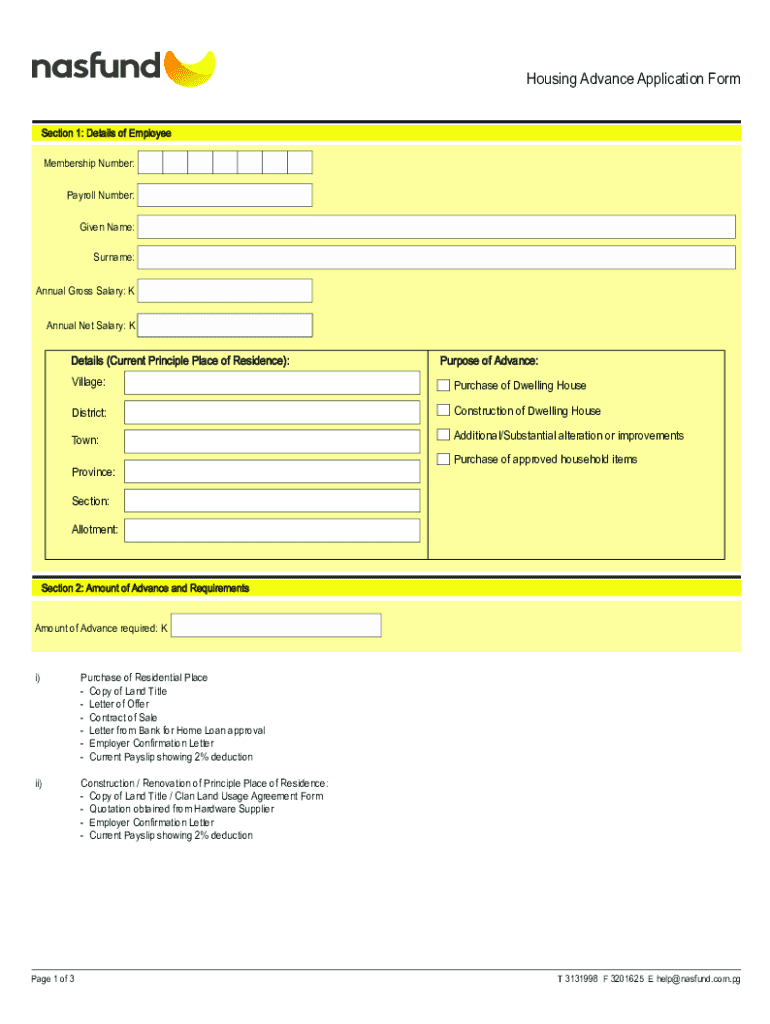
) ii) iii) Purchase/Construction of your principal place of residence. Renovation/Maintenance of principal place of residence. Purchase of the following household essential items for principal place of residence: - White goods (fridge and stove only); - Water tank & water pump (both must accompany each other); - Solar panels; - Electricity generator, and; - Dining table and chairs. Eligibility i) First Advance Withdrawal - Must be a member of an Authorised Superannuation Fund (ASF) for five (.
Loading

Open form follow the instructions

Easily sign the form with your finger

Send filled & signed form or save
How to fill out the PG Nasfund Housing Advance Form online
Filling out the PG Nasfund Housing Advance Form online can be a straightforward process when you understand the necessary steps. This guide aims to provide clear and supportive instructions to help you complete the form accurately and efficiently.
Follow the steps to successfully complete the form online.
- Click ‘Get Form’ button to retrieve the PG Nasfund Housing Advance Form and open it in your preferred online editor.
- Begin with Section 1: Details of Employee. Enter your membership number, payroll number, given name, surname, and salaries as requested. Ensure accuracy in these fields to avoid complications.
- Next, provide details about your current principal place of residence, including the village, district, town, and province. Clearly indicate the purpose of your housing advance by selecting one of the options listed.
- Proceed to Section 2: Amount of Advance and Requirements. Specify the amount of advance you are requesting and ensure you include necessary documentation based on the purpose of the advance, such as a copy of the land title or employer confirmation letter.
- In Section 3: Declaration and Conditions of Advance, read the statements carefully and confirm your understanding by signing off with your signature or right-hand thumb impression. Provide your mobile number, postal address, and email address for further correspondence.
- If applicable, Section 4 requires an employer declaration. Have an authorized representative from your employer complete this section, certifying the particulars of your application.
- Finally, review all the information you have entered for accuracy. Once everything is complete, save your changes, download a copy for your records, and if necessary, print or share the completed form as instructed.
Complete your PG Nasfund Housing Advance Form online today!
Experience a faster way to fill out and sign forms on the web. Access the most extensive library of templates available.
Related content
Our fiscal year ends on December 31. As used throughout this Annual Report on Form 20-F...
Report of the Treasurer for the Year Ended December 31, 2007 (2008). Chapter: 2007...
Get answers to your most pressing questions about US Legal Forms API.
How to increase Nasfund?
To increase your Nasfund savings, consider regularly contributing additional amounts, if possible. Reviewing your investment options and adjusting your contributions can also help. Utilizing resources like the PG Nasfund Housing Advance Form enables you to access housing assistance, further supporting your financial growth.
How to fill out a bank withdrawal form?
To fill out a bank withdrawal form, clearly indicate your account details, the amount you wish to withdraw, and the reason for the withdrawal if required. Ensure you sign the form and provide your identification as necessary. Consider using a standardized format, similar to the PG Nasfund Housing Advance Form, for consistency.
What is the WhatsApp number for Nasfund?
The WhatsApp number for Nasfund can be found on their official website or client service page. It provides a convenient way to ask questions about forms like the PG Nasfund Housing Advance Form. Using WhatsApp allows for quick and direct communication regarding your inquiries.
How do I fill out a Nasfund withdrawal form?
To fill out a Nasfund withdrawal form, first ensure you have the correct form, such as the PG Nasfund Housing Advance Form. Provide accurate personal information, specify the withdrawal amount, and include any necessary documentation. Lastly, double-check your entries before submitting to avoid delays.
Is Nasfund a bank?
No, Nasfund is not a bank; it is a superannuation fund in Papua New Guinea. It provides retirement savings and related financial services. Although it shares some characteristics with a bank, its primary focus is on providing investment and housing assistance through forms like the PG Nasfund Housing Advance Form.
How do I write a withdrawal form?
To write a withdrawal form, start by clearly stating your intention to withdraw funds. Include essential details like your account number, the amount you wish to withdraw, and any specific references to the PG Nasfund Housing Advance Form if applicable. Be sure to sign the form and provide your contact information for processing.
How can I withdraw my NASFUND?
Withdrawing from your NASFUND is a simple process. You can visit your NASFUND office or use the appropriate forms online. Make sure to have your NASFUND withdrawal form filled out accurately to avoid delays. The PG Nasfund Housing Advance Form is vital if you're specifically addressing housing-related withdrawals, so keep it on hand.
Use professional pre-built templates to fill in and sign documents online faster. Get access to thousands of forms.
If you believe that this page should be taken down, please follow our DMCA take down process here.