Loading
Form preview
  • US Legal Forms
  • Form Library
  • Independent Agency Forms
  • Independent Agency USPS Forms
  • Usps Ps 5543 2013

Get Usps Ps 5543 2013-2026

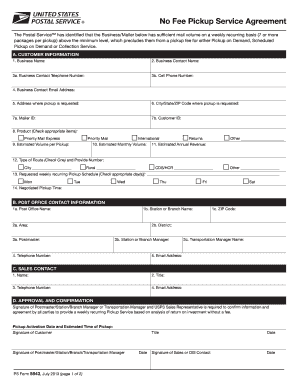
Pickup Activation Date and Estimated Time of Pickup PS Form 5543 July 2013 page 1 of 2 Date Signature of Sales or OIS Contact INSTRUCTIONS This form is used when a No Fee Pickup Service Agreement is initiated by USPS Sales and agreed upon by the customer and local installation head i.e. Postmaster or transportation manager for weekly recurring Pickup Request. .

How it works

  1. Open form

    Open form follow the instructions

  2. Easily sign form

    Easily sign the form with your finger

  3. Share form

    Send filled & signed form or save

How to fill out the USPS PS 5543 online

The USPS PS 5543 form is essential for establishing a no fee pickup service agreement for businesses with a significant volume of mail. This guide provides step-by-step instructions to assist you in accurately completing the form online.

Follow the steps to fill out the USPS PS 5543 form accurately.

  1. Click ‘Get Form’ button to obtain the form and open it in the editor.
  2. Begin filling out Section A: Customer Information. Provide the complete name of your business as it is registered, avoiding acronyms or symbols.
  3. Enter the Business Contact Name, which should be the person designated for any communications regarding the pickup service.
  4. Input the Business Contact Telephone Number and Cell Phone Number, ensuring they are current and accessible for USPS communication.
  5. Fill in the Business Contact Email Address, using a direct email for the contact person rather than a generic company email.
  6. Complete the Address where pickup is requested, ensuring it is a physical location and not a P.O. Box.
  7. Provide the City, State, and ZIP Code for the pickup location.
  8. Enter the Mailer ID and Customer ID, which allow USPS to track volume and service.
  9. In the Products section, check all applicable items that you wish to include in the pickup request.
  10. Estimate the Volume per Pickup, confirming it meets the minimum of 7 items.
  11. Estimate your Monthly and Annual Volume, providing accurate figures based on your business operations.
  12. Indicate the Type of Route and provide the route number if available.
  13. Select the days for your requested weekly recurring Pickup Schedule.
  14. Specify the negotiated Pickup Time that works best for your schedule.
  15. Complete Section B: Post Office Contact Information. Fill in details such as the Post Office Name and ZIP Code.
  16. Finish with Section C: Sales Contact by inputting the relevant information of the USPS sales representative initiating the request.
  17. Review all provided information for accuracy and completeness.
  18. To finalize, secure necessary signatures in Section D. Ensure that the Postmaster, Customer, and Sales Representative have signed the form.
  19. Once completed, save changes, download, print, or share the form as needed.

Encourage others to complete their USPS PS 5543 documents online to ensure a smooth pickup service agreement.

Get form

Experience a faster way to fill out and sign forms on the web. Access the most extensive library of templates available.
Get form

Related content

507 Mailer Services | Postal Explorer
1 from a customer who has an authorized signed agreement (Form 5543) with the local Post...
Learn more
DMM 507 Mailer Services
Jan 27, 2013 — 1 from a customer who has an authorized signed agreement (PS Form 5543)...
Learn more
THE SMALL SYSTEMS JOURNAL
Mar 9, 1985 — Thanks to The Macintosh' Office. Using our AppleLine protocol converter...
Learn more

Related links form

Puente Leadership Conference Form Report Of Sale 3930 Pm Wm0228 Form Sacramento County Pcor

Questions & Answers

Get answers to your most pressing questions about US Legal Forms API.

Contact support

If USPS does not deliver your package by the guaranteed time, you should first check your tracking information for updates. Next, reach out to USPS customer service to inquire about the delay. If it relates to a guaranteed service under USPS PS 5543, you can ask about possible claims or refunds. Being proactive in this situation will facilitate a smoother resolution.

To obtain compensation from USPS, you need to file a claim for your lost or damaged item. If the item was insured through USPS PS 5543, your claim might be streamlined, allowing for quicker processing. Make sure you provide all essential documents and follow the guidelines on their website. This approach helps maximize your chances of receiving fair compensation.

Filing an ECC case with USPS involves logging into the USPS website to fill out the necessary form. Be prepared with details about your shipment, including tracking numbers and delivery dates. Utilizing the USPS PS 5543 feature can facilitate this process, providing you with guidance on preparing your case effectively. This ensures that you adhere to the requirements needed for a successful submission.

To claim a lost package with USPS, you'll need to use the USPS PS 5543 claim form. Begin by tracking your package online to confirm its status. If it is indeed lost, complete the claim form with all specifics, including the tracking number and shipment details. You can submit the form online or visit a USPS location for assistance.

Filling out the USPS claim form is straightforward. Begin with the USPS PS 5543 form and gather your shipment receipt, tracking number, and any relevant information about the package. Ensure that all fields are filled accurately to avoid delays. Once completed, submit the form online or at your nearest USPS branch.

To fill out a USPS claim form, start by visiting the USPS website or your local post office. Obtain the USPS PS 5543 form and provide all necessary details, including your tracking number and shipment information. Make sure to specify the reason for your claim clearly. You can complete the process online or in person, depending on your preference.

To get approval for moving your mailbox, you must first consult USPS PS 5543 regulations to ensure compliance. Contact your local post office before making any changes to discuss your intended move. They may guide you through the necessary steps and inspections. Moving your mailbox correctly ensures that you maintain uninterrupted mail service and adherence to USPS standards.

To secure USPS government contracts, you primarily need to register as a vendor and familiarize yourself with the processes outlined by USPS, including details related to USPS PS 5543. Visit the USPS procurement website for information on available contracts and submission guidelines. Prepare necessary documentation and proposals that align with USPS requirements. Engaging with platforms like uslegalforms can help you access the templates and guidance you need to streamline your application.

To get your new mailbox approved, first, ensure it meets USPS PS 5543 specifications regarding size and placement. Install your mailbox following local ordinances and adjust its height and accessibility as needed. Next, contact your local post office to request an inspection. An authorized USPS representative will assess your mailbox, ensuring it is compliant, after which you will receive approval.

To apply your electronic signature when shipping a USPS package, you will need to fill out the relevant form, which often includes the USPS PS 5543 details. Use USPS's online tools or their mobile app to easily upload your electronic signature. Ensure that your signature is clear and meets the required guidelines before submitting it. This process simplifies your package delivery and enhances security.

Get This Form Now!

Use professional pre-built templates to fill in and sign documents online faster. Get access to thousands of forms.
Get form
If you believe that this page should be taken down, please follow our DMCA take down processhere.

Industry-leading security and compliance

US Legal Forms protects your data by complying with industry-specific security standards.
  • In businnes since 1997
    25+ years providing professional legal documents.
  • Accredited business
    Guarantees that a business meets BBB accreditation standards in the US and Canada.
  • Secured by Braintree
    Validated Level 1 PCI DSS compliant payment gateway that accepts most major credit and debit card brands from across the globe.
Get USPS PS 5543
Get form
  • Adoption
  • Bankruptcy
  • Contractors
  • Divorce
  • Home Sales
  • Employment
  • Identity Theft
  • Incorporation
  • Landlord Tenant
  • Living Trust
  • Name Change
  • Personal Planning
  • Small Business
  • Wills & Estates
  • Packages A-Z
  • Affidavits
  • Bankruptcy
  • Bill of Sale
  • Corporate - LLC
  • Divorce
  • Employment
  • Identity Theft
  • Internet Technology
  • Landlord Tenant
  • Living Wills
  • Name Change
  • Power of Attorney
  • Real Estate
  • Small Estates
  • Wills
  • All Forms
  • Forms A-Z
  • Form Library
  • Legal Hub
  • About Us
  • Help Portal
  • Legal Resources
  • Blog
  • Affiliates
  • Contact Us
  • Delete My Account
  • Site Map
  • Industries
  • Forms in Spanish
  • Localized Forms
  • State-specific Forms
  • Forms Kit
  • Real Estate Handbook
  • All Guides
  • Notarize
  • Incorporation services
  • For Consumers
  • For Small Business
  • For Attorneys
  • USLegal
  • FormsPass
  • pdfFiller
  • signNow
  • altaFlow
  • DocHub
  • Instapage
Form Packages
  • Adoption
  • Bankruptcy
  • Contractors
  • Divorce
  • Home Sales
  • Employment
  • Identity Theft
  • Incorporation
  • Landlord Tenant
  • Living Trust
  • Name Change
  • Personal Planning
  • Small Business
  • Wills & Estates
  • Packages A-Z
Form Categories
  • Affidavits
  • Bankruptcy
  • Bill of Sale
  • Corporate - LLC
  • Divorce
  • Employment
  • Identity Theft
  • Internet Technology
  • Landlord Tenant
  • Living Wills
  • Name Change
  • Power of Attorney
  • Real Estate
  • Small Estates
  • Wills
  • All Forms
  • Forms A-Z
  • Form Library
Customer Service
  • Legal Hub
  • About Us
  • Help Portal
  • Legal Resources
  • Blog
  • Affiliates
  • Contact Us
  • Delete My Account
  • Site Map
  • Industries
  • Forms in Spanish
  • Localized Forms
  • State-specific Forms
  • Forms Kit
Legal Guides
  • Real Estate Handbook
  • All Guides
Prepared for you
  • Notarize
  • Incorporation services
Our Customers
  • For Consumers
  • For Small Business
  • For Attorneys
Our Sites
  • USLegal
  • FormsPass
  • pdfFiller
  • signNow
  • altaFlow
  • DocHub
  • Instapage
Social Media
Call us now toll free:
+1 833 426 79 33
As seen in:
© Copyright 1999-2026 airSlate Legal Forms, Inc. 3720 Flowood Dr, Flowood, Mississippi 39232
  • Your Privacy Choices
  • Terms of Service
  • Privacy Notice
  • Content Takedown Policy
  • Bug Bounty Program