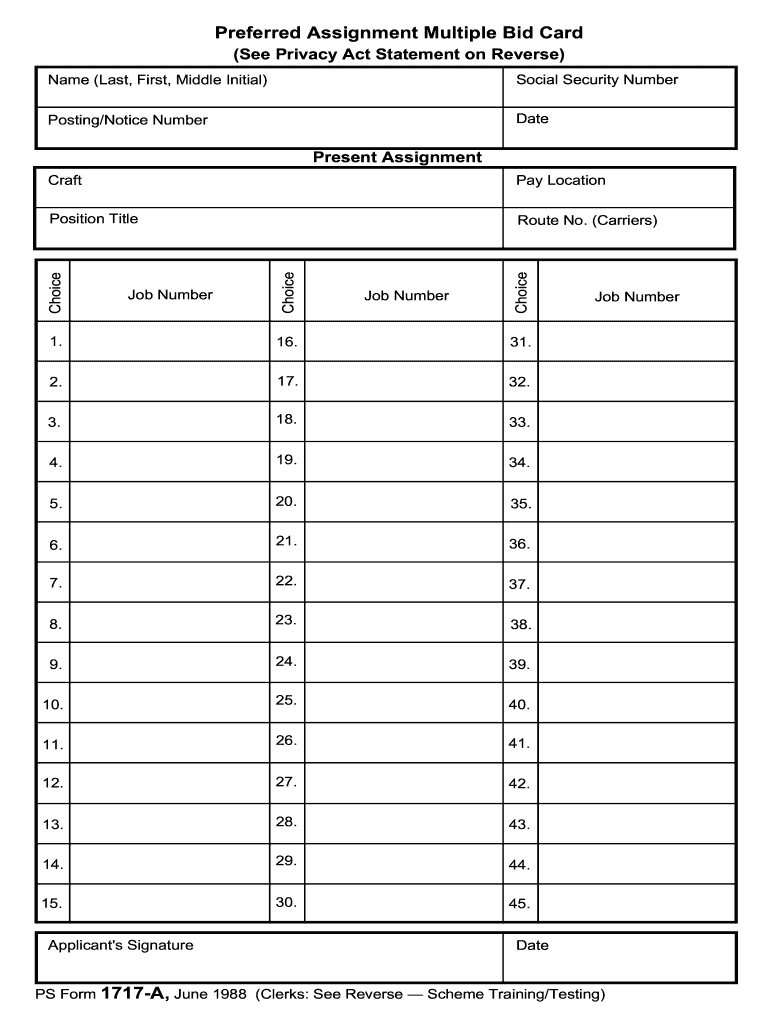
Preferred Assignment Multiple Bid Card See Privacy Act Statement on Reverse Name Last First Middle Initial Social Security Number Posting/Notice Number Date Present Assignment Route No. Carriers Job Number Choice Position Title Pay Location Craft Applicant s Signature PS Form 1717-A June 1988 Clerks See Reverse Scheme Training/Testing The collection of this information is authorized by 39 U.S.C. 1001. This information will be used to determine your qualifications and suitability for USPS employment. As a routine use this information may be disclosed to an appropriate law enforcement agency for investigative or prosecutorial purposes to a congressional office at your request to the Office of Management and Budget for review of private relief legislation to any agency where relevant to hiring contracting or licensing to a labor organization as required by the National Labor Relations Act and where pertinent in a legal proceeding to which the Postal Service is a party. Completion of this....
Loading

Open form follow the instructions

Easily sign the form with your finger

Send filled & signed form or save
How to fill out the USPS PS 1717-A online
The USPS PS 1717-A form is essential for individuals applying for preferred assignments within the United States Postal Service. This guide provides detailed instructions on how to fill out the form online, ensuring a smooth and efficient process for all users.
Follow the steps to complete the USPS PS 1717-A form online.
- Click ‘Get Form’ button to obtain the form and open it in the editor.
- Begin by entering your name in the designated section. Include your last name, followed by your first name and middle initial.
- Input your Social Security number in the next field to help identify your application.
- Fill in the Posting/Notice number. Ensure this is accurate to avoid any issues with your application.
- Enter the date on which you are completing the form.
- Specify your present assignment by detailing your current job title and responsibilities.
- Complete the field for Route No. (Carriers) and Job number as applicable to your position.
- For each choice category starting from 1 through 45, select your preferred position titles, pay location, and craft as needed.
- Ensure the section regarding the Clerk Craft — Scheme Training/Testing Alternative Election is filled based on your preference for training/testing.
- Sign and date the form in the designated areas to confirm the information is true and correct.
- Once all sections are filled, save your changes, download a copy of the form, print it, or share it as required for submission.
Complete your USPS PS 1717-A form online today to ensure a streamlined application process.
Experience a faster way to fill out and sign forms on the web. Access the most extensive library of templates available.
Related content
This table identifies the mailability of hazardous materials for domestic mail only...
by AC Cruce · 1982 — We examined machine operation data during 1,341 separate 30 minute...
1 Applications for Everyone. 1. Personal Reference Source-The Electronic Memorandum...
Get answers to your most pressing questions about US Legal Forms API.
How to fill out a bid sheet?
To fill out a bid sheet, start by gathering all necessary information regarding the items or services you wish to bid on. Clearly list the prices you are willing to offer and any terms related to the bid. It's important to ensure clarity and accuracy, as this will facilitate easy communication and understanding.
How to fill out a USPS change of address form?
Filling out a USPS change of address form is an essential task when relocating. You can complete this form online through the USPS website or at a local post office. Be sure to include your new address, effective dates, and any additional family member details to ensure a smooth transition.
How do I file exempt USPS?
To file an exempt USPS claim, begin by gathering your documentation, including proof of eligibility. Then, use the USPS claims portal to follow the prompts specifically designed for exempt filings. It's essential to ensure you meet the requirements to avoid any complications.
How do I file a USPS claim online?
You can file a USPS claim online by visiting the USPS claims page. Once there, you'll need to enter your tracking number and follow the prompts to submit your claim. Remember to have your contacts and relevant details handy, including any information related to the USPS PS 1717-A process.
How to fill out PS Form 1717 PDF?
Filling out the USPS PS 1717-A form is straightforward. First, download the PS Form 1717 PDF from the USPS website or the uslegalforms platform. Enter the necessary information, including addresses and other specific details, ensuring accuracy to prevent delays.
How do I claim a lost package with USPS?
To claim a lost package with USPS, you need to complete the USPS PS 1717-A form. Start by collecting your package’s tracking number and any shipment details. Once the form is filled out, submit it through the USPS claims portal or at your local post office to initiate the claims process and receive updates on your case.
How to fill out USPS claim form?
Filling out a USPS claim form starts with the USPS PS 1717-A, which you can find on the USPS website. You will need your tracking number, shipment details, and evidence of the item’s value. Ensure all information is accurate and complete, then submit the form via your nearest post office or online for a prompt resolution.
How to fill out a USPS claim form?
To fill out a USPS claim form, begin by downloading the USPS PS 1717-A form from the USPS website. Next, gather all necessary information, such as your tracking number, the proof of value, and any relevant receipts. After filling in the required details, print and sign the form before submitting it to your local post office or online through the USPS claims portal.
What is USPS PS lightweight?
USPS PS lightweight refers to a classification of services that are streamlined for efficiency while ensuring quality delivery. These lightweight options often cater to customers seeking quick, affordable solutions. Familiarity with the USPS PS 1717-A can help you navigate and select the best lightweight services suited to your needs.
What is a USPS PSA?
A USPS PSA, or Postal Service Agreement, establishes terms between USPS and vendors for various services. Understanding USPS PS 1717-A is crucial, as it often serves as a foundational document for these agreements. This ensures both parties are clear on their responsibilities and commitments in the partnership.
Use professional pre-built templates to fill in and sign documents online faster. Get access to thousands of forms.
If you believe that this page should be taken down, please follow our DMCA take down process here.