Loading
Get Ct Pressure Decay Test Notification For A Gasoline Dispensing Facility (gdf) 2013-2026
How it works
-

Open form follow the instructions
-

Easily sign the form with your finger
-

Send filled & signed form or save
How to fill out the CT Pressure Decay Test Notification for a Gasoline Dispensing Facility (GDF) online
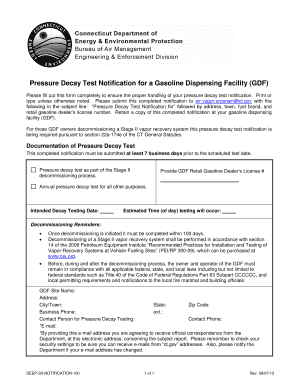
Completing the CT Pressure Decay Test Notification form is an essential step for gasoline dispensing facilities to ensure compliance with regulations regarding pressure decay tests. This guide provides clear instructions on how to fill out the form online effectively.
Follow the steps to complete your pressure decay test notification form.
- Press the ‘Get Form’ button to access the form and open it in the editor. This step allows you to retrieve the necessary document for completion.
- Fill in the 'GDF Site Name' field with the official name of your gasoline dispensing facility. Ensure that the name matches any registered documents.
- Provide the 'Address' of the facility. This should include the street number and name.
- Enter the 'City/Town' where your facility is located. This information helps in regional categorization.
- Complete the 'State' and 'Zip Code' fields accurately to confirm your facility's location.
- Add your 'Business Phone' number and any relevant extension, which will be used for any follow-up communications.
- Include the 'Contact Person for Pressure Decay Testing' field with the name of the individual responsible for the test.
- Fill in the 'Contact Phone' number of the responsible person to ensure they can be reached if needed.
- Enter a valid 'E-mail' address for official correspondence from the Department. Be sure to check that you can receive messages from 'ct.gov' addresses.
- Specify the 'GDF Retail Gasoline Dealer’s License #' to confirm your business authorization.
- State the 'Intended Decay Testing Date' to indicate when the test is scheduled to occur.
- Provide the 'Estimated Time (of day)' for when the testing will happen, ensuring it aligns with schedule requirements.
- Review the completed form for accuracy before submission.
- Once satisfied, save your changes and download the form for your records. You should also print it for your facility's compliance documentation.
- Finally, submit the completed notification to air.vapor.program@ct.gov, ensuring the subject line includes: 'Pressure Decay Test Notification for' followed by the required details.
Complete your pressure decay test notification online today for compliance and peace of mind.