Loading
Form preview
  • US Legal Forms
  • Form Library
  • More Forms
  • More Multi-State Forms
  • Se Fm02

Get Se Fm02

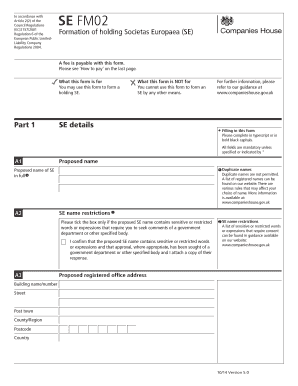
(SE) A fee is payable with this form. Please see How to pay on the last page. What this form is for You may use this form to form a holding SE. Part 1 What this form is NOT for You cannot use this form to form an SE by any other means. For further information, please refer to our guidance at www.companieshouse.gov.uk SE details Filling in this form Please complete in typescript or in bold black capitals. All fields are mandatory unless specified or indicated by * A1 Proposed name.

How it works

  1. Open form

    Open form follow the instructions

  2. Easily sign form

    Easily sign the form with your finger

  3. Share form

    Send filled & signed form or save

How to fill out the SE FM02 online

The SE FM02 form is essential for the formation of a holding Societas Europaea (SE). This guide provides clear and supportive instructions on completing the form online, ensuring that all necessary information is accurately provided.

Follow the steps to successfully complete the SE FM02 form.

  1. Press the ‘Get Form’ button to access the SE FM02 form and open it in your preferred online editor.
  2. Fill in the proposed name of the SE in section A1. Ensure that the name complies with naming conventions and is not a duplicate. Refer to the provided list of registered names on the relevant website.
  3. Complete section A3 with the proposed registered office address. All address fields must be filled in using bold black capital letters.
  4. Provide details about promoting companies or SEs in section A4. Fill in the registered number (if applicable) and the name of the promoting company.
  5. Complete Part 2 regarding the subscribing capital of the proposed SE. Ensure that the subscribed capital meets the minimum requirement of £50,000 or €57,100 in section B1.
  6. In Part 3, list all proposed members of the SE. Complete sections C1 to C5, ensuring to provide addresses and consent to act as a member.
  7. In Part 4, complete the Employee Involvement Statement, signing as required in A or B. This confirms compliance with employee involvement regulations.
  8. Save your changes, then download or print the completed form for your records. Share it as necessary with relevant authorities as specified.

Complete your SE FM02 form online today to ensure your SE is registered correctly.

Get form

Experience a faster way to fill out and sign forms on the web. Access the most extensive library of templates available.
Get form

Related content

Chapters 1 - 17 - Engineering Standards Manual
The ESM defines the minimum technical requirements for the design, fabrication...
Learn more
FST-FS-FM-02 Enhancing the Safety of Locally Grown...
This course is intended for Produce Growers and Farmers Market Produce Vendors.
Learn more
KW-M540BT
• ST: Acende-se quando se recebe uma transmissão estéreo. • MONO: Acende-se quando...
Learn more

Related links form

Service Unit Recognition Specialist - Girlscoutsp2p-learning.org - Online Girlscoutsp2p-learning Guide To Making A Logo Request (pdf) - United Nations Global Compact - Unglobalcompact Personal Financial Statement As Of 20 - SEI Cash Access Personal Financial Statement Hyak Financial Www.hyakfinancial.com

Questions & Answers

Get answers to your most pressing questions about US Legal Forms API.

Contact support

Yes, Ableton can send SysEx messages, enabling you to control MIDI devices effectively. To do this, configure the MIDI settings in Ableton and use the appropriate MIDI channel for your device. This feature allows you to integrate your creative workflows seamlessly with tools like SE FM02.

Filing computation typically involves completing forms related to tax or legal requirements. You can use the US Legal Forms platform to access various computation forms that meet your needs. This solution simplifies the process and ensures you have the proper documentation for your filing.

To play SysEx files, you need a MIDI-capable device that supports SysEx playback. Use software like a MIDI sequencer to load the SysEx file, and then send it to your MIDI device. As you explore different playback options, you'll find that SE FM02 can enhance this process, allowing for smooth integration and playback.

To send MIDI files from FL Studio, start by opening the project containing your MIDI data. Next, export the MIDI file through the 'Export' option in the file menu. You can then use the exported MIDI file in another software or send it to a device that supports MIDI, enhancing your production experience with SE FM02.

A SysEx file, short for System Exclusive file, is a type of MIDI file used to send specific messages to MIDI devices. These files are crucial for transferring settings and data unique to certain instruments. Understanding SysEx files is essential for music producers looking to integrate their instruments with software like SE FM02.

To send a SysEx file, you typically need a MIDI interface or a software that supports MIDI communication. Start by connecting your device to your computer and open your MIDI software. Then, load the SysEx file and use the software's sending function to transmit it through the selected MIDI port.

When filling out a service form related to SE FM02, start by carefully reading the form instructions. Fill in your details clearly, focusing on the sections that require your input. Utilizing the US Legal Forms platform can streamline this process, making it easier for you to submit your request accurately and promptly.

To fill out an application form for SE FM02, begin with gathering all essential information, such as personal details and any supporting documentation. Open the application on the US Legal Forms website to facilitate an efficient data entry process. After filling in each section, review it thoroughly to ensure that all information is accurate, minimizing delays in processing.

To complete a service request form for SE FM02, start by identifying the required information, such as the nature of your request and your contact details. Utilise the US Legal Forms platform for a user-friendly experience that guides you through each step. After filling in all necessary fields, double-check your entries before submitting them to ensure a timely response.

If you're using a Mac to fill out the SE FM02 form, open the document in the compatible application, such as Preview or a PDF reader. Use the form fields to enter your information. It's also helpful to save your work regularly to avoid losing any data, ensuring a successful submission through the US Legal Forms website.

Get This Form Now!

Use professional pre-built templates to fill in and sign documents online faster. Get access to thousands of forms.
Get form
If you believe that this page should be taken down, please follow our DMCA take down processhere.

Industry-leading security and compliance

US Legal Forms protects your data by complying with industry-specific security standards.
  • In businnes since 1997
    25+ years providing professional legal documents.
  • Accredited business
    Guarantees that a business meets BBB accreditation standards in the US and Canada.
  • Secured by Braintree
    Validated Level 1 PCI DSS compliant payment gateway that accepts most major credit and debit card brands from across the globe.
Get SE FM02
Get form
Form Packages
Adoption
Bankruptcy
Contractors
Divorce
Home Sales
Employment
Identity Theft
Incorporation
Landlord Tenant
Living Trust
Name Change
Personal Planning
Small Business
Wills & Estates
Packages A-Z
Form Categories
Affidavits
Bankruptcy
Bill of Sale
Corporate - LLC
Divorce
Employment
Identity Theft
Internet Technology
Landlord Tenant
Living Wills
Name Change
Power of Attorney
Real Estate
Small Estates
Wills
All Forms
Forms A-Z
Form Library
Customer Service
Your Privacy Choices
Terms of Service
Privacy Notice
Legal Hub
Content Takedown Policy
Bug Bounty Program
About Us
Help Portal
Legal Resources
Blog
Affiliates
Contact Us
Delete My Account
Site Map
Industries
Forms in Spanish
Localized Forms
State-specific Forms
Forms Kit
Legal Guides
Real Estate Handbook
All Guides
Prepared for You
Notarize
Incorporation services
Our Customers
For Consumers
For Small Business
For Attorneys
Our Sites
US Legal Forms
USLegal
FormsPass
pdfFiller
signNow
altaFlow
DocHub
Instapage
Social Media
Call us now toll free:
+1 833 426 79 33
As seen in:
  • USA Today logo picture
  • CBC News logo picture
  • LA Times logo picture
  • The Washington Post logo picture
  • AP logo picture
  • Forbes logo picture
© Copyright 1997-2025
airSlate Legal Forms, Inc.
3720 Flowood Dr, Flowood, Mississippi 39232
Form Packages
Adoption
Bankruptcy
Contractors
Divorce
Home Sales
Employment
Identity Theft
Incorporation
Landlord Tenant
Living Trust
Name Change
Personal Planning
Small Business
Wills & Estates
Packages A-Z
Form Categories
Affidavits
Bankruptcy
Bill of Sale
Corporate - LLC
Divorce
Employment
Identity Theft
Internet Technology
Landlord Tenant
Living Wills
Name Change
Power of Attorney
Real Estate
Small Estates
Wills
All Forms
Forms A-Z
Form Library
Customer Service
Your Privacy Choices
Terms of Service
Privacy Notice
Legal Hub
Content Takedown Policy
Bug Bounty Program
About Us
Help Portal
Legal Resources
Blog
Affiliates
Contact Us
Delete My Account
Site Map
Industries
Forms in Spanish
Localized Forms
State-specific Forms
Forms Kit
Legal Guides
Real Estate Handbook
All Guides
Prepared for You
Notarize
Incorporation services
Our Customers
For Consumers
For Small Business
For Attorneys
Our Sites
US Legal Forms
USLegal
FormsPass
pdfFiller
signNow
altaFlow
DocHub
Instapage
Social Media
Call us now toll free:
+1 833 426 79 33
As seen in:
  • USA Today logo picture
  • CBC News logo picture
  • LA Times logo picture
  • The Washington Post logo picture
  • AP logo picture
  • Forbes logo picture
© Copyright 1997-2025
airSlate Legal Forms, Inc.
3720 Flowood Dr, Flowood, Mississippi 39232