We use cookies to improve security, personalize the user experience, enhance our marketing activities (including cooperating with our marketing partners) and for other business use.
Click "here" to read our Cookie Policy. By clicking "Accept" you agree to the use of cookies. Read less
Read more
Accept
Loading
Form preview
  • US Legal Forms
  • Form Library
  • More Forms
  • More Multi-State Forms
  • Se70(1)

Get Se70(1)

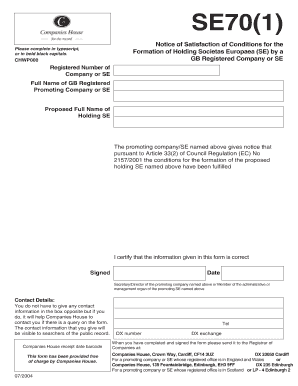
Ypescript, or in bold black capitals. CHWP000 Registered Number of Company or SE Full Name of GB Registered Promoting Company or SE Proposed Full Name of Holding SE The promoting company/SE named above gives notice that pursuant to Article 33(2) of Council Regulation (EC) No 2157/2001 the conditions for the formation of the proposed holding SE named above have been fulfilled I certify that the information given in this form is correct Signed Date Secretary/Director of the promoting company.

How it works

  1. Open form

    Open form follow the instructions

  2. Easily sign form

    Easily sign the form with your finger

  3. Share form

    Send filled & signed form or save

How to fill out the SE70(1) online

The SE70(1) form is essential for notifying the satisfaction of conditions for the formation of a holding Societas Europaea. This guide provides clear, step-by-step instructions to help you complete the form online effectively.

Follow the steps to complete the SE70(1) form online successfully.

  1. Click the ‘Get Form’ button to access the SE70(1) and open it in the editor.
  2. Enter the registered number of the company or Societas Europaea (SE) in the designated field. Ensure that this information is accurate as it links directly to your entity.
  3. Provide the full name of the Great Britain registered promoting company or SE. Use bold black capital letters for clarity.
  4. Fill in the proposed full name of the holding Societas Europaea in the specified section of the form.
  5. Acknowledge the fulfillment of conditions by confirming that the promoting company or SE gives notice pursuant to Article 33(2) of Council Regulation (EC) No 2157/2001.
  6. Certify the information by signing the form in the designated area. This signature must come from a secretary, director of the promoting company, or member of the administrative or management organ of the promoting SE.
  7. Optionally, include contact details to assist Companies House in reaching you if there are any queries regarding the form.
  8. Once you have completed the form, save your changes. You can also download, print, or share the form if needed.

Complete and submit documents online to ensure efficient processing.

Get form

Experience a faster way to fill out and sign forms on the web. Access the most extensive library of templates available.
Get form

Related content

Selenium-70 | Se | CID 6337536
Selenium-70; 19869-93-3; 70Se; Selenium, isotope of mass 70. Molecular Weight. 69.93352...
Learn more
Producing Graphics in S-PLUS
1 Introduction. This handout explains how to create and embellish simple graphics in...
Learn more
D971-3-13 - MODEL 150 SERIES (1969 THRU 1976)
Jul 2, 1990 — THIS REPRINT CONSISTS OF THE BASIC MANUAL, DATED 1 JULY 1972; CHANGE 1...
Learn more

Related links form

Proof Application For Optometry Programs Welcome To Chunghwa POST - Postal Life Insurance Services Heres Why Networking Is Important To Your Success

Questions & Answers

Get answers to your most pressing questions about US Legal Forms API.

Contact support

To factory reset a boss SE70, locate the settings on your device and navigate to the reset options. Follow the on-screen instructions carefully, ensuring you back up any important data before proceeding. A reset can enhance performance and eliminate any glitches you might encounter, allowing for smoother operation. If you need further assistance, consider using platforms like uslegalforms, which can provide tools and resources to help you troubleshoot effectively.

To find memory #1 in Tears of the Kingdom (TOTK), you must first progress through the main storyline. After hitting specific checkpoints, the game will highlight the memory location on your map. Use SE70(1) to keep track of your exploration efforts, making it easier to return to key areas for memories you've missed. This planning allows you to have a more organized approach towards achieving all your in-game milestones.

In The Legend of Zelda: Breath of the Wild (BotW), memory 1 can be found at the Great Plateau. Once you meet certain story requirements and reach the area, the game will prompt you to access the memory. Utilizing tools like SE70(1) can aid in efficiently managing your objectives in BotW, allowing you to collect memories and enhance your gaming experience without missing any essential steps.

To skip memories in Tears of the Kingdom (TOTK), navigate to the options menu and locate the memory section. Here, you can choose to skip any memory you have previously viewed. This feature helps streamline your gameplay, especially when using SE70(1) to focus on critical quests and achievements rather than backtracking through already experienced memories. Remember, it’s essential to monitor your progress for tracking purposes.

Get This Form Now!

Use professional pre-built templates to fill in and sign documents online faster. Get access to thousands of forms.
Get form
If you believe that this page should be taken down, please follow our DMCA take down processhere.

Industry-leading security and compliance

US Legal Forms protects your data by complying with industry-specific security standards.
  • In businnes since 1997
    25+ years providing professional legal documents.
  • Accredited business
    Guarantees that a business meets BBB accreditation standards in the US and Canada.
  • Secured by Braintree
    Validated Level 1 PCI DSS compliant payment gateway that accepts most major credit and debit card brands from across the globe.
Get SE70(1)
Get form
Form Packages
Adoption
Bankruptcy
Contractors
Divorce
Home Sales
Employment
Identity Theft
Incorporation
Landlord Tenant
Living Trust
Name Change
Personal Planning
Small Business
Wills & Estates
Packages A-Z
Form Categories
Affidavits
Bankruptcy
Bill of Sale
Corporate - LLC
Divorce
Employment
Identity Theft
Internet Technology
Landlord Tenant
Living Wills
Name Change
Power of Attorney
Real Estate
Small Estates
Wills
All Forms
Forms A-Z
Form Library
Customer Service
Terms of Service
Privacy Notice
Legal Hub
Content Takedown Policy
Bug Bounty Program
About Us
Help Portal
Legal Resources
Blog
Affiliates
Contact Us
Delete My Account
Site Map
Industries
Forms in Spanish
Localized Forms
State-specific Forms
Forms Kit
Legal Guides
Real Estate Handbook
All Guides
Prepared for You
Notarize
Incorporation services
Our Customers
For Consumers
For Small Business
For Attorneys
Our Sites
US Legal Forms
USLegal
FormsPass
pdfFiller
signNow
airSlate WorkFlow
DocHub
Instapage
Social Media
Call us now toll free:
+1 833 426 79 33
As seen in:
  • USA Today logo picture
  • CBC News logo picture
  • LA Times logo picture
  • The Washington Post logo picture
  • AP logo picture
  • Forbes logo picture
© Copyright 1997-2025
airSlate Legal Forms, Inc.
3720 Flowood Dr, Flowood, Mississippi 39232
Form Packages
Adoption
Bankruptcy
Contractors
Divorce
Home Sales
Employment
Identity Theft
Incorporation
Landlord Tenant
Living Trust
Name Change
Personal Planning
Small Business
Wills & Estates
Packages A-Z
Form Categories
Affidavits
Bankruptcy
Bill of Sale
Corporate - LLC
Divorce
Employment
Identity Theft
Internet Technology
Landlord Tenant
Living Wills
Name Change
Power of Attorney
Real Estate
Small Estates
Wills
All Forms
Forms A-Z
Form Library
Customer Service
Terms of Service
Privacy Notice
Legal Hub
Content Takedown Policy
Bug Bounty Program
About Us
Help Portal
Legal Resources
Blog
Affiliates
Contact Us
Delete My Account
Site Map
Industries
Forms in Spanish
Localized Forms
State-specific Forms
Forms Kit
Legal Guides
Real Estate Handbook
All Guides
Prepared for You
Notarize
Incorporation services
Our Customers
For Consumers
For Small Business
For Attorneys
Our Sites
US Legal Forms
USLegal
FormsPass
pdfFiller
signNow
airSlate WorkFlow
DocHub
Instapage
Social Media
Call us now toll free:
+1 833 426 79 33
As seen in:
  • USA Today logo picture
  • CBC News logo picture
  • LA Times logo picture
  • The Washington Post logo picture
  • AP logo picture
  • Forbes logo picture
© Copyright 1997-2025
airSlate Legal Forms, Inc.
3720 Flowood Dr, Flowood, Mississippi 39232