Loading
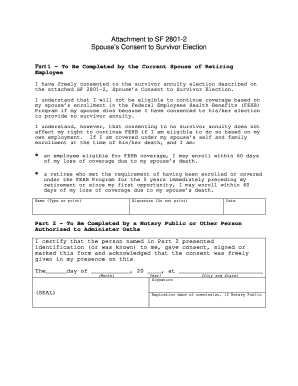
Get Opm Spouse's Consent To Survivor Election
How it works
-

Open form follow the instructions
-

Easily sign the form with your finger
-

Send filled & signed form or save
How to fill out the OPM Spouse's Consent to Survivor Election online
Filling out the OPM Spouse's Consent to Survivor Election is an important step for a person’s retirement planning. This guide offers clear, step-by-step instructions to help users navigate the form easily online.
Follow the steps to complete the form seamlessly.
- Press the ‘Get Form’ button to access the form and open it in the available online editor.
- In Part 1, provide your name, which should be typed or clearly printed to ensure legibility. This identifies you as the current partner of the retiring employee.
- Next, sign the form in the designated area. Remember, you should not print your signature; it must be your unique signature.
- Indicate the date when you are completing the form. This is crucial for the validation of your consent.
- Review the information you provided in Part 1 to ensure it is accurate and complete before proceeding.
- In Part 2, a notary public or an authorized person must complete this section. Make sure to have your identification ready for verification when they administer the oath and certify your consent.
- The authorized person will fill in the date of acknowledgment, city, and state, followed by adding their signature and seal.
- After completing the form, you'll have options to save changes, download, print, or share the form as necessary.
Complete your OPM Spouse's Consent to Survivor Election online today to ensure a smooth retirement process.
(SF-3107), Application for Immediate Retirement (FERS) SF-3107-2, Spouse's Consent to Survivor Election This form is only required if you do not elect the full survivor benefit for your current spouse. It should be included with the (SF-3107) (SF-2818), Continuation of Life Insurance Coverage.