Loading
Form preview
  • US Legal Forms
  • Other Templates
  • Independent Agency Forms
  • Independent Agency OPM Forms
  • Opm Sf 181 1982

Get Opm Sf 181 1982-2026

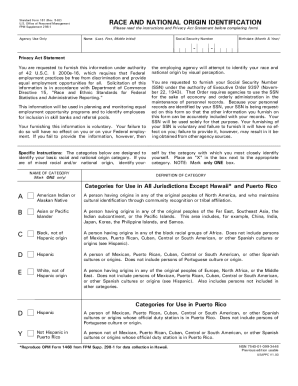
Ions and Privacy Act Statement before completing form) Name (Last, First, Middle Initial) Social Security Number - Birthdate (Month & Year) - Privacy Act Statement You are requested to furnish this information under authority of 42 U.S.C. § 2000e-16, which requires that Federal employment practices be free from discrimination and provide equal employment opportunities for all. Solicitation of this information is in accordance with Department of Commerce Directive 15, "Race and Ethnic Stand.

How it works

  1. Open form

    Open form follow the instructions

  2. Easily sign form

    Easily sign the form with your finger

  3. Share form

    Send filled & signed form or save

How to fill out the OPM SF 181 online

Filling out the OPM SF 181 form is an important step in identifying race and national origin for federal employment purposes. This guide will provide clear instructions to help you navigate the process effortlessly.

Follow the steps to successfully complete the OPM SF 181 online.

  1. Click the ‘Get Form’ button to acquire the form and open it in your preferred editing interface.
  2. Begin entering your name in the designated field. Make sure to include your last name, first name, and middle initial for accurate identification.
  3. In the next section, provide your Social Security Number. This information is requested to manage your personnel records effectively.
  4. Enter your birth date, ensuring that you specify both the month and year correctly.
  5. Carefully read the Privacy Act Statement provided on the form. It explains your rights and the voluntary nature of providing this information.
  6. Proceed to the race and national origin identification section. Review the categories listed and mark an 'X' in the box next to the category that you most closely identify with. Remember to select only one category.
  7. Once you have filled out all relevant sections, review the form for accuracy and completeness.
  8. Save your changes, and then choose to download, print, or share the completed form as needed.

Begin filling out your OPM SF 181 form online today to ensure your information is accurate and up to date.

Get form

Experience a faster way to fill out and sign forms on the web. Access the most extensive library of templates available.
Get form

Related content

ETHNICITY AND RACE IDENTIFICATION
A person having origins in any of the original peoples of Europe, the Middle East, or...
Learn more
ETHNICITY AND RACE IDENTIFICATION
A person having origins in any of the original peoples of Europe, the Middle East, or...
Learn more
GPON OLT Product Operation Manual V1.2
8.2.1 802.1Q VLAN Configuration List..................................................51...
Learn more

Related links form

California State Athletic Commission - Request For Live Scan Service - Dca Ca Request For Livescan Service Sales Form Cgs 409414 Form Endeca Url Optimization Form

Questions & Answers

Get answers to your most pressing questions about US Legal Forms API.

Contact support

The USCIS recognizes several race classifications within the context of the OPM SF 181 form. Common classifications include Asian, Black or African American, Native Hawaiian or Other Pacific Islander, and White. Each classification plays a role in demographic reporting and promoting diversity in the agency. Being aware of these classifications can help you accurately complete the required documentation.

To fill out the OPM SF 181 form, carefully read each section and choose the options that reflect your race and ethnicity. Take your time to ensure accuracy, as this information is significant for demographic reporting. If you require assistance, the UsLegalForms platform offers resources to help simplify the process of completing forms. Accessing these resources can make your form submission much smoother.

Your ethnicity on the OPM SF 181 form should represent your cultural, social, or national identity. Options may include Hispanic or Latino, not Hispanic or Latino, or multi-ethnic backgrounds. Reflect on your heritage and choose the option that resonates with you the most. By accurately identifying your ethnicity, you contribute to a better understanding of workforce demographics.

Race refers to groups based on physical characteristics, while ethnicity relates to cultural factors like nationality and language. When filling out the OPM SF 181, you will select a specific race category and also indicate your ethnic background. This distinction is crucial for accurate reporting and understanding of diversity in the workplace. Knowing how race and ethnicity differ helps you provide the correct information.

The SF 181 form is designed to collect information about an individual's race and ethnicity for Federal purposes. It helps organizations understand the diversity in their workforce and ensure equal opportunity. By participating in this demographic data collection, you contribute to broadening inclusion efforts across various fields. Understanding the SF 181 allows you to engage meaningfully in these essential discussions.

When completing the OPM SF 181 form, you will need to select a race and ethnicity category that best represents you. The categories include options like Asian, Black or African American, Hispanic or Latino, and White, among others. It is important to choose the option that accurately reflects your identity. If you have multiple ethnic backgrounds, select the one that feels most appropriate for you.

You can reach OPM retirement services by contacting their official customer service number or visiting their website for assistance. They offer support regarding the OPM SF 181 and other retirement-related inquiries. Utilizing resources like USLegalForms can also provide additional guidance on navigating the OPM services effectively.

You can send your SF 181 form to the specified address in your agency's instructions. It's crucial to ensure that you send it to the correct department to avoid delays in processing. For further assistance, the USLegalForms platform can direct you to the right resources that clarify where to send the OPM SF 181 form.

To send your completed SF 181 form, you should follow the submission guidelines provided with the form itself. Typically, submissions are directed to your agency's human resources department. If you're unsure, using USLegalForms can guide you on where to send the OPM SF 181 form based on your specific agency's procedures.

The SF 181 form serves as a standardized way to document race and ethnicity for federal employment purposes. It is essential for achieving accurate demographic data within government agencies. By completing the OPM SF 181, you contribute to valuable statistics that can enhance policy development and improve workplace inclusivity.

Get This Form Now!

Use professional pre-built templates to fill in and sign documents online faster. Get access to thousands of forms.
Get form
If you believe that this page should be taken down, please follow our DMCA take down processhere.
Get OPM SF 181
Get form
  • Adoption
  • Bankruptcy
  • Contractors
  • Divorce
  • Home Sales
  • Employment
  • Identity Theft
  • Incorporation
  • Landlord Tenant
  • Living Trust
  • Name Change
  • Personal Planning
  • Small Business
  • Wills & Estates
  • Packages A-Z
  • Affidavits
  • Bankruptcy
  • Bill of Sale
  • Corporate - LLC
  • Divorce
  • Employment
  • Identity Theft
  • Internet Technology
  • Landlord Tenant
  • Living Wills
  • Name Change
  • Power of Attorney
  • Real Estate
  • Small Estates
  • Wills
  • All Forms
  • Forms A-Z
  • Other Templates
  • Legal Hub
  • About Us
  • Help Portal
  • Legal Resources
  • Blog
  • Affiliates
  • Contact Us
  • Delete My Account
  • Site Map
  • Industries
  • Forms in Spanish
  • Localized Forms
  • State-specific Forms
  • Forms Kit
  • Real Estate Handbook
  • All Guides
  • Notarize
  • Incorporation services
  • For Consumers
  • For Small Business
  • For Attorneys
  • USLegal
  • FormsPass
  • pdfFiller
  • signNow
  • altaFlow
  • DocHub
  • Instapage
Form Packages
  • Adoption
  • Bankruptcy
  • Contractors
  • Divorce
  • Home Sales
  • Employment
  • Identity Theft
  • Incorporation
  • Landlord Tenant
  • Living Trust
  • Name Change
  • Personal Planning
  • Small Business
  • Wills & Estates
  • Packages A-Z
Form Categories
  • Affidavits
  • Bankruptcy
  • Bill of Sale
  • Corporate - LLC
  • Divorce
  • Employment
  • Identity Theft
  • Internet Technology
  • Landlord Tenant
  • Living Wills
  • Name Change
  • Power of Attorney
  • Real Estate
  • Small Estates
  • Wills
  • All Forms
  • Forms A-Z
  • Other Templates
Customer Service
  • Legal Hub
  • About Us
  • Help Portal
  • Legal Resources
  • Blog
  • Affiliates
  • Contact Us
  • Delete My Account
  • Site Map
  • Industries
  • Forms in Spanish
  • Localized Forms
  • State-specific Forms
  • Forms Kit
Legal Guides
  • Real Estate Handbook
  • All Guides
Prepared for you
  • Notarize
  • Incorporation services
Our Customers
  • For Consumers
  • For Small Business
  • For Attorneys
Our Sites
  • USLegal
  • FormsPass
  • pdfFiller
  • signNow
  • altaFlow
  • DocHub
  • Instapage
Social Media
Call us now toll free:
+1 833 426 79 33
As seen in:
© Copyright 1999-2026 airSlate Legal Forms, Inc. 17 Station Street, Suite 303, Brookline, MA 02445
  • Your Privacy Choices
  • Terms of Service
  • Privacy Notice
  • Content Takedown Policy
  • Bug Bounty Program