Loading
Form preview
  • US Legal Forms
  • Form Library
  • Industry Forms
  • Industry Shipping Forms
  • Ups Freight Gf704

Get Ups Freight Gf704

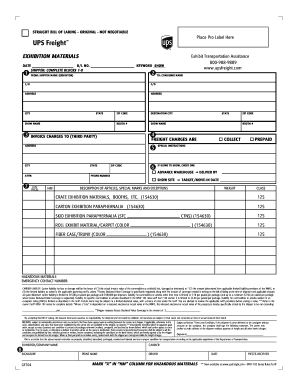
STRAIGHT BILL OF LADING - ORIGINAL - NOT NEGOTIABLE Place Pro Label Here EXHIBITION MATERIALS DATE B/L NO. KEYWORD SHOW SHIPPER: COMPLETE BLOCKS 1-8 1 FROM: SHIPPER NAME (EXHIBITOR) 2 Exhibit Transportation.

How it works

  1. Open form

    Open form follow the instructions

  2. Easily sign form

    Easily sign the form with your finger

  3. Share form

    Send filled & signed form or save

How to fill out the UPS Freight GF704 online

The UPS Freight GF704 is a crucial document for the transportation of exhibition materials. Proper completion of this form ensures accurate handling and delivery of your items. This guide provides step-by-step instructions to assist users in filling out the GF704 online effectively.

Follow the steps to fill out the UPS Freight GF704 form accurately.

  1. Press the ‘Get Form’ button to obtain the form and open it in the editor.
  2. Fill in the date and bill of lading number in the designated fields at the top of the form.
  3. Complete the shipper section by providing the name of the exhibitor, address details, and contact information. Make sure to fill in blocks 1-8 completely.
  4. Enter the consignee information, including name, address, city, state, and zip code, similarly to how you filled out the shipper's details.
  5. Indicate the show name, booth number, destination city and address, and a contact's phone number in the specified areas.
  6. Specify special instructions if necessary, and indicate whether the materials are being sent to an advance warehouse or show site.
  7. In the field for the number of pieces, state how many items you are shipping. Choose the option for freight charges (collect or prepaid) and fill in the target move-in date.
  8. Provide a detailed description of the articles being shipped, including any special markings or exceptions, and if applicable, mark the hazardous materials column by marking an 'X'.
  9. Fill in the weight and class of the contents being shipped, and list the specific types of items (e.g., crate, carton, skid) with their associated classifications.
  10. If excess declared value coverage is desired, specify the amount and ensure all charges are noted.
  11. Review the entire form for accuracy. Once complete, you can save the changes, download, print, or share the form as necessary.

Complete your UPS Freight GF704 online today to ensure a smooth shipping process for your exhibition materials.

Get form

Experience a faster way to fill out and sign forms on the web. Access the most extensive library of templates available.
Get form

Related content

Ups 68132 - Supermicro restart ipmi - shutter.wiki
... Freight Support Less Than Truckload (more than 150 lbs): 800-333 … Contact Us About...
Learn more
Ups 68132 - Supermicro restart ipmi - shutter.wiki
... Freight Support Less Than Truckload (more than 150 lbs): 800-333 … Contact Us About...
Learn more

Related links form

DISTRICT OF COLUMBIA PROPERTY INSURANCE FACILITY ESSENTIAL HOMEOWNERS INSURANCE INSPECTION AND Dc 37 Grievance Udc Application For Undergraduate Admissions Form Policy Guaranty Fee Remittance From T G1

Questions & Answers

Get answers to your most pressing questions about US Legal Forms API.

Contact support

To determine your UPS Freight class, you need to assess your shipment's weight and the type of goods being shipped. Factors such as density, stowability, handling, and liability come into play. UPS provides resources and tools that help classify your shipment accurately, ensuring you use the UPS Freight GF704 service correctly.

Requesting a UPS Express freight pickup is straightforward. Just log into your UPS account and access the scheduling tool, where you can specify the details of your shipment. Make sure to choose the Express service to ensure timely delivery with your UPS Freight GF704 shipment.

To create a UPS shipment, log into your UPS account or navigate to the shipping section of the UPS website. Fill in the necessary details like package dimensions, weight, and shipping address. Select your preferred service option, finalize the information, and print your label to get started.

To create an UPS Freight shipment, log in to your UPS account. Enter the shipment details, including package type, dimensions, and destination, ensuring you select the UPS Freight GF704 option for your needs. After reviewing the information, you can print your label and schedule a pickup.

Creating a freight shipment starts with gathering essential information such as the shipment's dimensions, weight, and destination. Next, you can use the UPS website to input these details into the shipping tool. This will help you generate a shipping label and track your UPS Freight GF704 shipment throughout its journey.

To schedule an UPS Freight shipment, you can visit the UPS website or use the UPS mobile app. Simply enter your shipment details, including pickup and delivery locations, shipment dimensions, and weight. You'll also have options to choose the service level that suits your needs and confirm the scheduled time for pickup or delivery.

Filing a claim with UPS Freight GF704 is a simple process. Start by logging into your UPS account and navigating to the claims section. Enter all pertinent details about your freight shipment, including tracking information and specifics of the claim, to facilitate a quick resolution.

To file a freight claim with UPS Freight GF704, you must begin by documenting the condition of the shipment upon arrival. Ensure you take photos of any damage and keep all shipping documents intact. Then, submit your claim through the UPS website, providing details of the shipment and damage to move your claim forward.

Filing a UPS report is essential if you experience shipment issues. Navigate to the UPS website and use the claims section to fill out your report detailing the shipping problems, including any relevant tracking numbers. Make sure to include all necessary documentation to expedite the resolution process.

To put in a claim with UPS, especially concerning UPS Freight GF704, you need to start by accessing the UPS claims portal. Provide necessary information such as the tracking number, details of the shipment, and evidence supporting your claim, like photos or receipts. This process ensures that your claim is processed efficiently and correctly.

Get This Form Now!

Use professional pre-built templates to fill in and sign documents online faster. Get access to thousands of forms.
Get form
If you believe that this page should be taken down, please follow our DMCA take down processhere.

Industry-leading security and compliance

US Legal Forms protects your data by complying with industry-specific security standards.
  • In businnes since 1997
    25+ years providing professional legal documents.
  • Accredited business
    Guarantees that a business meets BBB accreditation standards in the US and Canada.
  • Secured by Braintree
    Validated Level 1 PCI DSS compliant payment gateway that accepts most major credit and debit card brands from across the globe.
Get UPS Freight GF704
Get form
Form Packages
Adoption
Bankruptcy
Contractors
Divorce
Home Sales
Employment
Identity Theft
Incorporation
Landlord Tenant
Living Trust
Name Change
Personal Planning
Small Business
Wills & Estates
Packages A-Z
Form Categories
Affidavits
Bankruptcy
Bill of Sale
Corporate - LLC
Divorce
Employment
Identity Theft
Internet Technology
Landlord Tenant
Living Wills
Name Change
Power of Attorney
Real Estate
Small Estates
Wills
All Forms
Forms A-Z
Form Library
Customer Service
Your Privacy Choices
Terms of Service
Privacy Notice
Legal Hub
Content Takedown Policy
Bug Bounty Program
About Us
Help Portal
Legal Resources
Blog
Affiliates
Contact Us
Delete My Account
Site Map
Industries
Forms in Spanish
Localized Forms
State-specific Forms
Forms Kit
Legal Guides
Real Estate Handbook
All Guides
Prepared for You
Notarize
Incorporation services
Our Customers
For Consumers
For Small Business
For Attorneys
Our Sites
US Legal Forms
USLegal
FormsPass
pdfFiller
signNow
altaFlow
DocHub
Instapage
Social Media
Call us now toll free:
+1 833 426 79 33
As seen in:
  • USA Today logo picture
  • CBC News logo picture
  • LA Times logo picture
  • The Washington Post logo picture
  • AP logo picture
  • Forbes logo picture
© Copyright 1997-2026
airSlate Legal Forms, Inc.
3720 Flowood Dr, Flowood, Mississippi 39232
Form Packages
Adoption
Bankruptcy
Contractors
Divorce
Home Sales
Employment
Identity Theft
Incorporation
Landlord Tenant
Living Trust
Name Change
Personal Planning
Small Business
Wills & Estates
Packages A-Z
Form Categories
Affidavits
Bankruptcy
Bill of Sale
Corporate - LLC
Divorce
Employment
Identity Theft
Internet Technology
Landlord Tenant
Living Wills
Name Change
Power of Attorney
Real Estate
Small Estates
Wills
All Forms
Forms A-Z
Form Library
Customer Service
Your Privacy Choices
Terms of Service
Privacy Notice
Legal Hub
Content Takedown Policy
Bug Bounty Program
About Us
Help Portal
Legal Resources
Blog
Affiliates
Contact Us
Delete My Account
Site Map
Industries
Forms in Spanish
Localized Forms
State-specific Forms
Forms Kit
Legal Guides
Real Estate Handbook
All Guides
Prepared for You
Notarize
Incorporation services
Our Customers
For Consumers
For Small Business
For Attorneys
Our Sites
US Legal Forms
USLegal
FormsPass
pdfFiller
signNow
altaFlow
DocHub
Instapage
Social Media
Call us now toll free:
+1 833 426 79 33
As seen in:
  • USA Today logo picture
  • CBC News logo picture
  • LA Times logo picture
  • The Washington Post logo picture
  • AP logo picture
  • Forbes logo picture
© Copyright 1997-2026
airSlate Legal Forms, Inc.
3720 Flowood Dr, Flowood, Mississippi 39232