Loading
Get Business Online Banking Application
How it works
-

Open form follow the instructions
-

Easily sign the form with your finger
-

Send filled & signed form or save
How to fill out the BUSINESS ONLINE BANKING APPLICATION online
Filling out the BUSINESS ONLINE BANKING APPLICATION online is a straightforward process designed to help businesses access banking services efficiently. This guide provides a step-by-step walkthrough to ensure that all required information is accurately completed.
Follow the steps to successfully complete your application.
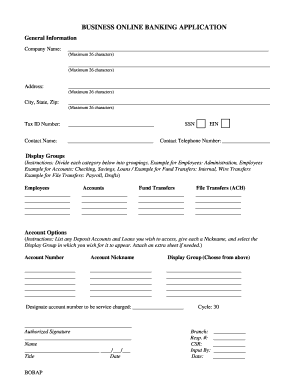
- Click ‘Get Form’ button to obtain the form and open it in your preferred document editor.
- Enter the company name in the designated field. Ensure the name does not exceed 26 characters.
- Input the company's address, including street, city, state, and zip code. Each component has a character limit of 26.
- Provide the tax identification number (TIN) in the specified space.
- Enter the contact person's name and provide either their social security number (SSN) or employer identification number (EIN).
- Input the contact telephone number for the company.
- In the display groups section, categorize employees, accounts, fund transfers, and file transfers by listing relevant information for each category. This includes naming the specific roles or accounts you wish to include.
- For account options, provide the account number, nickname, and select the corresponding display group from previous sections. If necessary, attach an extra sheet for additional accounts.
- Designate an account number to be service charged, if applicable.
- Complete the authorized signature section by signing, including your name, title, and date.
- For employee information, fill in the employee's name, contact phone, display group, and security data including the mother’s maiden name and email address.
- Specify authorized access times by listing the days of the week along with the corresponding begin and end times.
- Provide a verification access ID that consists of the first initial and last name with a minimum of six letters. Enter a temporary verification password.
- Indicate whether the employee will need approval for stop payments, internal transfers, or approving other employees’ transfers.
- Complete administration options to grant access to specific administrative functions as needed.
- In the employee account authorization section, include the account numbers for which access is granted and select the account options applicable to the employee.
- For fund transfer authorization, complete sections related to internal transfers, including any recurring transfers and specific account details.
- Once completed, ensure to save changes to the document. You may choose to download, print, or share the finished application as necessary.
Start completing your BUSINESS ONLINE BANKING APPLICATION online today for seamless banking access.
The best online banking app varies based on your business needs, but features such as ease of use, security, and customer support are crucial. Look for an application that integrates well with your financial systems and offers beneficial features. Using a choice BUSINESS ONLINE BANKING APPLICATION suited for your operations can significantly enhance your financial management.
Industry-leading security and compliance
US Legal Forms protects your data by complying with industry-specific security standards.
-
In businnes since 199725+ years providing professional legal documents.
-
Accredited businessGuarantees that a business meets BBB accreditation standards in the US and Canada.
-
Secured by BraintreeValidated Level 1 PCI DSS compliant payment gateway that accepts most major credit and debit card brands from across the globe.