Loading
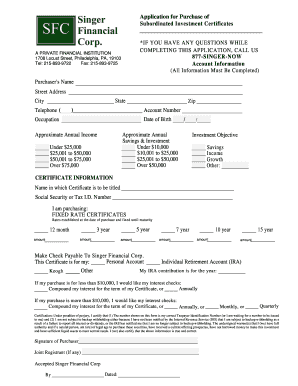
Get Application For Purchase Of Subordinated Investment Certificates
How it works
-

Open form follow the instructions
-

Easily sign the form with your finger
-

Send filled & signed form or save
How to fill out the Application For Purchase Of Subordinated Investment Certificates online
Filling out the Application For Purchase Of Subordinated Investment Certificates online can seem daunting, but this guide provides step-by-step instructions to help you through the process. Whether you're a first-time investor or looking to add to your portfolio, we aim to make this process clear and straightforward.
Follow the steps to successfully complete your application.
- Click ‘Get Form’ button to obtain the form and open it in your preferred document editor.
- Begin by filling out the account information section. You will need to provide your full name, street address, city, state, and zip code, along with your telephone number and account number.
- Next, enter your date of birth and occupation. Specify your approximate annual income and approximate annual savings & investment by selecting the appropriate ranges provided.
- In the investment objective section, indicate your goal for this investment by selecting from options such as savings, income, growth, or other.
- Proceed to the certificate information section. Input the name in which the certificate will be titled and your Social Security or Tax Identification Number. Select the type of certificates you are purchasing, specifying the amounts for the duration options provided (e.g., 3 year, 5 year).
- Indicate how you would like to make the check payable and choose the account type for the investment, whether it is a personal account or an IRA. If applicable, enter the year for your IRA contribution.
- If your purchase is less than $10,000, indicate how you would like to receive your interest checks. If it exceeds $10,000, specify your preference for compounding interest or receiving checks in specified intervals (annually, monthly, or quarterly).
- Review the certification statement carefully. Ensure that all the information is accurate. By signing, you are certifying that the provided taxpayer identification number is correct and that you meet the necessary legal conditions for investing.
- Finally, sign the form as the purchaser and, if applicable, include a joint registrant's signature. If accepted, ensure to enter the date of signing.
- After completing the application, you can save your changes, download, print, or share the form as needed.
Begin filling out the Application For Purchase Of Subordinated Investment Certificates online today!
Industry-leading security and compliance
US Legal Forms protects your data by complying with industry-specific security standards.
-
In businnes since 199725+ years providing professional legal documents.
-
Accredited businessGuarantees that a business meets BBB accreditation standards in the US and Canada.
-
Secured by BraintreeValidated Level 1 PCI DSS compliant payment gateway that accepts most major credit and debit card brands from across the globe.