Loading
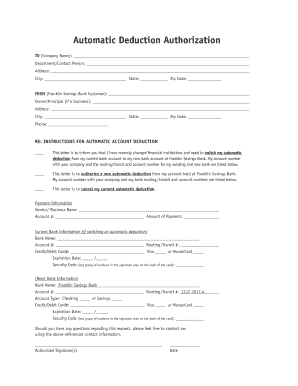
Get Automatic Deduction Authorization
How it works
-

Open form follow the instructions
-

Easily sign the form with your finger
-

Send filled & signed form or save
How to fill out the Automatic Deduction Authorization online
Filling out the Automatic Deduction Authorization form online is a straightforward process that allows users to switch their automatic deductions to a new bank account. This guide provides clear instructions to ensure successful completion of the form.
Follow the steps to complete the Automatic Deduction Authorization form effectively.
- Press the ‘Get Form’ button to access the document and open it in your preferred editor.
- In the section labeled 'TO (Company Name)', enter the name of the company or service where the payments are currently being deducted.
- Fill in the 'Department/Contact Person' field with the relevant individual's name or department responsible for handling such requests.
- Supply the complete 'Address', 'City', 'State', and 'Zip Code' for the company or service provider.
- Under 'FROM (Franklin Savings Bank Customer)', indicate the name of the owner or principal in the corresponding field.
- Provide your address and phone number in the designated fields to establish contact.
- In the 'Payment Information' section, enter the vendor or business name, along with your current account number and the amount to be deducted.
- If you are switching from another bank, complete the 'Current Bank Information' section, including the bank name, account number, routing/transit number, credit/debit card number, expiration date, and security code.
- In the 'New Bank Information' section, enter your information for Franklin Savings Bank, including the account number, account type (checking or savings), routing/transit number, credit/debit card information, expiration date, and security code.
- Sign the document in the 'Authorized Signature(s)' field and date it appropriately.
- Review your entries for accuracy before saving changes, downloading, or printing the form for submission.
Complete your Automatic Deduction Authorization online to ensure seamless transactions.
To fill out an authorization form effectively, start with your personal information, such as your full name and address. Follow this by entering the financial details for the transaction, like account numbers. Ensure you read the terms and conditions, sign the document, and submit it to activate your Automatic Deduction Authorization.
Industry-leading security and compliance
US Legal Forms protects your data by complying with industry-specific security standards.
-
In businnes since 199725+ years providing professional legal documents.
-
Accredited businessGuarantees that a business meets BBB accreditation standards in the US and Canada.
-
Secured by BraintreeValidated Level 1 PCI DSS compliant payment gateway that accepts most major credit and debit card brands from across the globe.