Loading
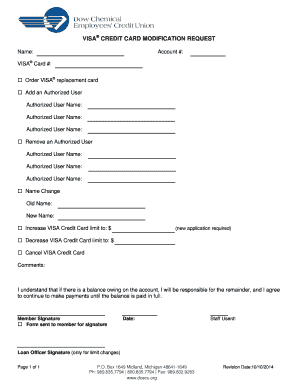
Get Visa® Credit Card Modification Request
How it works
-

Open form follow the instructions
-

Easily sign the form with your finger
-

Send filled & signed form or save
How to fill out the VISA® CREDIT CARD MODIFICATION REQUEST online
Completing the VISA® CREDIT CARD MODIFICATION REQUEST is a straightforward process that allows users to modify their credit card account details online. This guide will provide clear and detailed instructions to ensure that all necessary information is accurately submitted.
Follow the steps to complete your modification request.
- Click ‘Get Form’ button to obtain the form and open it in the editor.
- Enter your name in the designated field as it appears on your account. This ensures clarity in identification.
- Provide your account number in the appropriate section. This helps to accurately link the request to your credit card account.
- Input your VISA® card number in the specified field to specify which card the modifications are for.
- Select one of the options for modifications you wish to make: order a replacement card, add or remove an authorized user, request a name change, increase or decrease your credit limit, or cancel your card.
- If adding an authorized user, enter their names in the respective fields. Make sure to fill out their names entirely and clearly.
- For removing an authorized user, list their names in the applicable sections.
- If you are requesting a name change, fill out both the old name and new name fields accurately.
- To adjust your credit card limit, specify the new limit or indicate a decrease. Note that an application may be required for increases.
- If you wish to cancel your VISA® credit card, simply indicate this in the provided option.
- Use the comments section to provide any additional information or context regarding your request.
- Acknowledge your understanding that you remain responsible for any balance owed. Sign and date the form where indicated.
- Once all information is filled out, you can save changes, download, print, or share the completed form as required.
Start your modification request online today to manage your VISA® credit card efficiently.
To replace a damaged Visa card, first contact your card issuer. You can reach out via their website or customer service line. Request a VISA® CREDIT CARD MODIFICATION REQUEST for a replacement card. Ensure you provide all necessary information to expedite the process.
Industry-leading security and compliance
US Legal Forms protects your data by complying with industry-specific security standards.
-
In businnes since 199725+ years providing professional legal documents.
-
Accredited businessGuarantees that a business meets BBB accreditation standards in the US and Canada.
-
Secured by BraintreeValidated Level 1 PCI DSS compliant payment gateway that accepts most major credit and debit card brands from across the globe.