Loading
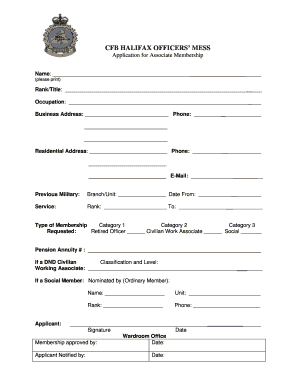
Get Canada Cfb Halifax Officers Mess Application For Associate Membership 2004-2026
How it works
-

Open form follow the instructions
-

Easily sign the form with your finger
-

Send filled & signed form or save
How to fill out the Canada CFB Halifax Officers Mess Application For Associate Membership online
Completing the Canada CFB Halifax Officers Mess Application for Associate Membership online can be a straightforward process if you follow the appropriate steps. This guide will walk you through each section of the application to ensure you provide all necessary information accurately.
Follow the steps to complete the application effectively.
- Click ‘Get Form’ button to obtain the form and open it in the editor.
- Begin by filling out your name in the designated field. Ensure to print your name clearly, as it will be used for identification and communication.
- Next, provide your rank or title. This helps in understanding your position in the military or affiliated organization.
- Complete the occupation section with your current job title. This information can provide context regarding your professional background.
- Fill in your business address and corresponding phone number. This is essential for contacting you regarding membership details.
- Detail your residential address and phone number to facilitate communication in a personal context.
- Enter your email address for digital correspondence and notifications related to your application.
- In the previous military section, indicate your branch and unit, along with the dates of service to provide proof of military background.
- Specify your rank and the ending date of service in the corresponding fields.
- Select the type of membership you are requesting by checking the appropriate box: Retired Officer, Civilian Work Associate, or Social Member.
- If applicable, provide your pension annuity number, classification, and level if you are a DND civilian or working associate.
- If applying as a social member, complete the section regarding your nomination by an ordinary member, including their name, unit, rank, and phone number.
- Finally, sign and date the application at the bottom. Your signature confirms that the information provided is accurate.
- Once you have filled out all sections, review the form for any errors or omissions. You can now save changes, download, print, or share the completed form as needed.
Ensure you complete the Canada CFB Halifax Officers Mess Application For Associate Membership online for a smooth submission.