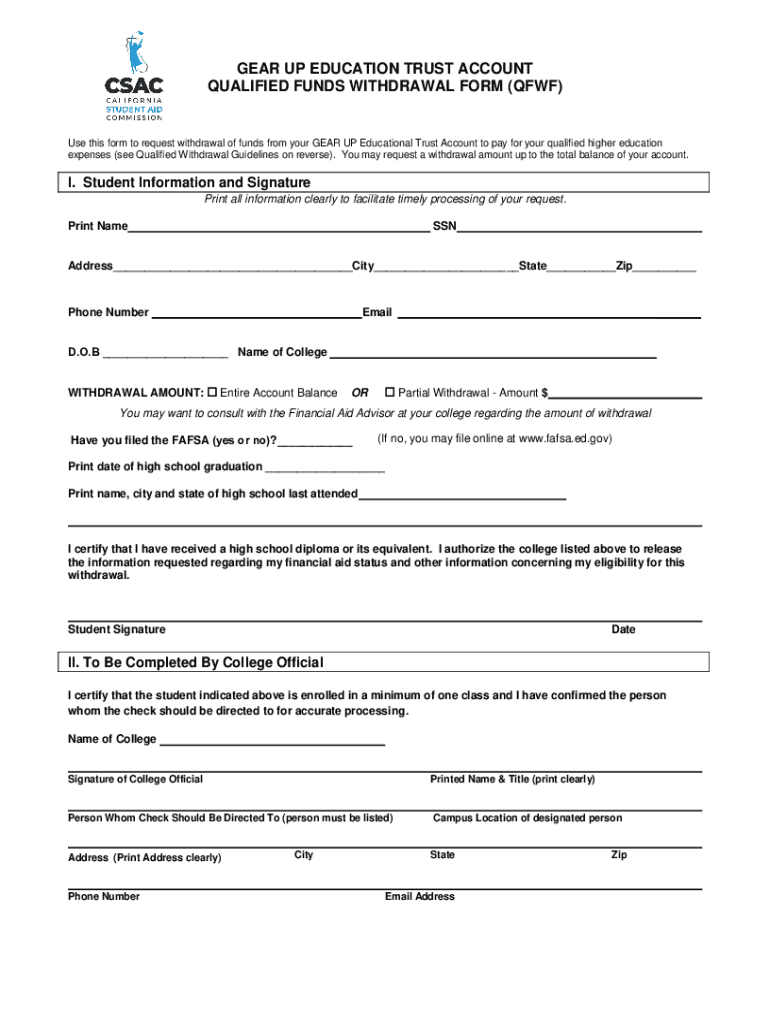
Ional Trust Account to pay for your qualified higher education expenses (see Qualified Withdrawal Guidelines on reverse). You may request a withdrawal amount up to the total balance of your account. I. Student Information and Signature Print all information clearly to facilitate timely processing of your request. Print Name SSN Address City State Zip Phone Number Email D.O.B Name of.
Loading

Open form follow the instructions

Easily sign the form with your finger

Send filled & signed form or save
How to fill out the CA Qualified Funds Withdrawal Form (QFWF) online
Filling out the CA Qualified Funds Withdrawal Form (QFWF) is an essential step for accessing your GEAR UP Educational Trust Account to cover qualified higher education expenses. This guide provides clear guidance on the necessary steps to complete the form online, ensuring you have the correct information to facilitate your request.
Follow the steps to successfully complete the form online.
- Click ‘Get Form’ button to obtain the form and open it in the editor.
- Begin by entering your personal information in the 'Student Information and Signature' section. This includes your printed name, Social Security Number, address, phone number, email, and date of birth.
- Indicate the name of the college you are attending and select your desired withdrawal amount by checking either the 'Entire Account Balance' option or specifying a 'Partial Withdrawal' amount.
- Respond to whether you have filed the FAFSA by marking 'yes' or 'no'. If you have not filed, you may need to do so online.
- Print the date of your high school graduation and the name, city, and state of the last high school you attended. Confirm that you have received a high school diploma or its equivalent.
- Sign and date the form to certify that the information provided is accurate and authorize the college to release necessary information for processing your withdrawal.
- If applicable, ensure the 'To Be Completed By College Official' section is filled out by an official from your college, certifying your enrollment status and providing their contact information.
- Review the form for accuracy and completeness. Once everything is confirmed, save your changes, download, print, or share the form as needed.
Complete your withdrawal form online to access your GEAR UP Educational Trust Account today.
Experience a faster way to fill out and sign forms on the web. Access the most extensive library of templates available.
Related content
... FINANCE SERVICES [6199] IRS NUMBER: 752291093 STATE OF INCORPORATION: TX FISCAL YEAR...
by ZE SHAPIRO · 2022 · Cited by 17 — The next Part briefly explores the current state...
... CA ZIP: 90404 BUSINESS PHONE: 310 444 4300 MAIL ADDRESS: STREET 1: 2120 COLORADO AVE...
Get answers to your most pressing questions about US Legal Forms API.
How to withdraw form 19?
To withdraw Form 19, which is pertinent to certain immigration matters, submit a written request to the agency that received your initial form. Provide relevant details for prompt processing. If you require additional support during this process, the CA Qualified Funds Withdrawal Form (QFWF) can aid in addressing any necessary financial transactions.
How to withdraw form i485 application?
Withdrawing your form I-485 application involves sending a written request to USCIS. Include your receipt number and personal information to facilitate the process. For managing finances when dealing with applications like the CA Qualified Funds Withdrawal Form (QFWF), consider our platform for speedy assistance.
How to withdraw form from CA?
To withdraw a form from California, such as an application or request previously submitted, write a formal withdrawal request to the appropriate agency. Ensure that you include your personal details and any reference numbers. Utilizing the CA Qualified Funds Withdrawal Form (QFWF) can smoothen your withdrawal plans and simplify your interactions with state agencies.
Can we withdraw from form 15CA?
Yes, you can withdraw from Form 15CA, which is typically used for foreign remittances. To do this, you may need to fill out a CA Qualified Funds Withdrawal Form (QFWF) specific to your circumstances and submit it to the relevant authorities. If you’re unsure about the procedure, our platform can help you navigate this process with ease.
How to get a withdrawal form from a bank?
To obtain a withdrawal form from your bank, visit your local branch or check the bank's website for downloadable forms. Usually, banks have specific withdrawal requests, so ensure you fill out the relevant form accurately. For financial transactions relating to the CA Qualified Funds Withdrawal Form (QFWF), reach out to your bank's customer service for guidance.
How to withdraw visa application form?
To withdraw your visa application form, you must submit a written request to the U.S. Citizenship and Immigration Services (USCIS) or the applicable consulate. Include any relevant details such as your application number and personal information. If you need assistance, consider using our platform, which provides the CA Qualified Funds Withdrawal Form (QFWF) to streamline your withdrawal process.
How do I make a withdrawal from my bank?
Making a withdrawal from your bank typically involves filling out a withdrawal slip at your branch or using an ATM. You will need to specify your account information and the amount you wish to take out. If your withdrawal involves specific funds or qualified withdrawals, consider using the CA Qualified Funds Withdrawal Form (QFWF) for a clear and efficient process.
How to fill out California Form 540?
To fill out California Form 540, collect your income details, deductions, and credits first. Complete each section sequentially, ensuring that all information is accurate and up to date. The CA Qualified Funds Withdrawal Form (QFWF) might come in handy if you need to withdraw funds related to your tax obligations while filing your California tax return.
How to fill out a withdrawal form?
When filling out a withdrawal form, carefully provide your personal information, account number, and the amount you wish to withdraw. Double-check to ensure all details are accurate to prevent delays. If you require a specific format, such as the CA Qualified Funds Withdrawal Form (QFWF), our platform offers templates and guidance to help you complete your request accurately.
How to fill out a bank withdrawal form?
To complete a bank withdrawal form, enter your account details, withdrawal amount, and the type of transaction. Make sure to check any additional requirements specific to your bank. Using the CA Qualified Funds Withdrawal Form (QFWF) can help simplify the withdrawal process if you need to submit funds across multiple accounts or jurisdictions.
Use professional pre-built templates to fill in and sign documents online faster. Get access to thousands of forms.
If you believe that this page should be taken down, please follow our DMCA take down process here.