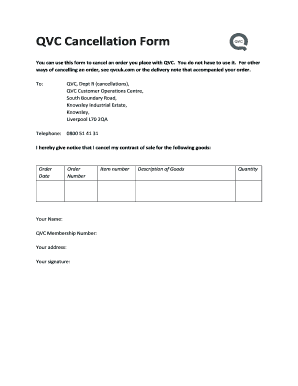
Your order. To: QVC, Dept R (cancellations), QVC Customer Operations Centre, South Boundary Road, Knowsley Industrial Estate, Knowsley, Liverpool L70 2QA Telephone: 0800 51 41 31 I hereby give notice that I cancel my contract of sale for the following goods: Order Date Order Number Your Name: QVC Membership Number: Your address: Your signature: Item number Description of Goods Quantity Details of your statutory cancellation rights 1.1 You have a statutory right to cancel your purchas.
Open form follow the instructions
Easily sign the form with your finger
Send filled & signed form or save
How to fill out the UK QVC Cancellation Form online
Filling out the UK QVC Cancellation Form online is a straightforward process that allows you to formally cancel your order with QVC. This guide provides step-by-step instructions to assist you in ensuring that all necessary information is accurately completed, facilitating a smooth cancellation.
Follow the steps to easily fill out the UK QVC Cancellation Form online.
- Press the ‘Get Form’ button to access the QVC Cancellation Form and open it in the editor.
- In the first section, provide your name as it appears on your account. This ensures QVC can identify you correctly.
- Enter your QVC membership number in the designated field to help link your cancellation to your account.
- Fill in your address accurately, as this will be necessary for any correspondence regarding your cancellation.
- Specify the order date and order number for the goods you want to cancel. This information helps expedite the cancellation process.
- In the section for 'Description of Goods,' list the item number and provide a brief description of the products you are returning.
- Indicate the quantity of each item you wish to cancel to ensure there is clarity on your order.
- Finally, review all the information for accuracy, and then electronically sign the form to confirm your cancellation.
- Once complete, you can save changes, download, print, or share the form as needed for your records.
Complete your QVC Cancellation Form online today for a hassle-free cancellation experience!
Experience a faster way to fill out and sign forms on the web. Access the most extensive library of templates available.
Related content
You can generally meet the certification requirements by providing a properly executed IRS...
by AH Choi · 2021 · Cited by 19 — In mergers and acquisitions transactions, a buyer...
Apr 27, 2016 — The Marketplace transaction take rate was lower in 2014 compared to 2013...
Get answers to your most pressing questions about US Legal Forms API.
How can I unsubscribe from QVC?
You can unsubscribe from QVC by visiting your account settings and finding the option for subscription management. Following the prompts will facilitate the unsubscription process. If you prefer additional structure, the UK QVC Cancellation Form can be a handy resource.
How do I close my QVC account?
To close your QVC account, log into your account and navigate to the account settings. There, you will find an option to deactivate or close your account. For an organized approach, consider completing the UK QVC Cancellation Form, which outlines the steps clearly.
How do I cancel my QVC subscription?
You can cancel your QVC subscription by logging in to your account and going to the subscription management page. From there, find the subscription you wish to cancel and follow the provided instructions. The UK QVC Cancellation Form can also help clarify the steps you need to take.
How to cancel QVC subscription without calling?
To cancel your QVC subscription without making a call, you can access your account online and follow the cancellation steps provided in the subscription management section. Should you prefer a more structured approach, utilize the UK QVC Cancellation Form for guidance.
Can I cancel an order with QVC?
Yes, you can cancel an order with QVC as long as it has not yet shipped. To do this, log in to your account, go to your order history, and select the order to cancel. The UK QVC Cancellation Form is a useful tool to help you with this process.
How to cancel subscribe and save on QVC?
You can cancel your subscribe and save subscription on QVC by logging into your account and accessing the manage subscriptions section. There, you can select the subscription you wish to cancel and follow the prompts. For detailed guidance, consider using the UK QVC Cancellation Form.
How do I contact QVC UK Customer Service?
To contact QVC UK Customer Service, you can visit their official website for phone numbers and live chat options. They also have an email address available for inquiries. If you need assistance with any cancellation, the UK QVC Cancellation Form can guide you through the process.
Can I cancel a QVC order online?
Yes, you can cancel a QVC order online by visiting their website and navigating to your order history. By selecting the order you wish to cancel, you can easily complete the cancellation process. Additionally, using the UK QVC Cancellation Form can help streamline your request.
How to cancel auto delivery on QVC UK?
To cancel auto delivery on QVC UK, log into your account and access the auto delivery settings in the order section. From there, you can manage your subscriptions and select the option to cancel. For a smoother experience, refer to the UK QVC Cancellation Form to ensure you’re following all the right steps.
How do you cancel a QVC account?
Canceling your QVC account involves logging into your account and proceeding to the account settings. From there, look for the cancellation option and follow the prompts. It's beneficial to use the UK QVC Cancellation Form to ensure your request is processed smoothly without any misunderstandings.
Use professional pre-built templates to fill in and sign documents online faster. Get access to thousands of forms.
If you believe that this page should be taken down, please follow our DMCA take down process here.