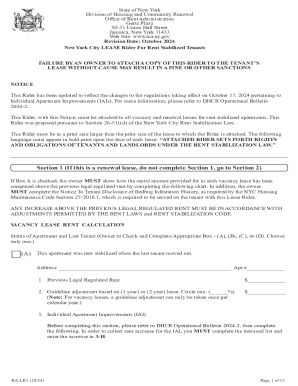
R 2024 New York City LEASE Rider For Rent Stabilized Tenants FAILURE BY AN OWNER TO ATTACH A COPY OF THIS RIDER TO THE TENANT S LEASE WITHOUT CAUSE MAY RESULT IN A FINE OR OTHER SANCTIONS NOTICE This Rider has been updated to reflect the changes to the regulations taking effect on October 17, 2024 pertaining to Individual Apartment Improvements (IAIs). For more information, please refer to DHCR Operational Bulletin 2024-2. This Rider, with this Notice, must be attached to all vacancy and renew.
Open form follow the instructions
Easily sign the form with your finger
Send filled & signed form or save
How to fill out the NY RA-RL1 online
The NY RA-RL1 form is essential for rent-stabilized tenants in New York City, ensuring compliance with housing regulations. This guide provides a clear, step-by-step approach to filling out this form online, aiding both landlords and tenants in understanding their rights and obligations.
Follow the steps to fill out the NY RA-RL1 online effectively:
- Press the ‘Get Form’ button to retrieve the NY RA-RL1 form and open it in your online editor.
- Begin with Section 1 if this lease is not a renewal. For a renewal lease, skip to Section 2. If Box A is checked, complete the required vacancy lease rent calculation fields, including the previous legal regulated rent and any guideline adjustments.
- In Section 1, indicate if the apartment was rent stabilized when the last tenant vacated by checking the appropriate box (A, B, C, or D) and complete the detailed calculations for any increases.
- Proceed to Section 2, where you will need to provide the address of the housing accommodation, as well as the lease start and end dates. Ensure tenant acknowledgment is captured by having them sign and date this section.
- Review Section 3 for provisions explaining tenant and owner rights under the rent stabilization law. Ensure all necessary advisories and required attachments are completed.
- Once all sections are accurately filled, review the entire document for completeness and accuracy before saving the changes.
- You can then download, print, or share the completed form as necessary.
Complete your NY RA-RL1 form online today for a hassle-free experience!
Experience a faster way to fill out and sign forms on the web. Access the most extensive library of templates available.
Related content
Apr 18, 2023 — This is not the application on New York Eye and Ear. To change the...
This process is required to correctly report New York City taxable wages in Form W-2 box...
Relay RL1 controls the HV ON / OFF in the charging unit. ICs 9A, 9B, 8B and 7A all provide...
Get answers to your most pressing questions about US Legal Forms API.
What is the difference between T4 and T5 income?
A T4 slip reports employment income, while a T5 slip provides information on investment income such as dividends and interest. Understanding this distinction is key for your tax strategy. With the help of the NY RA-RL1, you can effectively manage these income streams to optimize your financial outcomes.
What is the difference between T4 and rl1?
A T4 is issued for employment income in Canada, while the RL1 denotes various income types, particularly in Quebec. For individuals working in New York, knowing how these forms differ is important for accurate tax preparation. The NY RA-RL1 addresses these differences and helps you navigate your obligations.
Who gets RL1?
The RL1 tax slip is issued to individuals earning income from various sources, particularly in Quebec. If you receive payments from employers, pension plans, or investment accounts, you may receive an RL1. Understanding how this relates to the NY RA-RL1 can help ensure all income is reported correctly.
What is a RL1 tax slip?
A RL1 tax slip is designed to report income from various categories, primarily for use in Quebec. However, individuals with cross-border income may also need to consider this form in conjunction with their New York tax obligations. The NY RA-RL1 provides a comprehensive approach to managing these tax slips accurately.
What is the difference between a T1 and a T3?
A T1 is primarily for reporting personal income, whereas a T3 is used for income earned through trusts. If you are navigating tax forms in New York, knowing which form applies to your income can save you time and confusion. The NY RA-RL1 may help clarify the complexities involved.
What is the rl1 for?
The RL-1 is a tax slip used to report income from various sources in Quebec, such as employment, pensions, and benefits. While primarily a Quebec form, understanding its implications is important if you have income sources in New York that interact with Canadian tax rules. The NY RA-RL1 may provide guidance on managing these nuances.
What is the RL-1 summary form?
The RL-1 summary form provides an overview of all RL-1 slips issued by a payer, summarizing total amounts reported for the year. This form is essential for keeping track of various income types, especially in New York. It's beneficial to review the RL-1 when preparing your taxes, as part of the NY RA-RL1 process.
How is a T1 different from a T4?
A T1 slip is typically used to report income from self-employment, while a T4 slip is for employment income, including wages and salaries. If you are managing your taxes in New York, understanding the distinction between these forms is crucial. The NY RA-RL1 comes into play when comparing different types of income reporting to ensure compliance.
How to get rune arcs in RL1?
Acquiring rune arcs in NY RA-RL1 involves engaging with specific in-game activities or events designed to reward players with these items. This often includes completing quests or exploring designated areas. Check community forums or guides for strategies, and consider utilizing platforms like USLegalForms for detailed insights.
How to access RL-1?
You can access NY RA-RL1 through the official state website or local government offices handling these documents. Online applications have made it easier, allowing you to complete the process from your device. For additional assistance, USLegalForms offers tools that guide you through accessing these forms effortlessly.
Use professional pre-built templates to fill in and sign documents online faster. Get access to thousands of forms.
If you believe that this page should be taken down, please follow our DMCA take down process here.