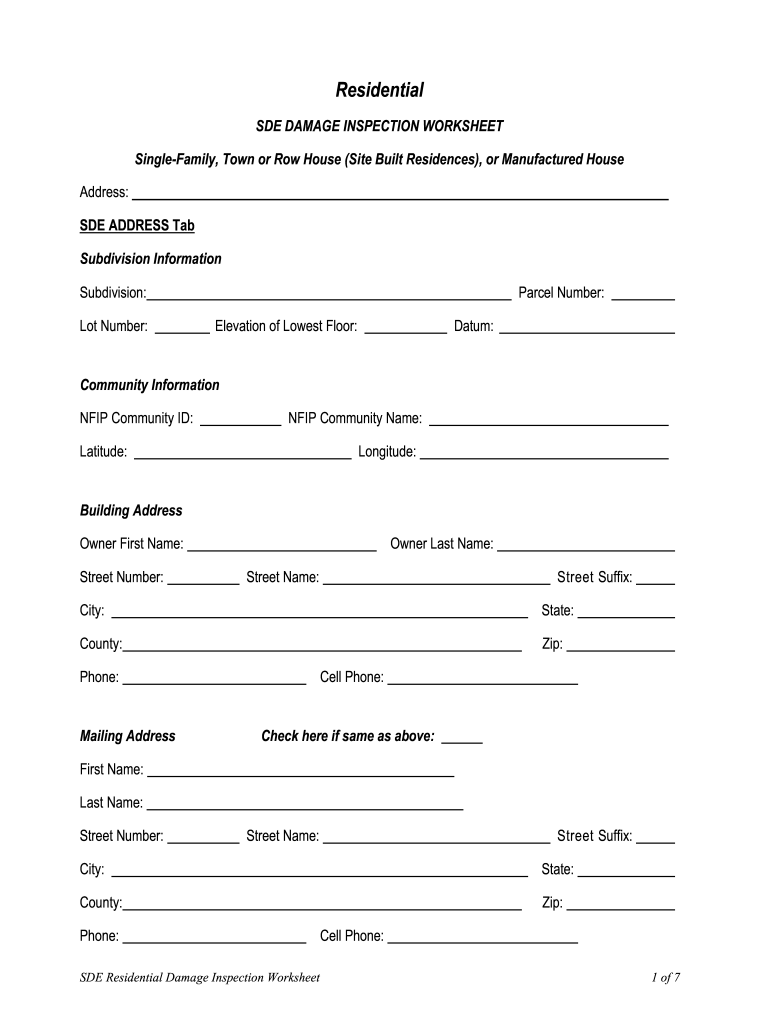
: Parcel Number: Elevation of Lowest Floor: Datum: Community Information NFIP Community ID: NFIP Community Name: Latitude: Longitude: Building Address Owner First Name: Street Number: Owner Last Name: Street Name: Street Suffix: City: State: County: Zip: Phone: Mailing Address Cell Phone: Check here if same as above: First Name: Last Name: Street Number: Street Name: Street Suffix: City: State: County: Zip: Phone: SDE Residential Damage Inspection Worksheet Cell Phone: .
Loading

Open form follow the instructions

Easily sign the form with your finger

Send filled & signed form or save
How to fill out the SDE Residential Damage Inspection Worksheet online
The SDE Residential Damage Inspection Worksheet is a crucial document for assessing damage to various types of residential properties. This guide provides step-by-step instructions tailored to help you fill out the form online efficiently and accurately.
Follow the steps to successfully complete your form
- Click 'Get Form' button to access the SDE Residential Damage Inspection Worksheet. This will allow you to open the form and begin filling it out.
- Start by entering the address of the property in the designated SDE address tab. Include details such as subdivision information, lot number, parcel number, and the elevation of the lowest floor.
- In the community information section, input the NFIP community ID and name, along with the latitude and longitude of the property.
- Fill in the building address, providing details about the owner, including their first and last name, street number, street name, and suffix. Be sure to include the city, state, county, zip code, and phone number.
- If applicable, enter the mailing address information. You can check the box if it is the same as the building address.
- Provide detailed information about the structure attributes, including its type (single-family house, manufactured house, etc.), foundation type, superstructure, roof covering, and exterior finish.
- Next, detail the damage information by entering the date the damage occurred and the cause of damage. If there are specific conditions, note those as well.
- Include the inspector information, which should feature the inspector’s name, phone number, and date of inspection.
- Complete the NFIP information section, filling in the FIRM panel number, zone, regulatory floodway details, and base flood elevation.
- On the cost tab, enter the total square footage of the damage and select the appropriate structure footprint diagram while entering structure dimensions.
- Input additional adjustments related to costs for roofing, heating/cooling, appliances, and other categories as needed.
- Lastly, review all sections for accuracy and completeness. Once satisfied, save your changes, download, print, or share the completed form as required.
Begin filling out your SDE Residential Damage Inspection Worksheet online today!
Experience a faster way to fill out and sign forms on the web. Access the most extensive library of templates available.
Related content
Care of: SDE STRUCTURE / DAMAGE / NFIP INFO Tab. Structure Attributes. Residence Type:...
SDE Residential Worksheet. Inspector Name. DIAGRAM w/ MEASUREMENTS and NUMBER OF STORIES:...
Initial Inspection. • Upon receipt of the TX320, inspect the packaging and contents for...
Get answers to your most pressing questions about US Legal Forms API.
What can substantial damage estimator (SDE) tool data help communities to demonstrate?
Data from the SDE Residential Damage Inspection Worksheet enables communities to clearly demonstrate the impact of disasters on local infrastructure. This information is crucial for securing funding and support for recovery efforts. By showcasing damage assessments, communities can advocate more effectively for resources and assistance, making it easier to recover and rebuild. In essence, the SDE data provides essential evidence that strengthens a community's case for needed aid.
How does the substantial damage estimator (SDE) assist communities that participate in the NFIP?
The SDE Residential Damage Inspection Worksheet provides communities with a structured approach to assess substantial damage after a disaster. By offering a standardized evaluation process, this tool helps ensure that all damaged properties are assessed fairly and consistently. Communities can better understand their damage levels, allowing them to make informed decisions about recovery and future planning. Ultimately, the SDE enhances the overall resilience of communities participating in the National Flood Insurance Program (NFIP).
What is the goal of the substantial damage survey process?
The primary goal of the substantial damage survey process is to thoroughly assess and quantify the damage to residential structures after significant events. Using the SDE Residential Damage Inspection Worksheet, the process helps create a systematic approach to understanding the implications of damage. This understanding aids communities in planning effective recovery strategies and securing necessary aid.
What can substantial damage estimator tool data help communities to demonstrate?
The SDE Residential Damage Inspection Worksheet empowers communities to present a clear and quantified assessment of residential damage. This data is essential for justifying the need for assistance and demonstrates the impact of the disaster on community infrastructure. With clear figures, local leaders can advocate for more effective support during recovery initiatives.
When using the substantial damage estimator (SDE) tool, what data must first be assembled?
To effectively utilize the SDE Residential Damage Inspection Worksheet, communities must first gather key data concerning the properties in question. This includes details like building age, structural components, and previous damage history. Having accurate documentation enables the SDE tool to generate reliable estimates, thereby facilitating informed decision-making.
When using the substantial damage estimator tool for a residential assessment, which address tab fields are required?
To effectively utilize the SDE Residential Damage Inspection Worksheet, users must complete specific fields in the address tab. These include the street number, street name, city, state, and zip code. Providing accurate information ensures that assessments of potential damage are reliable and relevant. By carefully inputting these details, users can harness the full capabilities of the estimator tool.
Which is a resource for technical assistance with the sde tool?
For technical assistance, consult your Regional Office of the Federal Emergency Management Agency (FEMA). The addresses and telephone numbers for the FEMA Regional Offices can be found at: http://.fema.gov/fema-regional-contacts. Disclaimer: “Windows” and “.
Which is a reason to use default data in the sde tool?
It reduces consistency errors.
What is the substantial damage estimator (sde tools) percent damage calculation based on?
The SDE Tool is based on the concept of using damage percentage estimates for individual structure elements to determine whether the structure as a whole is substantially damaged.
What is the primary goal of the sde tool?
2:21 16:39 The SDE tool was developed in response to the challenges that many local and state officials face asMoreThe SDE tool was developed in response to the challenges that many local and state officials face as they tried to conduct substantial damage assessments in ance with the NFIP. After major
Use professional pre-built templates to fill in and sign documents online faster. Get access to thousands of forms.
If you believe that this page should be taken down, please follow our DMCA take down process here.