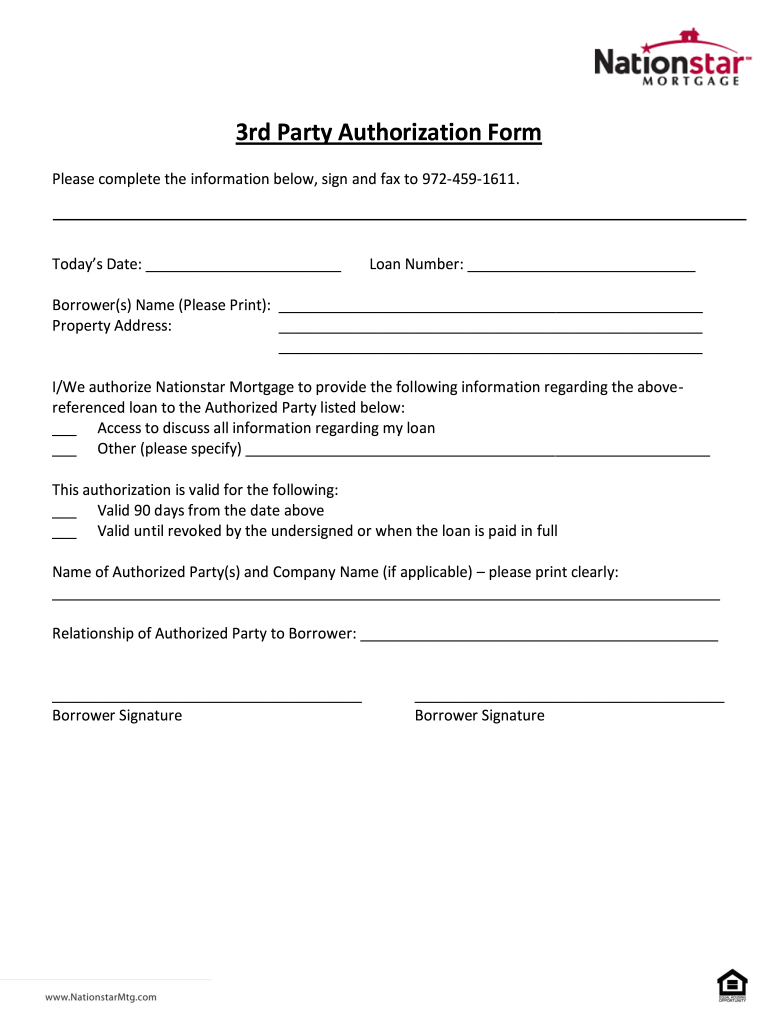
Authorization form please complete the information below, sign and fax to 9724591611. todays date: loan number: short sale thirdpartyauthorization form short sale thirdparty authorization form page.

Open form follow the instructions

Easily sign the form with your finger

Send filled & signed form or save
How to fill out the Nationstar Mortgage 3rd Party Authorization Form online
The Nationstar Mortgage 3rd Party Authorization Form allows you to grant access to your loan information to another individual or organization. This guide will walk you through the process of completing this form online, ensuring clarity and ease of use.
Follow the steps to complete the authorization form effectively
- Click ‘Get Form’ button to obtain the form and open it in your preferred editor.
- Enter today’s date in the designated field at the top of the form.
- Provide your loan number clearly in the appropriate field.
- Print your name (borrower(s)) in the given section, ensuring accuracy and legibility.
- Complete the property address section with the full address of the property associated with the loan.
- Indicate your preferences regarding the information you want authorized by checking the appropriate boxes; you can allow access to all information or specify additional details if needed.
- Select the validity period for this authorization by marking either the box for 90 days or the box indicating it remains valid until revoked or when the loan is fully paid.
- Enter the name of the authorized party or organization, along with any company name if applicable, ensuring all details are printed clearly.
- Describe the relationship of the authorized party to you, the borrower, in the space provided.
- Sign the form where indicated. If there are multiple borrowers, each must provide their signature.
Complete your documents online efficiently and ensure proper handling of your mortgage inquiries.
Experience a faster way to fill out and sign forms on the web. Access the most extensive library of templates available.
Related content
Nationstar shall conduct transactional testing and compliance/controls testing, either...
The State Bar of Texas, through its TexasBarBooks Department, publishes practice books...
Get answers to your most pressing questions about US Legal Forms API.
What happened to Mr. Cooper's mortgage?
Mr. Cooper's focus has shifted towards improving borrower experience and technology integration in mortgage processes. Many services formerly associated with Nationstar are now streamlined under the Mr. Cooper brand. If you need assistance regarding your mortgage, consider using the Nationstar Mortgage 3rd Party Authorization Form for easier communication with authorized users.
How to fill out the third party authorization form?
Filling out the Nationstar Mortgage 3rd Party Authorization Form is quite straightforward. First, gather the necessary information about both the account holder and the authorized party. Then, ensure you provide accurate details in the designated fields. Finally, submit the completed form to Mr. Cooper, allowing the authorized user access to your account details.
How do I add an authorized user to my Mr. Cooper account?
To add an authorized user to your Mr. Cooper account, log in to your account and navigate to the ‘Account Settings’ section. Here, you can find the option to manage authorized users. Be sure to have the individual’s information ready, and once completed, you can easily share access to services like the Nationstar Mortgage 3rd Party Authorization Form.
Are Nationstar and Mr. Cooper the same mortgage company?
Yes, Nationstar Mortgage is the parent company of Mr. Cooper. In recent years, Nationstar rebranded itself as Mr. Cooper to create a more consumer-friendly identity. As a result, services from Nationstar, including the Nationstar Mortgage 3rd Party Authorization Form, still operate under the Mr. Cooper brand.
What is a third party authorization on a mortgage?
A third party authorization on a mortgage allows a designated individual to obtain information and make inquiries related to the mortgage on behalf of the borrower. This can involve handling payments, making inquiries, or discussing terms with your lender. The Nationstar Mortgage 3rd Party Authorization Form is the tool you need to set this up quickly and efficiently, ensuring your authorized representative can operate smoothly.
What does third party authorization mean?
Third party authorization means allowing an individual to act on your behalf regarding specific transactions or information. In the context of mortgages, using the Nationstar Mortgage 3rd Party Authorization Form enables someone else to communicate with your lender, access your account details, and make decisions about your mortgage. This arrangement can simplify processes and ensure that your needs are met even when you cannot take action yourself.
What is a mortgage third party authorization form?
A mortgage third party authorization form, such as the Nationstar Mortgage 3rd Party Authorization Form, is a legal document that grants permission for someone other than the borrower to access information regarding a mortgage. This form is critical when family members, friends, or financial advisors assist in managing mortgage-related tasks. It helps streamline communications and ensures that authorized parties can operate on your behalf effectively.
How long is a third party authorization form valid?
The validity of a third party authorization form, such as the Nationstar Mortgage 3rd Party Authorization Form, typically remains effective until you revoke it or until the mortgage account is closed. It’s essential to keep your authorization details updated to ensure smooth communication with your third party. Always check with your lender for specific timeframes and policies related to authorizations.
How do I send insurance documents to Mr. Cooper?
To send insurance documents to Mr. Cooper, use the secure upload feature available on their website. You can also mail the documents to the address provided in your account details. For those who prefer to have someone else manage this, completing the Nationstar Mortgage 3rd Party Authorization Form allows another person to submit these documents on your behalf.
What is third party authorization?
Third party authorization is a legal process that allows someone to act on your behalf regarding your account. This can include handling communications, accessing documents, or managing payments. The Nationstar Mortgage 3rd Party Authorization Form makes it simple for you to designate a trusted individual or entity to assist you with your mortgage needs.
Use professional pre-built templates to fill in and sign documents online faster. Get access to thousands of forms.
If you believe that this page should be taken down, please follow our DMCA take down process here.