Loading
Form preview
  • US Legal Forms
  • Other Templates
  • Industry Forms
  • Industry Realtor Forms
  • Boardwalk One Defender Resorts Rental Agreement

Get Boardwalk One Defender Resorts Rental Agreement

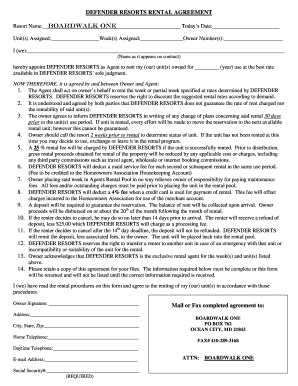
Umber(s):______________________ I (we):________________________________________________________________________________________________ (Name as it appears on contract) hereby appoint DEFENDER RESORTS as Agent to rent my (our) unit(s) owned for _________ (year) use at the best rate available in DEFENDER RESORTS’ sole judgment. NOW THEREFORE, it is agreed by and between Owner and Agent: 1. The Agent shall act on owner’s behalf to rent the week or partial week specified at rates determined by.

How it works

  1. Open form

    Open form follow the instructions

  2. Easily sign form

    Easily sign the form with your finger

  3. Share form

    Send filled & signed form or save

How to fill out the Boardwalk One Defender Resorts Rental Agreement online

Filling out the Boardwalk One Defender Resorts Rental Agreement online can streamline the rental process and ensure that your information is accurately captured. This guide provides detailed steps to help you complete the agreement with confidence.

Follow the steps to complete the rental agreement successfully.

  1. Click ‘Get Form’ button to obtain the rental agreement and open it in an online editor.
  2. Fill in the resort name as 'Boardwalk One' in the designated space.
  3. Enter today’s date in the provided field.
  4. Specify the unit(s) assigned to you in the appropriate section.
  5. Indicate the week(s) assigned by entering the relevant information.
  6. Provide your owner number(s) in the specified area.
  7. Write your name as it appears on the contract in the designated line.
  8. Appoint Defender Resorts as the agent by checking the agreement to ensure clarity.
  9. Review the rental conditions outlined in the agreement to ensure understanding.
  10. Fill out your contact information including address, city, state, zip code, and home telephone.
  11. Enter your daytime telephone number and email address in the respective fields.
  12. Provide your Social Security number as it is required for processing.
  13. Sign the agreement where indicated and ensure all fields are completed before submission.
  14. Once all fields are filled out correctly, you can save changes, download, print, or share the completed form.

Complete your rental agreement online today for a seamless experience.

Get form

Experience a faster way to fill out and sign forms on the web. Access the most extensive library of templates available.
Get form

Related content

0000950130-96-000349.txt
Agreements to lease an approved hotel building or the land under the building must be for...
Learn more
The Boss's Big Reveal
The success of our commitment to integrating excellence and access is also evident in our...
Learn more
good wife - NamuWiki
Sep 19, 2025 — The drama consists of a large setting of the wife of a state prosecutor...
Learn more

Related links form

Medi Cal Provider Certification Form Cigna Form Delta Dental Credential Application Form For California Short Doyle

Get This Form Now!

Use professional pre-built templates to fill in and sign documents online faster. Get access to thousands of forms.
Get form
If you believe that this page should be taken down, please follow our DMCA take down processhere.
Get Boardwalk One Defender Resorts Rental Agreement
Get form
  • Adoption
  • Bankruptcy
  • Contractors
  • Divorce
  • Home Sales
  • Employment
  • Identity Theft
  • Incorporation
  • Landlord Tenant
  • Living Trust
  • Name Change
  • Personal Planning
  • Small Business
  • Wills & Estates
  • Packages A-Z
  • Affidavits
  • Bankruptcy
  • Bill of Sale
  • Corporate - LLC
  • Divorce
  • Employment
  • Identity Theft
  • Internet Technology
  • Landlord Tenant
  • Living Wills
  • Name Change
  • Power of Attorney
  • Real Estate
  • Small Estates
  • Wills
  • All Forms
  • Forms A-Z
  • Other Templates
  • Legal Hub
  • About Us
  • Help Portal
  • Legal Resources
  • Blog
  • Affiliates
  • Contact Us
  • Delete My Account
  • Site Map
  • Industries
  • Forms in Spanish
  • Localized Forms
  • State-specific Forms
  • Forms Kit
  • Real Estate Handbook
  • All Guides
  • Notarize
  • Incorporation services
  • For Consumers
  • For Small Business
  • For Attorneys
  • USLegal
  • FormsPass
  • pdfFiller
  • signNow
  • altaFlow
  • DocHub
  • Instapage
Form Packages
  • Adoption
  • Bankruptcy
  • Contractors
  • Divorce
  • Home Sales
  • Employment
  • Identity Theft
  • Incorporation
  • Landlord Tenant
  • Living Trust
  • Name Change
  • Personal Planning
  • Small Business
  • Wills & Estates
  • Packages A-Z
Form Categories
  • Affidavits
  • Bankruptcy
  • Bill of Sale
  • Corporate - LLC
  • Divorce
  • Employment
  • Identity Theft
  • Internet Technology
  • Landlord Tenant
  • Living Wills
  • Name Change
  • Power of Attorney
  • Real Estate
  • Small Estates
  • Wills
  • All Forms
  • Forms A-Z
  • Other Templates
Customer Service
  • Legal Hub
  • About Us
  • Help Portal
  • Legal Resources
  • Blog
  • Affiliates
  • Contact Us
  • Delete My Account
  • Site Map
  • Industries
  • Forms in Spanish
  • Localized Forms
  • State-specific Forms
  • Forms Kit
Legal Guides
  • Real Estate Handbook
  • All Guides
Prepared for you
  • Notarize
  • Incorporation services
Our Customers
  • For Consumers
  • For Small Business
  • For Attorneys
Our Sites
  • USLegal
  • FormsPass
  • pdfFiller
  • signNow
  • altaFlow
  • DocHub
  • Instapage
Social Media
Call us now toll free:
+1 833 426 79 33
As seen in:
© Copyright 1999-2026 airSlate Legal Forms, Inc. 17 Station Street, Ste. 203, Brookline, MA 02445
  • Your Privacy Choices
  • Terms of Service
  • Privacy Notice
  • Content Takedown Policy
  • Bug Bounty Program