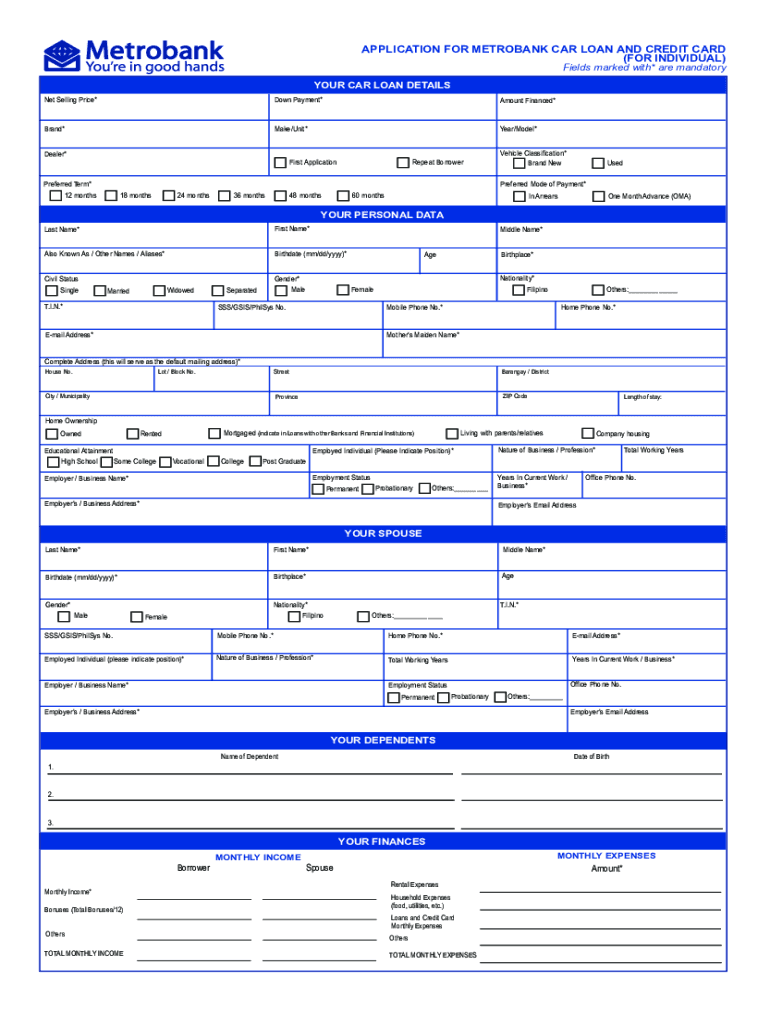
* Repeat Borrower First Application Vehicle Classification* Brand New Used Preferred Mode of Payment* Preferred Term* 18 months 12 months 24 months 48 months 36 months 60 months One Month Advance (OMA) In Arrears YOUR PERSONAL DATA Last Name* First Name* Also Known As / Other Names / Aliases* Birthdate (mm/dd/yyyy)* Gender* Male Civil Status Single Widowed Married T.I.N.* Middle Name* Separated Age Birthplace* Nationality* Filipino Female Mobile Phone No.* SSS/GSIS/Phi.
Loading

Open form follow the instructions

Easily sign the form with your finger

Send filled & signed form or save
How to fill out the PH Metrobank MB-III-CL-76 online
This guide provides you with clear instructions on how to complete the PH Metrobank MB-III-CL-76 application form for a car loan and credit card online. Follow these steps to ensure your application is filled out accurately and efficiently.
Follow the steps to complete your online application successfully.
- Use the ‘Get Form’ button to obtain the PH Metrobank MB-III-CL-76 form and open it in your preferred online editing tool.
- Begin with the section titled 'Your car loan details.' Fill in the required fields such as the net selling price, down payment, amount financed, brand, make/unit, year/model, and dealer. Ensure that all information is precise as these details are crucial.
- In the 'Your personal data' section, provide your last name, first name, and also known as/aliases. Complete the fields for your birthdate, gender, civil status, T.I.N., middle name, and contact information. Make certain to fill in your complete address, as this will serve as your default mailing address.
- Next, provide details about your spouse if applicable, including their personal information like name, T.I.N., and employment details. Ensure each required field is thoroughly completed.
- In the 'Your finances' section, input your and your spouse's monthly income, as well as total monthly expenses including housing and any other obligations. This information is essential for assessing your finances.
- Fill out sections regarding your bank deposits, credit cards, vehicles, and any existing loans with other banks. Be diligent with your entries to ensure transparency and accuracy.
- Complete any additional declarations, including any connections you may have with Metrobank officials or significant public figures. Providing this information is crucial for compliance purposes.
- Read through the Car Loan Undertaking and Data Consent sections carefully. Confirm your understanding and authorize the necessary disclosures by signing where indicated.
- Review the entire application for accuracy and completeness. Once you are confident all information is correct, save your changes, and prepare to download, print, or share the form as required.
Begin your application process online today to secure your car loan and credit card.
Experience a faster way to fill out and sign forms on the web. Access the most extensive library of templates available.
Related content
... 76, Mortgage Pass-Through Certificates Series 2005-76, Bank of New York ... Metrobank...
Sep 18, 2024 — Management Trainee Program Qualifying Test with Metrobank on May 25...
Feb 17, 2021 — The Group's statements of financial position and statements of income as...
Get answers to your most pressing questions about US Legal Forms API.
How to check Metrobank online?
You can easily check your Metrobank account online by visiting the Metrobank website and logging into your online banking profile. This allows you to view your balances, transaction history, and any recent activity. Keeping tabs on your Metrobank account, including benefits from the PH Metrobank MB-III-CL-76, is crucial for effective financial management.
How can I recover my Metrobank account online?
Recovering your Metrobank account online is simple. Visit the official Metrobank website and click on the account recovery option. Follow the prompts to verify your identity, and you’ll be guided through the process, allowing you to regain access to account features such as those offered by PH Metrobank MB-III-CL-76.
How do I activate my debit card for international usage?
Activating your debit card for international usage requires a quick online process. Once you log into your Metrobank account, look for the debit card settings and switch on international access. This is essential to ensure seamless transactions abroad, particularly if you're looking to maximize benefits tied to the PH Metrobank MB-III-CL-76.
Can I use a Metrobank debit card internationally?
Yes, you can use your Metrobank debit card internationally, provided that you’ve activated the international feature. It’s crucial to check the card settings in your online banking account to ensure that it’s enabled. By doing so, you will access worldwide services smoothly and utilize exclusive offers linked to PH Metrobank MB-III-CL-76.
How to activate Metrobank debit card for international use?
To activate your Metrobank debit card for international use, visit the Metrobank online banking portal. After logging in, choose the debit card option and enable international transactions. This way, you will confidently use your card globally, leveraging benefits relevant to PH Metrobank MB-III-CL-76 while you travel.
How can I activate my Metrobank ATM card for international use?
Activating your Metrobank ATM card for international use is straightforward. First, log in to your Metrobank online account, then navigate to the card management section. Here, you can enable international use on your ATM card, ensuring that you can make transactions abroad without any hassle, particularly when using features like PH Metrobank MB-III-CL-76.
How to redeem Metrobank giftaway?
To redeem the Metrobank giftaway, you need to follow the specific instructions provided with your gift code. Typically, you can visit the designated redemption link, input your gift code, and complete any required forms. Keep in mind that using your Metrobank services, such as the PH Metrobank MB-III-CL-76, may enhance your experience and eligibility for additional rewards.
How do I call Metrobank from abroad?
To call Metrobank from abroad, dial the international access code followed by the Philippines' country code, which is +63. Then input the Metrobank hotline number applicable to your inquiry. Ensure you have your PH Metrobank MB-III-CL-76 details ready for verification during the call.
How to claim remittance in Metrobank Philippines?
To claim remittance in Metrobank Philippines, visit your nearest Metrobank branch with valid identification and the necessary remittance details. Provide the reference number and any documents required. This process ties closely with your PH Metrobank MB-III-CL-76 for seamless transactions.
How do I file a complaint with Metrobank?
Filing a complaint with Metrobank is a simple process. You can do this through their customer service hotline or the contact form available on their website. When you provide your PH Metrobank MB-III-CL-76 account details, it helps them address your complaint more effectively and in a timely manner.
Use professional pre-built templates to fill in and sign documents online faster. Get access to thousands of forms.
If you believe that this page should be taken down, please follow our DMCA take down process here.