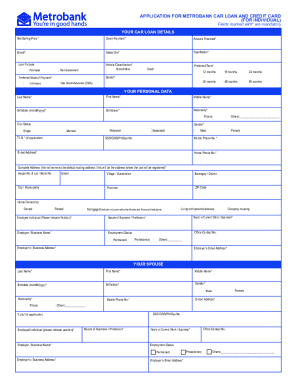
D* Brand* Make/Unit* Year/Model* Loan Purpose Vehicle Classification* Brand New Reimbursement Purchase Preferred Term* Used 12 months 18 months 24 months 36 months 48 months 60 months Dealer* Preferred Mode of Payment* One Month Advance (OMA) In Arrears YOUR PERSONAL DATA Last Name* First Name* Middle Name* Birthdate (mm/dd/yyyy)* Birthplace* Nationality* Filipino Civil Status Others: Gender* Single Widowed Married T.I.N.* (If applicable).
Open form follow the instructions
Easily sign the form with your finger
Send filled & signed form or save
How to fill out the PH Metrobank MB-III-CL-76 online
Completing the PH Metrobank MB-III-CL-76 application form online can be a straightforward process if you follow the right steps. This guide provides an overview and detailed instructions to help you fill out the form accurately and efficiently.
Follow the steps to successfully complete your application
- Click ‘Get Form’ button to obtain the form and open it in the editor.
- Begin by filling out the 'Your Car Loan Details' section. Provide details such as the net selling price, down payment, amount financed, and vehicle classification (choose between brand new or used). Specify the brand, make/unit, year/model, loan purpose, preferred term, dealer, and mode of payment.
- Move to the 'Your Personal Data' section. Fill in mandatory fields including last name, first name, middle name, birthdate, birthplace, nationality, civil status, gender, and T.I.N. Include your contact information such as mobile phone number, email address, and home phone number.
- Complete the 'Your Spouse' section if applicable. Provide similar details as in your personal data section, including the spouse's full name, birthdate, nationality, and employment information.
- In the 'Your Dependents' section, list any dependents along with their dates of birth.
- Fill out the 'Your Finances' section by providing details about monthly income and expenses for both the borrower and spouse. Make sure to calculate total monthly income and expenses accurately.
- Provide information regarding your credit cards and bank deposits, including the branch and bank details.
- Complete the 'Approved Loans/Credit Facilities with Metrobank' section, along with loans from other banks and financial institutions, detailing outstanding balances.
- If applicable, fill out the 'Attorney-in-Fact/Loan Administrator Information' section with accurate details and relationships.
- Review the 'Source of Product Information' section and select your source of information for this application.
- Answer the 'Other Declaration' questions regarding any connections to Metrobank officers or public figures.
- Complete the 'Car Loan Undertaking' by reading and agreeing to the provided terms and conditions.
- Ensure that you fill out the 'Data Privacy Consent' section, allowing Metrobank to process your data.
- Finally, review all provided information for accuracy. Make any necessary changes before saving, downloading, printing, or sharing the completed form.
Complete your Metrobank car loan application online today!
Experience a faster way to fill out and sign forms on the web. Access the most extensive library of templates available.
Related content
Metro Bank and First National Bank of Pennsylvania have entered into an agreement of...
Sep 18, 2024 — 10. Securities Registered pursuant to Sections 4 and 8 of the RSA. Title...
Feb 17, 2021 — The Group's statements of financial position and statements of income as...
Get answers to your most pressing questions about US Legal Forms API.
Can I activate online banking online?
Yes, you can activate your online banking account through the Metro Bank website. After registering with the PH Metrobank MB-III-CL-76 feature, you will have the option to activate your online banking account directly online. Follow the prompts and provide the necessary information to complete your activation securely.
How to load Metrobank prepaid card online?
Loading your Metrobank prepaid card online is simple and can be done through the Metro Bank online banking platform. Once you log in with your account linked to the PH Metrobank MB-III-CL-76 feature, navigate to the prepaid card management section to add funds to your card. Following the instructions provided there will ensure a quick and easy loading process.
How do I know my 13 digit account number in Metrobank?
To find your 13-digit Metrobank account number, check your account opening documents or any previous correspondence from the bank. Additionally, if you already have access to online banking via the PH Metrobank MB-III-CL-76 feature, you can log in to view your account details. If you still cannot locate it, contacting customer support will help resolve your issue.
Can I open a Metro Bank account online without going to the bank?
Opening a Metro Bank account online is possible, allowing you to bypass a physical visit to the bank. By using the PH Metrobank MB-III-CL-76 feature, you can submit your application through their secure online platform. Ensure you prepare the necessary documents for a smooth application process and to expedite your registration.
How to register Metrobank online banking?
You can register for Metrobank online banking by heading to their website and following the easy registration steps under online banking services. Input your details, including your account number linked to the PH Metrobank MB-III-CL-76, and create your secure access credentials. After your registration is complete, you’ll gain full access to manage your bank account directly online.
How do I register to Metro Bank online banking?
To register for Metro Bank online banking, visit the Metro Bank official website and locate the online banking registration section. Fill in the required information, including your 13-digit account number associated with the PH Metrobank MB-III-CL-76 feature. Once you complete your registration, you will receive confirmation of your online banking access shortly thereafter.
Can I open a Metro Bank account while abroad?
Yes, you can open a Metro Bank account while abroad using the PH Metrobank MB-III-CL-76 feature. This allows you to access banking services, enabling you to manage your finances from anywhere. You may need to complete specific documentation and identification processes, so it's best to check the official Metro Bank website for details. Alternatively, you can seek assistance through platforms like uslegalforms for guidance.
How do I report Metrobank online?
To report any issues with Metrobank online, access their official website and use the designated contact form. Alternatively, you can call their customer service hotline for immediate assistance. Utilizing the PH Metrobank MB-III-CL-76 feature enables you to address your concerns swiftly.
How long does it take for Metrobank remittance?
Metrobank remittance typically takes a few hours to be available for pick-up, depending on the sending location. In some cases, international remittances may take longer, but Metrobank strives to process payments promptly. With PH Metrobank MB-III-CL-76, you can track your remittance for more clarity on timing.
Where can I claim Metrobank remittance?
You can claim your Metrobank remittance at any Metrobank branch across the Philippines. Simply bring your identification and any necessary documents provided by the sender. The availability of PH Metrobank MB-III-CL-76 facilitates easy access to your funds at multiple locations.
Use professional pre-built templates to fill in and sign documents online faster. Get access to thousands of forms.
If you believe that this page should be taken down, please follow our DMCA take down process here.