Loading
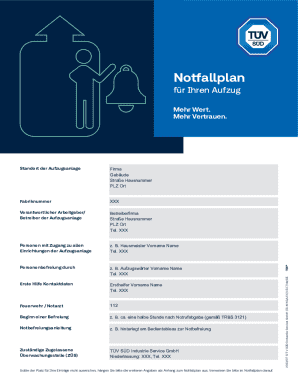
Get De Tv Sud Industrie Service Is-mkg/lcc/152 2023-2025
How it works
-

Open form follow the instructions
-

Easily sign the form with your finger
-

Send filled & signed form or save
How to fill out the DE TV SUD Industrie Service IS-MKG/LCC/152 online
This guide provides clear and supportive instructions on how to complete the DE TV SUD Industrie Service IS-MKG/LCC/152 form online. It is designed to assist users with varying levels of experience in digital document management, ensuring that everyone can effectively fill out this important safety document.
Follow the steps to complete your form successfully
- Click the ‘Get Form’ button to retrieve the document and access it for online completion.
- Enter the complete address of the elevator location in the ‘Standort der Aufzugsanlage’ field. Be sure to include the company name, street address, house number, postal code, and city to facilitate quick emergency responses.
- In the ‘Fabriknummer’ section, fill in the factory number located on the nameplate or in the inspection certificate for the elevator.
- Provide the full name and contact information of the responsible employer or operator of the elevator in the ‘Verantwortlicher Arbeitgeber/Betreiber der Aufzugsanlage’ section.
- List the individuals with access to all facilities of the elevator in the designated field, including their phone numbers. These could be personnel such as janitors, internal emergency services, or security officers.
- In the ‘Personenbefreiung durch’ field, indicate the name and contact details of the designated elevator operator or responsible person who will manage emergency rescues.
- Fill in the contact information for the first aid provider in the ‘Erste Hilfe Kontaktdaten’ section, including names and telephone numbers.
- Specify the time frame for initiating rescues in the ‘Beginn einer Befreiung’ section. Typically, this should state ‘approximately 30 minutes’ unless your organization has a shorter timeframe.
- Document the location of the rescue instruction manual for the elevator in the ‘Notbefreiungsanleitung’ field to ensure quick access during emergencies.
- Enter the name and contact details of the responsible approved monitoring body (ZÜS) that conducts inspections in the final field.
- If you have additional information that does not fit in the provided fields, attach an appendix to the emergency plan and reference it appropriately in the document.
- Once all sections are completed, save the changes to the document, and consider downloading, printing, or sharing the form as needed.
Complete your documents online today and ensure your elevator safety compliance.
Industry-leading security and compliance
US Legal Forms protects your data by complying with industry-specific security standards.
-
In businnes since 199725+ years providing professional legal documents.
-
Accredited businessGuarantees that a business meets BBB accreditation standards in the US and Canada.
-
Secured by BraintreeValidated Level 1 PCI DSS compliant payment gateway that accepts most major credit and debit card brands from across the globe.