Loading
Get Gsa Sf30 1983-2026
How it works
-

Open form follow the instructions
-

Easily sign the form with your finger
-

Send filled & signed form or save
How to fill out the GSA SF30 online
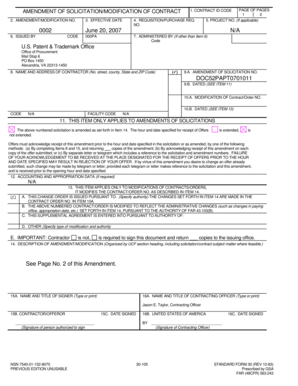
The GSA SF30 form, also known as the amendment of solicitation or modification of contract, is a vital document in the procurement process. This guide will provide clear, step-by-step instructions to assist you in completing the form accurately and effectively online.
Follow the steps to successfully complete the GSA SF30 online.
- Click the 'Get Form' button to obtain the form and open it in the editor.
- In item 1, enter the contract identification code to specify which contract is being amended.
- For item 2, input the specific amendment or modification number, which helps track the changes made.
- Fill out item 3 with the effective date of this amendment; make sure to use the correct format.
- In item 4, include the requisition or purchase request number, if applicable.
- Complete item 5 with the project number, if applicable, to link the amendment to the relevant project.
- Input the information in item 6 regarding who issued the form, including the respective code.
- If applicable, provide details in item 7 concerning the entity administering the contract.
- Complete item 8 with the contractor's name and address, ensuring all contact details are correct.
- In items 9.A and 9.B, fill in the amendment of solicitation number along with its date.
- For item 10, enter the modification of contract/order number, including the relevant date.
- In item 11, choose between the options regarding the acknowledgement of receipt of this amendment.
- Enter the necessary accounting and appropriation data in item 12, if required.
- For item 13, indicate which authorities or provisions the modification of contracts/orders is pursuant to.
- In item 14, describe the specifics of the amendment/modification, ensuring clarity and precision.
- Type or print the name and title of the signer in item 15A, and have them sign in item 15B.
- In item 16A, enter the name and title of the contracting officer, followed by the required signature.
- Finally, save your completed form, and you can choose to download, print, or share it as needed.
Start filling out your GSA SF30 online to ensure smooth contract amendments.
In banking contexts, GSA commonly stands for 'General Security Agreement.' This is a legal document that provides security interests in all assets of a borrower. While it differs from the General Services Administration, both share essential functions in their respective fields. When discussing financial dealings involving GSA SF30, it's crucial to differentiate between these definitions for clarity.