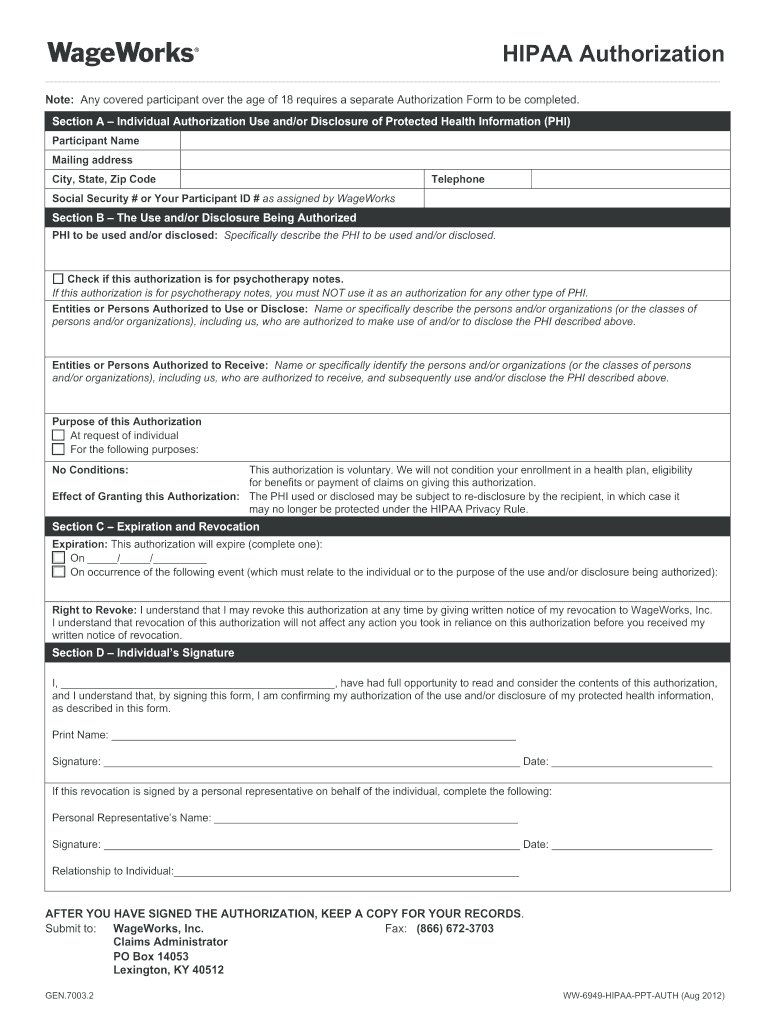
Hip to Individual:__________________________________________________________ AFTER YOU HAVE SIGNED THE AUTHORIZATION, KEEP A COPY FOR YOUR RECORDS. Submit to: WageWorks, Inc. Fax: (866) 672-3703 Claims Administrator PO Box 14053 Lexington, KY 40512 GEN.7003.2 WW-6949-HIPAA-PPT-AUTH (Aug 2012) .
Loading

Open form follow the instructions

Easily sign the form with your finger

Send filled & signed form or save
How to fill out the Wageworks GEN 7003.2 (WW-6949-HIPAA-PPT-AUTH) online
This guide provides clear instructions on how to complete the Wageworks GEN 7003.2 form, also known as the HIPAA authorization form, in an online format. Following these steps will ensure you fill out the necessary fields accurately and understand the implications of your authorization.
Follow the steps to fill out the Wageworks GEN 7003.2 form online.
- Click the ‘Get Form’ button to access the Wageworks GEN 7003.2 form and open it in your preferred online editor.
- In Section A, provide your name, mailing address, city, state, and zip code. Enter your telephone number and either your Social Security number or your WageWorks assigned participant ID number.
- In Section B, specify the protected health information (PHI) that is to be used and/or disclosed. Indicate if the authorization is for psychotherapy notes, remembering that this authorization cannot be used for any other type of PHI.
- List the entities or persons authorized to use or disclose the PHI. Clearly identify the organizations or individuals involved.
- Identify the persons or organizations authorized to receive the PHI, detailing how they are connected to the information being shared.
- State the purpose of the authorization. This could be at the request of the individual or for any specific purpose noted.
- Complete Section C by indicating when the authorization will expire. You may specify a date or an event related to the individual or purpose for the use and/or disclosure.
- In the signature section, read the authorization details before signing. Provide your printed name, signature, and the date of signing.
- If applicable, if this authorization is signed by a personal representative, they should also print their name, sign, date, and indicate their relationship to the individual.
- After completing the form, ensure you save your changes. You can then download, print, or share the completed form as needed.
Complete your Wageworks GEN 7003.2 form online today to ensure your healthcare information is managed appropriately.
Experience a faster way to fill out and sign forms on the web. Access the most extensive library of templates available.
Get answers to your most pressing questions about US Legal Forms API.
How to fill out HIPAA authorization?
Filling out a HIPAA authorization form requires a systematic approach. Start with your personal information, followed by the information you authorize for release. Next, include the name and purpose of the recipients, and indicate when the authorization expires. Leveraging the guidance from Wageworks GEN 7003.2 (WW-6949-HIPAA-PPT-AUTH) can simplify this process, ensuring you cover all necessary components.
Should I accept or decline HIPAA authorization?
Deciding whether to accept or decline a HIPAA authorization often depends on your circumstances. If the authorization serves a clear purpose that benefits your health or care, it may be wise to accept it. However, if you have concerns about privacy or the details involved, you may opt to decline. Consider using resources such as Wageworks GEN 7003.2 (WW-6949-HIPAA-PPT-AUTH) to evaluate your options more clearly.
What is an example of a HIPAA authorization?
An example of a HIPAA authorization could be a document that allows a healthcare provider to share your medical records with a family member or another healthcare professional. The form would state your name, the information to be shared, and the recipient's name along with a specified purpose, like coordinating care. You can find templates and examples through Wageworks GEN 7003.2 (WW-6949-HIPAA-PPT-AUTH) to help you draft your own authorization.
What is required on a HIPAA authorization?
A HIPAA authorization must include several key elements. You need to identify yourself, detail the specific information you are allowing to be shared, and name the individuals or entities permitted to access your information. Additionally, the authorization should outline the purpose of the disclosure and have a clear expiration date. Make sure to reference the Wageworks GEN 7003.2 (WW-6949-HIPAA-PPT-AUTH) to guide you through these requirements.
How do I fill out a HIPAA authorization form?
To fill out a HIPAA authorization form effectively, begin by providing your personal details, including your name and contact information. Next, specify what health information you are authorizing for release and the parties involved in the release. Once you've filled in these sections, review the form for accuracy before signing and dating it. Utilizing resources like Wageworks GEN 7003.2 (WW-6949-HIPAA-PPT-AUTH) can help ensure you complete the form correctly.
How to fill out HIPAA privacy authorization form?
Filling out the HIPAA privacy authorization form requires you to provide specific details about your personal information. Start by entering your name, address, and contact details at the top of the form. Next, clearly indicate who is authorized to receive your information, as this directly relates to the Wageworks GEN 7003.2 (WW-6949-HIPAA-PPT-AUTH). Finally, review the form for accuracy and sign it to complete the process.
What makes an authorization HIPAA compliant?
An authorization is HIPAA compliant when it contains specific elements such as a clear description of the information to be disclosed and the purpose of the disclosure. The Wageworks GEN 7003.2 (WW-6949-HIPAA-PPT-AUTH) exemplifies these requirements, ensuring that both the patient and healthcare providers understand their rights and obligations. Adhering to these standards promotes security and trust in the management of personal health information.
What is a HIPAA compliant form?
A HIPAA compliant form is a document designed to meet the standards set by the Health Insurance Portability and Accountability Act for protecting patient information. Forms like the Wageworks GEN 7003.2 (WW-6949-HIPAA-PPT-AUTH) incorporate necessary elements to ensure that patient privacy is maintained. Using these forms ensures that your healthcare information is shared responsibly and legally.
What is a HIPAA compliant authorization form?
A HIPAA compliant authorization form is a document that allows healthcare providers to share your medical information with third parties, ensuring your rights are protected under HIPAA regulations. An example of such a form is the Wageworks GEN 7003.2 (WW-6949-HIPAA-PPT-AUTH), which facilitates the sharing of information necessary for health services while maintaining your privacy. By completing this form, you help ensure that your sensitive information is handled according to legal standards, thus promoting trust in your healthcare providers.
Use professional pre-built templates to fill in and sign documents online faster. Get access to thousands of forms.
If you believe that this page should be taken down, please follow our DMCA take down process here.