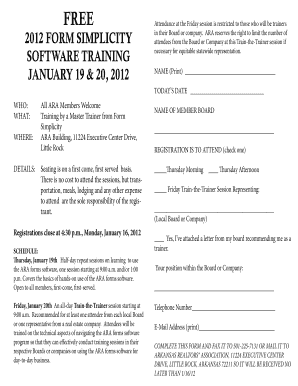
Get 2012 Form Simplicity Software Training January 19 & 20 ...
How it works
-

Open form follow the instructions
-

Easily sign the form with your finger
-

Send filled & signed form or save
How to fill out the 2012 form simplicity software training january 19 & 20 online
Filling out the 2012 form simplicity software training registration is an essential step for those looking to attend the training sessions. This guide provides clear, step-by-step instructions to help you complete the form accurately and efficiently online.
Follow the steps to complete your training registration form.
- Click ‘Get Form’ button to obtain the form and open it in the editor.
- Begin by entering your name in the 'NAME (Print)' field at the top of the form. Ensure that it is legibly written as it will be used for identification purposes during the training.
- Next, fill in 'TODAY’S DATE' with the current date. This date logs when you completed the registration.
- Indicate if you represent a member board by filling in the 'NAME OF MEMBER BOARD' section. This is important for ensuring relevant training content.
- Select your preferred training session by checking the appropriate box under 'REGISTRATION IS TO ATTEND.' Options include Thursday Morning, Thursday Afternoon, and Friday Train-the-Trainer Session.
- If you are attending the Train-the-Trainer session, confirm your status by checking 'Yes' alongside the statement regarding attaching a recommendation letter from your board.
- Indicate your position within the board or company in the designated field. This information helps tailor discussions to your role's needs.
- Provide your telephone number in the specified field, ensuring it is current for any follow-up communications regarding the training.
- Lastly, enter your email address in the 'E-Mail Address (print)' field. This will be used for confirmation and updates about the training sessions.
- Once all fields are complete, review your entries for accuracy. You will then have the option to save changes, download, print, or share the form before submission.
Complete your registration today to secure your spot at the training sessions!
To share a transaction in Form Simplicity, first, open the specific transaction you want to share. Next, look for the 'Share' option, where you can enter the email address or select users from your contacts. This feature allows you to collaborate seamlessly with colleagues or clients, making it easier to manage documents while you prepare for the 2012 FORM SIMPLICITY SOFTWARE TRAINING JANUARY 19 & 20. By sharing transactions, you ensure that everyone involved has access to the most up-to-date information.
Industry-leading security and compliance
-
In businnes since 199725+ years providing professional legal documents.
-
Accredited businessGuarantees that a business meets BBB accreditation standards in the US and Canada.
-
Secured by BraintreeValidated Level 1 PCI DSS compliant payment gateway that accepts most major credit and debit card brands from across the globe.