Loading
Form preview
  • US Legal Forms
  • Other Templates
  • Industry Forms
  • Industry Insurance & Medical Forms
  • Uphp Annual Diabetes Foot Exam Form 2006

Get Uphp Annual Diabetes Foot Exam Form 2006-2026

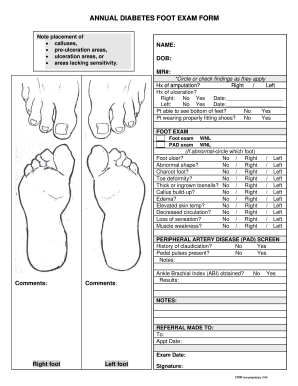
Title: Microsoft Word Annual Foot exam Int 73pg2.doc Author: dkinnunen Created Date: 2/27/2006 11:56:43 AM.

How it works

  1. Open form

    Open form follow the instructions

  2. Easily sign form

    Easily sign the form with your finger

  3. Share form

    Send filled & signed form or save

How to fill out the UPHP Annual Diabetes Foot Exam Form online

Filling out the UPHP Annual Diabetes Foot Exam Form online is a vital step in managing a person's diabetes and maintaining foot health. This guide will provide clear, step-by-step instructions to help users complete the form accurately and effectively.

Follow the steps to complete the online form.

  1. Click ‘Get Form’ button to obtain the form and open it in the appropriate editing platform.
  2. Begin by entering the user's name, date of birth (DOB), and medical record number (MR#) in the designated fields.
  3. Indicate any history of amputation by specifying right or left, if applicable.
  4. Note the history of ulceration for both feet. For each foot, check 'No' or 'Yes' and provide the date of the ulceration if applicable.
  5. Assess whether the user is able to see the bottom of their feet and if they are wearing properly fitting shoes by selecting the appropriate 'Yes' or 'No' options.
  6. Complete the foot exam section by checking the relevant boxes for findings such as foot ulcers, abnormal shapes, or callus build-up for each foot.
  7. Proceed to the Peripheral Artery Disease (PAD) screen section, where users should indicate if there is a history of claudication and if pedal pulses are present.
  8. Fill in any notes or comments regarding the examination observations in the provided fields.
  9. Complete the Ankle Brachial Index (ABI) results section by marking 'Yes' or 'No' and entering the results if applicable.
  10. Indicate if a referral was made, including details about the appointment date and exam date.
  11. Finally, the user or examiner must sign the form to validate the entries.
  12. Once all fields are completed, users can save changes, download the form, print it, or share it as needed.

Complete the UPHP Annual Diabetes Foot Exam Form online today to support effective diabetes management.

Get form

Experience a faster way to fill out and sign forms on the web. Access the most extensive library of templates available.
Get form

Related content

List of Model Proposals Supplemental Document for...
Purpose of this Document: This document contains all of the model proposals that were...
Learn more
Diabetic Foot Exam
This article explores the significance of diabetic foot exams, the methodologies involved...
Learn more
Surgical Site Infection Event (SSI)
Jan 1, 2025 — Diabetes: The NHSN SSI surveillance definition of diabetes indicates that...
Learn more

Related links form

Ddsd Oklahoma Mcps Form 271 6 APPLICATION FOR MR/DD SERVICE REGISTRY - Chfs Ky Application. - Department Of Human Services - Dhs Sd

Questions & Answers

Get answers to your most pressing questions about US Legal Forms API.

Contact support

Medicare usually covers diabetic foot care if you meet certain criteria, including having any diabetes-related complications. Generally, patients can receive covered diabetic foot care services up to twice a year. Utilize the UPHP Annual Diabetes Foot Exam Form to keep track of your appointments and eligibility for Medicare coverage related to foot health.

The American Diabetes Association (ADA) recommends that individuals with diabetes receive foot exams at least annually, or more frequently if they have a history of foot problems. The guidelines emphasize a comprehensive examination, including inspection of skin, nails, and circulation. Using the UPHP Annual Diabetes Foot Exam Form can help you adhere to these guidelines and document the exams effectively.

Billing for a diabetic foot exam typically involves using specific codes that correspond to the services provided. Providers should document the patient's condition thoroughly to justify the exam and submit the correct billing codes. The UPHP Annual Diabetes Foot Exam Form can assist healthcare providers in this process, making it straightforward to ensure accurate billing.

The ICD-10 code for a diabetic foot assessment is E11.621, which specifically addresses diabetic foot ulcers. Knowing this code can aid healthcare providers in accurate documentation and billing. Make sure to utilize the UPHP Annual Diabetes Foot Exam Form to streamline the inclusion of relevant codes into your medical records.

It's important to have a diabetic foot exam at least once a year. For individuals with diabetes, regular assessments help in early detection and prevention of serious complications. The UPHP Annual Diabetes Foot Exam Form simplifies the scheduling of these vital checkups, ensuring you stay on top of your foot health.

To conduct a diabetic foot examination, start by thoroughly inspecting your feet for any cuts, blisters, or areas of redness. Look closely between your toes and the soles for any abnormalities. Additionally, using the UPHP Annual Diabetes Foot Exam Form helps track any findings or concerns from your self-exams. Regular self-checks combined with professional exams are crucial in keeping your feet healthy.

You can get a diabetic foot exam at your primary care physician’s office or a specialized podiatrist’s clinic. Many healthcare facilities offer these services, ensuring that your foot health is closely monitored. Additionally, accessing the UPHP Annual Diabetes Foot Exam Form makes it easy to document your exam history. Finding a suitable location for your exam is essential for maintaining your overall health.

Completing a diabetic foot check involves a systematic approach. Start with a visual examination of the feet, followed by checking circulation and sensation through touch. Utilize the UPHP Annual Diabetes Foot Exam Form to record observations, and ensure to assess for any risk factors that may warrant immediate attention or intervention.

It is crucial to never use sharp objects to remove calluses or corns from a diabetic patient's feet, as this can lead to cuts or infections. Avoid soaking the feet in hot water, as it may cause burns due to reduced sensitivity. Additionally, refrain from using tight or ill-fitting footwear, which can cause blisters or pressure sores, documenting any concerns with the UPHP Annual Diabetes Foot Exam Form.

When conducting a foot assessment, start by visually inspecting both feet for any abnormalities, such as cuts, blisters, or discoloration. Next, gently palpate the feet to check for temperature differences, sensitivity, or swelling. Finally, document your findings using the UPHP Annual Diabetes Foot Exam Form to ensure a thorough record, facilitating any necessary follow-ups or referrals.

Get This Form Now!

Use professional pre-built templates to fill in and sign documents online faster. Get access to thousands of forms.
Get form
If you believe that this page should be taken down, please follow our DMCA take down processhere.
Get UPHP Annual Diabetes Foot Exam Form
Get form
  • Adoption
  • Bankruptcy
  • Contractors
  • Divorce
  • Home Sales
  • Employment
  • Identity Theft
  • Incorporation
  • Landlord Tenant
  • Living Trust
  • Name Change
  • Personal Planning
  • Small Business
  • Wills & Estates
  • Packages A-Z
  • Affidavits
  • Bankruptcy
  • Bill of Sale
  • Corporate - LLC
  • Divorce
  • Employment
  • Identity Theft
  • Internet Technology
  • Landlord Tenant
  • Living Wills
  • Name Change
  • Power of Attorney
  • Real Estate
  • Small Estates
  • Wills
  • All Forms
  • Forms A-Z
  • Other Templates
  • Legal Hub
  • About Us
  • Help Portal
  • Legal Resources
  • Blog
  • Affiliates
  • Contact Us
  • Delete My Account
  • Site Map
  • Industries
  • Forms in Spanish
  • Localized Forms
  • State-specific Forms
  • Forms Kit
  • Real Estate Handbook
  • All Guides
  • Notarize
  • Incorporation services
  • For Consumers
  • For Small Business
  • For Attorneys
  • USLegal
  • FormsPass
  • pdfFiller
  • signNow
  • altaFlow
  • DocHub
  • Instapage
Form Packages
  • Adoption
  • Bankruptcy
  • Contractors
  • Divorce
  • Home Sales
  • Employment
  • Identity Theft
  • Incorporation
  • Landlord Tenant
  • Living Trust
  • Name Change
  • Personal Planning
  • Small Business
  • Wills & Estates
  • Packages A-Z
Form Categories
  • Affidavits
  • Bankruptcy
  • Bill of Sale
  • Corporate - LLC
  • Divorce
  • Employment
  • Identity Theft
  • Internet Technology
  • Landlord Tenant
  • Living Wills
  • Name Change
  • Power of Attorney
  • Real Estate
  • Small Estates
  • Wills
  • All Forms
  • Forms A-Z
  • Other Templates
Customer Service
  • Legal Hub
  • About Us
  • Help Portal
  • Legal Resources
  • Blog
  • Affiliates
  • Contact Us
  • Delete My Account
  • Site Map
  • Industries
  • Forms in Spanish
  • Localized Forms
  • State-specific Forms
  • Forms Kit
Legal Guides
  • Real Estate Handbook
  • All Guides
Prepared for you
  • Notarize
  • Incorporation services
Our Customers
  • For Consumers
  • For Small Business
  • For Attorneys
Our Sites
  • USLegal
  • FormsPass
  • pdfFiller
  • signNow
  • altaFlow
  • DocHub
  • Instapage
Social Media
Call us now toll free:
+1 833 426 79 33
As seen in:
© Copyright 1999-2026 airSlate Legal Forms, Inc. 17 Station Street, Suite 303, Brookline, MA 02445
  • Your Privacy Choices
  • Terms of Service
  • Privacy Notice
  • Content Takedown Policy
  • Bug Bounty Program