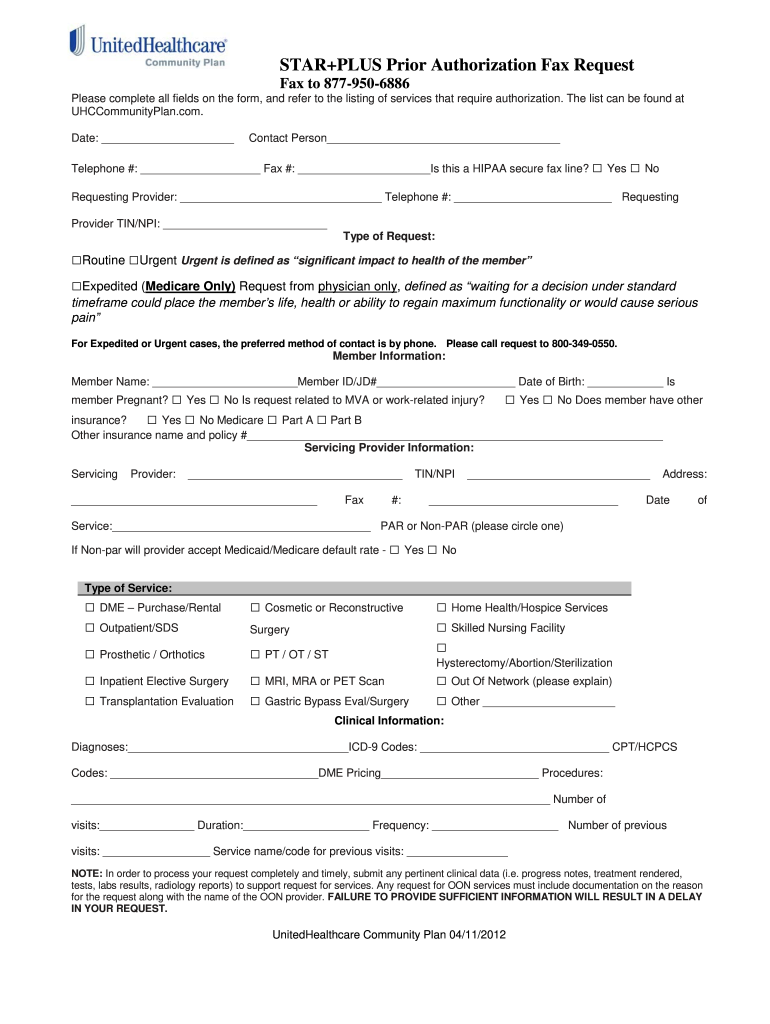
Date: _____________________ Contact Person_____________________________________ Telephone #: ___________________ Fax #: _____________________Is this a HIPAA secure fax line? □ Yes □ No Requesting Provider: ________________________________ Telephone #: _________________________ Requesting Provider TIN/NPI: __________________________ Type of Request: □Routine □Urgent Urgent is defined as “significant impact to health of the member” □Expedited (Medicare Only) Request from physicia.
Loading

Open form follow the instructions

Easily sign the form with your finger

Send filled & signed form or save
How to fill out the United Health Care STAR+PLUS Prior Authorization Fax Request online
The United Health Care STAR+PLUS Prior Authorization Fax Request is an important document needed for obtaining necessary services. This guide will walk you through each section of the form, ensuring you complete it accurately and efficiently, even if you have limited experience with similar documents.
Follow the steps to complete your authorization request effectively.
- Press the ‘Get Form’ button to access the STAR+PLUS Prior Authorization Fax Request form and have it readily available for completion.
- Begin by entering the date at the top of the form. This date indicates when the request is being submitted.
- Fill in the contact person's name, telephone number, and fax number. Ensure that you indicate whether the fax line is HIPAA secure by checking the appropriate box.
- Provide the requesting provider's name, telephone number, and their TIN/NPI number.
- Select the type of request by marking the appropriate box: Routine, Urgent, or Expedited. Remember that urgent requests relate to significant impacts on the member's health.
- Complete the member information section, including their name, member ID or JD number, date of birth, pregnancy status, and any work-related injuries.
- If applicable, enter details about other insurance the member may have, including the name of the insurance provider and policy number.
- Proceed to fill in the servicing provider information, including their name, fax number, TIN/NPI, and address.
- Indicate the date of service and whether the provider is PAR (Participating) or Non-PAR (Non-Participating). If Non-PAR, check if the provider will accept Medicaid/Medicare default rate.
- Select the type of service you are requesting by checking the corresponding box. Options include items like DME, outpatient services, surgery, and more.
- Provide clinical information, including diagnoses, ICD-9 codes, CPT/HCPCS codes, and details regarding the frequency and number of visits.
- Ensure to submit all pertinent clinical data that supports the request, such as progress notes or test results, for timely processing.
- Review all entries to confirm accuracy before saving changes, downloading, printing, or sharing the completed form.
Take the time to complete the United Health Care STAR+PLUS Prior Authorization Fax Request online today for a smooth authorization process.
Experience a faster way to fill out and sign forms on the web. Access the most extensive library of templates available.
Related content
give you the care or grant your request for prior approval for a service, drug, or supply;...
For authorization, please answer each question and fax this form PLUS chart notes back to...
Bravo Health Bravo Health Star Plus BridgeSpan Bridgeview 68069 CB186 22286 35182 51037...
Get answers to your most pressing questions about US Legal Forms API.
How do I submit a prior authorization for UnitedHealthcare?
Submitting a prior authorization for UnitedHealthcare requires you to gather all necessary documentation and use the appropriate fax or online submission methods. You can easily find guidelines on their website that detail the submission process. Ensuring your United Health Care STAR+PLUS Prior Authorization Fax Request is thorough will help in getting quicker approvals.
What is the fax number for UHC prior authorization?
The fax number for UHC prior authorization is generally specified in your provider materials. Always ensure you have the latest number, as changes can occur. Proper use of the UHC prior authorization fax number is essential for your United Health Care STAR+PLUS Prior Authorization Fax Request to reach the right team.
What is the phone number for UnitedHealthcare Choice Plus prior authorization?
You can contact UnitedHealthcare Choice Plus for prior authorization at their dedicated phone number found on their official website. Speaking directly with a representative can clarify any questions while you prepare your United Health Care STAR+PLUS Prior Authorization Fax Request. It's always good to have direct communication for any clarification.
What is the fax number for UHC provider prior authorization?
The fax number for UHC provider prior authorization can vary based on the specific plan type. To find the correct number, refer to the UHC provider portal or your provider manual. This is vital for submitting your United Health Care STAR+PLUS Prior Authorization Fax Request effectively and quickly.
Can I fax claims to UnitedHealthcare?
Yes, you can fax claims to UnitedHealthcare, and it's often a preferred method for many providers. Make sure to use the appropriate fax number listed for claim submissions to ensure your United Health Care STAR+PLUS Prior Authorization Fax Request is handled promptly. Following the guidelines provided by UnitedHealthcare helps in streamlining your process.
What is the fax number for 1-800-711-4555?
The fax number associated with 1-800-711-4555 is usually found in the contact or customer service section of the relevant healthcare plan’s documentation. It's important to confirm this number before submitting your United Health Care STAR+PLUS Prior Authorization Fax Request. Ensure your submissions go through to expedite your prior authorization process.
What is the fax number for health Partners prior authorization?
For Health Partners prior authorization, you can use the designated fax number provided on their official website. This is critical as it ensures your United Health Care STAR+PLUS Prior Authorization Fax Request is sent directly to the right department. Always check for the most current fax number to avoid delays in processing your requests.
What is the fax number for Medicare prior authorization?
The fax number for Medicare prior authorization generally differs based on the type of service and patient eligibility. You can locate the correct fax number by reviewing Medicare documentation or visiting the official website. The United Health Care STAR+PLUS Prior Authorization Fax Request can be a valuable resource for understanding the submission requirements. Ensuring that you fax the correct information can help prevent delays in processing your authorization requests.
What is the fax number for NGS Medicare?
The fax number for NGS Medicare requests can be found on the NGS Medicare website or any recent provider communications. It is important to ensure that the documents you send conform to their requirements. When submitting the United Health Care STAR+PLUS Prior Authorization Fax Request, the correct fax number ensures your request will be handled without delay.
What is the fax number for senior whole health prior authorization?
The fax number for senior whole health prior authorization is necessary for health professionals who need to submit requests. Make sure you have the latest contact information to prevent any processing delays. Should you need to submit a United Health Care STAR+PLUS Prior Authorization Fax Request, always confirm you're using the correct number.
Use professional pre-built templates to fill in and sign documents online faster. Get access to thousands of forms.
If you believe that this page should be taken down, please follow our DMCA take down process here.