Loading
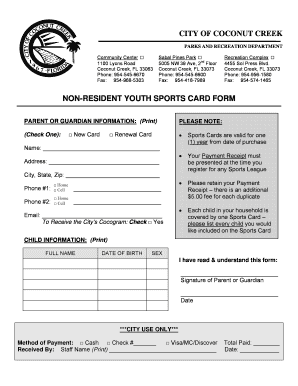
Get City Coconut Creek Non Resident Sports Card Form
How it works
-

Open form follow the instructions
-

Easily sign the form with your finger
-

Send filled & signed form or save
How to fill out the City Coconut Creek Non Resident Sports Card Form online
Filling out the City Coconut Creek Non Resident Sports Card Form online is a straightforward process that allows users to register for youth sports activities. This guide provides clear, step-by-step instructions to help you complete the form accurately and efficiently.
Follow the steps to complete the form online
- Press the ‘Get Form’ button to access the form and open it in the online editor.
- In the Parent or Guardian Information section, indicate whether you are applying for a New Card or a Renewal Card by checking the appropriate box.
- Fill in your Name and Address, including City, State, and Zip Code.
- Provide two phone numbers. Indicate the type of each phone number by checking either Home or Cell.
- Enter your Email address and indicate if you would like to receive the City’s Cocogram by marking the checkbox.
- In the Child Information section, list the Full Name, Date of Birth, and Sex for each child you would like to include on the Sports Card.
- At the bottom of the form, sign and date to confirm that you have read and understood the form.
- Once you have completed the form, you can save your changes, download a copy, print it for your records, or share it as needed.
Complete your documents online today to ensure a smooth registration process!
Industry-leading security and compliance
US Legal Forms protects your data by complying with industry-specific security standards.
-
In businnes since 199725+ years providing professional legal documents.
-
Accredited businessGuarantees that a business meets BBB accreditation standards in the US and Canada.
-
Secured by BraintreeValidated Level 1 PCI DSS compliant payment gateway that accepts most major credit and debit card brands from across the globe.