Loading
Get Company Financial Statemen - Arizona Department Of Financial ... - Azdfi
How it works
-

Open form follow the instructions
-

Easily sign the form with your finger
-

Send filled & signed form or save
How to fill out the Company Financial Statement - Arizona Department of Financial Institutions online
Filling out the Company Financial Statement for the Arizona Department of Financial Institutions is an essential task for collection agencies. This guide provides clear, step-by-step instructions to help users complete the form accurately and efficiently.
Follow the steps to successfully complete your financial statement online.
- Click ‘Get Form’ button to access the document and open it in the editor.
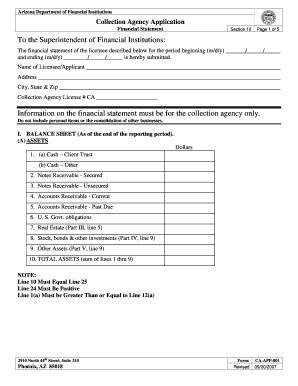
- Begin by entering your company details. In this section, provide the name of the licensee or applicant, address, city, state, and zip code. Make sure to include your collection agency license number.
- Complete the 'Balance Sheet' section. Start with 'Assets' by accurately listing the amounts for cash accounts, notes receivable, and accounts receivable. Remember that line 10 must equal line 25, and line 1(a) should be greater than or equal to line 12(a).
- Next, input the 'Liabilities' figures. This includes notes payable, accounts payable—both client trust and other, and accrued taxes, among others. Sum these amounts to get the total liabilities.
- Proceed to the 'Net Worth' section. Provide details for preferred stock, common stock, additional paid-in capital, retained earnings, and treasury stock. Calculate the total net worth by summing these figures.
- In the 'Statement of Change in Net Worth/Equity' part, you will need to document any changes in your capital stock and retained earnings. Ensure that the ending balance agrees with the total net worth from Section I.
- Complete the schedules for real estate owned and for stocks, bonds, and other investments. Ensure to list all necessary details and amounts.
- Fill out the 'Statement of Income and Expenses.' Carefully input income from various sources, followed by expenses. Calculate the net profit or loss at the end of this section.
- Review the schedules of other income and expenses to detail any items exceeding 10% of the total. Complete these schedules as accurately as possible.
- Finally, verify all details entered. Ensure accuracy and completeness, then save changes. You have the option to download, print, or share the completed form as needed.
Complete your Company Financial Statement online to ensure compliance with Arizona financial regulations.
Related links form
You can view a company's financial statements by visiting the Arizona Department Of Financial Institutions' website. They offer access to publicly available financial filings. This transparency helps you evaluate a company's financial health before making investment decisions.
Industry-leading security and compliance
US Legal Forms protects your data by complying with industry-specific security standards.
-
In businnes since 199725+ years providing professional legal documents.
-
Accredited businessGuarantees that a business meets BBB accreditation standards in the US and Canada.
-
Secured by BraintreeValidated Level 1 PCI DSS compliant payment gateway that accepts most major credit and debit card brands from across the globe.