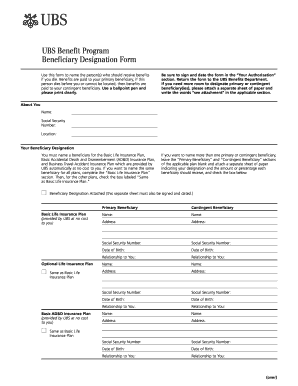
Get Ubs Beneficiary Designation Form 2001-2026
How it works
-

Open form follow the instructions
-

Easily sign the form with your finger
-

Send filled & signed form or save
How to fill out the UBS Beneficiary Designation Form online
Filling out the UBS Beneficiary Designation Form is an essential step to ensure that your benefits are distributed according to your wishes. This guide will walk you through each section of the form with clear, step-by-step instructions, making it easy to complete online.
Follow the steps to fill out the form accurately and efficiently.
- Click ‘Get Form’ button to access and open the Beneficiary Designation Form in the editor.
- Begin by completing the ‘About You’ section. Enter your name, social security number, and current location clearly, using a ballpoint pen if filling out a physical copy.
- Move to the ‘Your Beneficiary Designation’ section. Here, you must designate a primary beneficiary for the Basic Life Insurance Plan, Basic Accidental Death and Dismemberment Insurance Plan, and Business Travel Accident Insurance Plan.
- If you wish to name the same beneficiary for all plans, simply fill out the ‘Basic Life Insurance Plan’ section and check the box labeled ‘Same as Basic Life Insurance Plan’ for the other plans.
- For multiple primary or contingent beneficiaries, leave the appropriate fields blank and attach a separate sheet detailing each beneficiary’s name, address, social security number, date of birth, and their relationship to you. Remember to indicate the percentage of benefits each should receive.
- Complete the ‘Primary Beneficiary’ and ‘Contingent Beneficiary’ sections with the required information. Provide names, addresses, social security numbers, dates of birth, and relationship details for each person you are designating.
- Review the ‘Your Authorization’ section carefully. You must sign and date the form to authorize the listed beneficiaries, ensuring the form’s validity.
- Once all sections are completed, save changes, print, or download the form if needed. Return the signed form to the UBS Benefits Department as per the provided mailing instructions.
Start filling out your UBS Beneficiary Designation Form online today to ensure your benefits are allocated according to your wishes.
Many banks allow you to add a beneficiary to your account online, making the process quick and user-friendly. You typically need to log into your online banking portal and locate the beneficiary designation section. If your bank supports this option, it can usually be done in just a few clicks without the need for physical paperwork. However, if you need more assistance, resources like uslegalforms can provide guidance on this process.