We use cookies to improve security, personalize the user experience, enhance our marketing activities (including cooperating with our marketing partners) and for other business use.
Click "here" to read our Cookie Policy. By clicking "Accept" you agree to the use of cookies. Read less
Read more
Accept
Loading
Form preview
  • US Legal Forms
  • Form Library
  • More Forms
  • More Multi-State Forms
  • Ph Professional Regulation Commission Prd-29 2023

Get Ph Professional Regulation Commission Prd-29 2023-2025

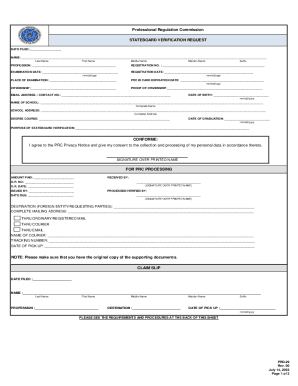
Last Name First Name Middle Name Maiden Name Suffix PROFESSION: REGISTRATION NO. : EXAMINATION DATE: REGISTRATION DATE: mm/dd/yyyy mm/dd/yyyy PLACE OF EXAMINATION: PRC ID CARD EXPIRATION DATE.

How it works

  1. Open form

    Open form follow the instructions

  2. Easily sign form

    Easily sign the form with your finger

  3. Share form

    Send filled & signed form or save

How to fill out the PH Professional Regulation Commission PRD-29 online

Filling out the PH Professional Regulation Commission PRD-29 form online is a crucial step for individuals seeking stateboard verification. This guide provides a comprehensive overview and step-by-step instructions to help users efficiently complete the form in a user-friendly manner.

Follow the steps to accurately fill out the PRD-29 form online:

  1. Click ‘Get Form’ button to access the PRD-29 form that you will fill out online.
  2. Begin by entering your name in the provided fields. Include your last name, first name, middle name, maiden name, and suffix if applicable.
  3. Indicate your profession in the appropriate field.
  4. Fill in your registration number, ensuring it is accurate.
  5. Provide the examination date and registration date in the specified mm/dd/yyyy format.
  6. Specify the place of examination clearly.
  7. Enter the expiration date of your PRC ID card.
  8. Complete the citizenship section by stating your citizenship.
  9. If required, provide proof of citizenship in the designated field.
  10. Fill in your email address and contact number accurately.
  11. Enter your date of birth in the mm/dd/yyyy format.
  12. Provide the name of your school and the complete address.
  13. Specify your degree course.
  14. Enter your date of graduation in the required format.
  15. Clearly state the purpose of stateboard verification.
  16. Read and agree to the PRC privacy notice by signing over your printed name.
  17. Once all fields are completed, review your entries for accuracy, then save your changes.
  18. You may download, print, or share the form as needed.

Complete your PRD-29 form online today for a smooth stateboard verification process.

Get form

Experience a faster way to fill out and sign forms on the web. Access the most extensive library of templates available.
Get form

Related content

CHAPTER Ph 300 INITIAL LICENSURE, REGISTRATION
Adopt Ph 300 to read as follows: CHAPTER Ph 300 INITIAL LICENSURE, REGISTRATION, AND...
Learn more
EN Horizon Europe Work Programme 2023-2025 2...
Dec 6, 2022 — Work Programme 2023-2025. 2. Marie Skłodowska-Curie Actions. (European...
Learn more
EDPB Annual Report 2024 - European Union
Apr 23, 2025 — 2.3.1. Statement 1/2024 on legislative developments regarding the...
Learn more

Related links form

MI DHS HAP Electronic Funds Transfer (Direct Deposit) Application S8 Landlord 2022 AK Trailer Rentals Commercial Trailer Rental Agreement 2014 NY VR 66 2022 KS Wichita Municipal Court Cash Bond Refund Form 2021

Questions & Answers

Get answers to your most pressing questions about US Legal Forms API.

Contact support

To obtain your PRC license in the Philippines, you must first complete the necessary educational requirements and pass the relevant examinations. Once you have met these qualifications, visit the PH Professional Regulation Commission PRD-29 website for details on submission procedures and application forms. This process ensures you are officially registered to practice your profession.

Yes, you can change your email in the PRC system. Simply log into your account on the PH Professional Regulation Commission PRD-29 website, navigate to your profile settings, and update your email address accordingly. Always remember to verify the new email to ensure your account remains secure and accessible.

If you need to retrieve your PRC ID, start by checking the PH Professional Regulation Commission PRD-29 website for guidelines on replacement IDs. You will typically need to submit an application along with a valid identification document. Be sure to specify your details correctly to avoid any delays in processing.

To retrieve your PRC account and password, visit the official website of the PH Professional Regulation Commission PRD-29. Navigate to the login section and select the ‘Forgot Password’ link. Follow the prompts to verify your identity, and you will receive instructions to reset your password via your registered email.

You should renew your PRC at least every three years, as per the guidelines from the PH Professional Regulation Commission PRD-29. Timely renewal helps you maintain an active professional status and adhere to regulatory requirements. Planning ahead ensures you meet any Continuing Professional Development objectives that might be necessary for the renewal process.

To update your status in PRC online, first log in to your account on the official PH Professional Regulation Commission PRD-29 website. Locate the status update option and fill in the necessary fields with current information. After reviewing your entries, submit your request, and ensure any required documents are uploaded as part of the process.

As of now, the requirement for Continuing Professional Development (CPD) in the Philippines remains valid, including in 2025. The PH Professional Regulation Commission PRD-29 continues to mandate CPD to promote professional growth and expertise. It's essential to stay updated on any changes in regulations through official PRC announcements or communications.

You should renew your PRC license before its expiration date to avoid any penalties or disruptions in your professional practice. It's advisable to apply for renewal at least two months before expiry, keeping your occupation and the specific guidelines from the PH Professional Regulation Commission PRD-29 in mind. This proactive approach allows you to arrange necessary Continuing Professional Development credits in advance.

To change information in your PRC account, log in to the official portal of the PH Professional Regulation Commission PRD-29. Navigate to the user profile section and select the details you wish to update. Submit any required documents that support your changes, and ensure your information is accurate. If you encounter issues, consider reaching out to customer support for assistance.

Get This Form Now!

Use professional pre-built templates to fill in and sign documents online faster. Get access to thousands of forms.
Get form
If you believe that this page should be taken down, please follow our DMCA take down processhere.

Industry-leading security and compliance

US Legal Forms protects your data by complying with industry-specific security standards.
  • In businnes since 1997
    25+ years providing professional legal documents.
  • Accredited business
    Guarantees that a business meets BBB accreditation standards in the US and Canada.
  • Secured by Braintree
    Validated Level 1 PCI DSS compliant payment gateway that accepts most major credit and debit card brands from across the globe.
Get PH Professional Regulation Commission PRD-29
Get form
Form Packages
Adoption
Bankruptcy
Contractors
Divorce
Home Sales
Employment
Identity Theft
Incorporation
Landlord Tenant
Living Trust
Name Change
Personal Planning
Small Business
Wills & Estates
Packages A-Z
Form Categories
Affidavits
Bankruptcy
Bill of Sale
Corporate - LLC
Divorce
Employment
Identity Theft
Internet Technology
Landlord Tenant
Living Wills
Name Change
Power of Attorney
Real Estate
Small Estates
Wills
All Forms
Forms A-Z
Form Library
Customer Service
Terms of Service
Privacy Notice
Legal Hub
Content Takedown Policy
Bug Bounty Program
About Us
Help Portal
Legal Resources
Blog
Affiliates
Contact Us
Delete My Account
Site Map
Industries
Forms in Spanish
Localized Forms
State-specific Forms
Forms Kit
Legal Guides
Real Estate Handbook
All Guides
Prepared for You
Notarize
Incorporation services
Our Customers
For Consumers
For Small Business
For Attorneys
Our Sites
US Legal Forms
USLegal
FormsPass
pdfFiller
signNow
airSlate WorkFlow
DocHub
Instapage
Social Media
Call us now toll free:
+1 833 426 79 33
As seen in:
  • USA Today logo picture
  • CBC News logo picture
  • LA Times logo picture
  • The Washington Post logo picture
  • AP logo picture
  • Forbes logo picture
© Copyright 1997-2025
airSlate Legal Forms, Inc.
3720 Flowood Dr, Flowood, Mississippi 39232
Form Packages
Adoption
Bankruptcy
Contractors
Divorce
Home Sales
Employment
Identity Theft
Incorporation
Landlord Tenant
Living Trust
Name Change
Personal Planning
Small Business
Wills & Estates
Packages A-Z
Form Categories
Affidavits
Bankruptcy
Bill of Sale
Corporate - LLC
Divorce
Employment
Identity Theft
Internet Technology
Landlord Tenant
Living Wills
Name Change
Power of Attorney
Real Estate
Small Estates
Wills
All Forms
Forms A-Z
Form Library
Customer Service
Terms of Service
Privacy Notice
Legal Hub
Content Takedown Policy
Bug Bounty Program
About Us
Help Portal
Legal Resources
Blog
Affiliates
Contact Us
Delete My Account
Site Map
Industries
Forms in Spanish
Localized Forms
State-specific Forms
Forms Kit
Legal Guides
Real Estate Handbook
All Guides
Prepared for You
Notarize
Incorporation services
Our Customers
For Consumers
For Small Business
For Attorneys
Our Sites
US Legal Forms
USLegal
FormsPass
pdfFiller
signNow
airSlate WorkFlow
DocHub
Instapage
Social Media
Call us now toll free:
+1 833 426 79 33
As seen in:
  • USA Today logo picture
  • CBC News logo picture
  • LA Times logo picture
  • The Washington Post logo picture
  • AP logo picture
  • Forbes logo picture
© Copyright 1997-2025
airSlate Legal Forms, Inc.
3720 Flowood Dr, Flowood, Mississippi 39232