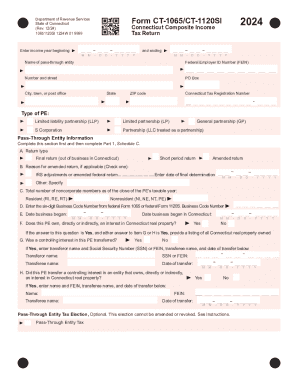
And ending M M - D D - Y Y Y Y M M - Name of pass-through entity D D - Y Y Y Y Federal Employer ID Number (FEIN) Number and street PO Box City, town, or post office State ZIP code Connecticut Tax Registration Number Type of PE: Limited liability partnership (LLP) Limited partnership (LP) S Corporation Partnership (LLC treated as a partnership) General partnership (GP) Pass-Through Entity Informa.
Open form follow the instructions
Easily sign the form with your finger
Send filled & signed form or save
How to fill out the CT DRS CT-1065/CT-1120SI online
Filling out the CT DRS CT-1065/CT-1120SI form online can seem daunting, but this guide aims to simplify the process. The form is crucial for pass-through entities in Connecticut, and understanding each section will help ensure accurate filing.
Follow the steps to effectively complete your form.
- Click ‘Get Form’ button to obtain the form and open it in the online editor.
- Enter the income year at the top of the form, specifying the beginning and ending dates.
- Complete the Pass-Through Entity Information section by providing the name of the entity and its Federal Employer Identification Number (FEIN).
- Indicate the type of pass-through entity, selecting from options such as LLP, LP, S Corporation, LLC, or GP.
- Fill in the Return Type section, selecting if it is a final return, short period return, or amended return. If applicable, provide a reason for amendments.
- In the Pass-Through Entity Information section, complete details about the total number of noncorporate members, including both residents and nonresidents.
- Follow through Parts 1 and 2, providing calculations for Connecticut-sourced income and determining any additional allocations or apportionments.
- In Part 4, enter member information accurately, detailing ownership percentages and ensuring all fields are filled according to guidelines.
- Complete the declaration at the end of the form, affirming the accuracy of the information provided.
- Once all sections are filled out, review the form for any errors, then save changes, download, print, or share the form as needed.
Begin filling out your CT DRS CT-1065/CT-1120SI form online today for a smooth submission process.
Experience a faster way to fill out and sign forms on the web. Access the most extensive library of templates available.
Related content
Pass-Through Entity Tax Information. TSSB- 2025-4, DRS Provides Filing Season Update...
Form 1099-MISC, Miscellaneous Income, against its. Connecticut pass-through entity tax...
DECLARATION: I declare under the penalty of law that I have examined this return and, to...
Get answers to your most pressing questions about US Legal Forms API.
What is a CT tax return?
A CT tax return is a document filed with the Connecticut Department of Revenue Services to report income and calculate taxes owed. For business entities, the CT-1065 and CT-1120SI forms are common filings. Understanding these forms and their requirements is crucial for proper compliance with state tax laws.
Where's my refund from CT DRS?
To find your refund from CT DRS, check the refund dashboard on their official website. By entering your relevant details, you can easily track the status of your CT-1065/CT-1120SI refund. This service provides peace of mind and transparency throughout your refund process.
How long does a CT refund take?
Typically, a CT refund takes about four to six weeks to process after submission. However, this duration can vary based on the complexity of your CT-1065/CT-1120SI filing. To expedite the process, ensure your tax return is complete and accurate when submitted.
What is CT 1065 CT 1120SI?
CT 1065 and CT 1120SI are tax forms used by businesses in Connecticut. The CT 1065 is used for partnership income reporting, while the CT 1120SI is designed for S corporations. Understanding these forms is essential for compliance with CT DRS regulations and for avoiding potential penalties.
Where is the refund dashboard status?
You can view your refund dashboard status through the CT DRS website. Once you log in, navigate to the 'Refund Status' section. This feature allows you to track your CT-1065/CT-1120SI refund in real-time, ensuring you stay informed throughout the process.
How do I get a CT tax registration number?
As mentioned earlier, obtaining a CT tax registration number is done through the Connecticut Department of Revenue Services' online portal. This process allows for a smoother filing experience where you can also access forms like the CT DRS CT-1065/CT-1120SI for your business needs. By completing this registration, your business can remain compliant with state laws.
How to get CT payment reference?
To obtain a Connecticut payment reference, you will typically find it on your payment voucher or confirmation email after making a payment. This reference helps you track your payments to the state and is important for filing and tax compliance. If you are using the CT DRS CT-1065/CT-1120SI forms, ensure to include any relevant payment references associated with your filing.
Is CT tax registration number the same as EIN?
No, a Connecticut tax registration number is not the same as an Employer Identification Number (EIN). The tax registration number is specific to state tax purposes, whereas the EIN is a federal identifier used for various business registrations. Ensure you obtain both if you are starting a business and plan to file using forms such as the CT DRS CT-1065/CT-1120SI.
How do I get my 1099-G online CT?
Accessing your 1099-G online in Connecticut is simple. Visit the Connecticut Department of Revenue Services website and use their online service to retrieve tax forms including your 1099-G. Keep in mind that if you need to file taxes as a business, the CT DRS CT-1065/CT-1120SI must be filed as well to report your income.
How do I get my CT tax form?
You can obtain your CT tax form directly from the Connecticut Department of Revenue Services website. They provide downloadable versions of all necessary tax forms, including the CT DRS CT-1065/CT-1120SI for specific filing requirements. If you prefer, you can also request forms by mail through their customer service.
Use professional pre-built templates to fill in and sign documents online faster. Get access to thousands of forms.
If you believe that this page should be taken down, please follow our DMCA take down process here.