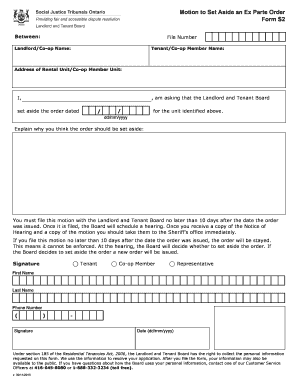
Get Canada Form S2 - Ontario 2015-2026
How it works
-

Open form follow the instructions
-

Easily sign the form with your finger
-

Send filled & signed form or save
How to fill out and sign Canada Form S2 - Ontario online?
Get your online template and fill it in using progressive features. Enjoy smart fillable fields and interactivity.Follow the simple instructions below:Tax, legal, business and other e-documents need an advanced level of compliance with the law and protection. Our documents are regularly updated in accordance with the latest legislative changes. Plus, with us, all the information you provide in your Canada Form S2 - Ontario is well-protected against loss or damage via top-notch encryption.
The tips below can help you fill out Canada Form S2 - Ontario easily and quickly:
- Open the form in the feature-rich online editing tool by clicking on Get form.
- Complete the required fields which are colored in yellow.
- Click the arrow with the inscription Next to move from box to box.
- Use the e-autograph solution to add an electronic signature to the form.
- Add the date.
- Double-check the entire document to be sure that you haven?t skipped anything.
- Click Done and download the new form.
Our service allows you to take the entire procedure of submitting legal papers online. For that reason, you save hours (if not days or even weeks) and eliminate unnecessary expenses. From now on, fill out Canada Form S2 - Ontario from the comfort of your home, business office, as well as on the go.
Tips on how to fill out, edit and sign Canada Form S2 - Ontario online
How to fill out and sign Canada Form S2 - Ontario online?
Get your online template and fill it in using progressive features. Enjoy smart fillable fields and interactivity.Follow the simple instructions below:
Tax, legal, business and other e-documents need an advanced level of compliance with the law and protection. Our documents are regularly updated in accordance with the latest legislative changes. Plus, with us, all the information you provide in your Canada Form S2 - Ontario is well-protected against loss or damage via top-notch encryption.
The tips below can help you fill out Canada Form S2 - Ontario easily and quickly:
- Open the form in the feature-rich online editing tool by clicking on Get form.
- Complete the required fields which are colored in yellow.
- Click the arrow with the inscription Next to move from box to box.
- Use the e-autograph solution to add an electronic signature to the form.
- Add the date.
- Double-check the entire document to be sure that you haven?t skipped anything.
- Click Done and download the new form.
Our service allows you to take the entire procedure of submitting legal papers online. For that reason, you save hours (if not days or even weeks) and eliminate unnecessary expenses. From now on, fill out Canada Form S2 - Ontario from the comfort of your home, business office, as well as on the go.
How to edit Canada Form S2 - Ontario: customize forms online
Take full advantage of our powerful online document editor while completing your paperwork. Fill out the Canada Form S2 - Ontario, emphasize on the most important details, and effortlessly make any other necessary alterations to its content.
Preparing documentation electronically is not only time-saving but also comes with a possibility to alter the template according to your needs. If you’re about to work on Canada Form S2 - Ontario, consider completing it with our comprehensive online editing tools. Whether you make an error or enter the requested details into the wrong area, you can quickly make adjustments to the document without the need to restart it from the beginning as during manual fill-out. In addition to that, you can point out the essential information in your document by highlighting specific pieces of content with colors, underlining them, or circling them.
Follow these simple and quick steps to fill out and adjust your Canada Form S2 - Ontario online:
- Open the file in the editor.
- Provide the required information in the empty fields using Text, Check, and Cross tools.
- Follow the form navigation to avoid missing any required fields in the template.
- Circle some of the critical details and add a URL to it if necessary.
- Use the Highlight or Line options to emphasize the most important pieces of content.
- Decide on colors and thickness for these lines to make your form look professional.
- Erase or blackout the details you don’t want to be visible to others.
- Substitute pieces of content that contain mistakes and type in text that you need.
- End up editing with the Done button after you make certain everything is correct in the form.
Our robust online solutions are the simplest way to complete and customize Canada Form S2 - Ontario in accordance with your needs. Use it to prepare personal or business documentation from anyplace. Open it in a browser, make any alterations in your documents, and return to them anytime in the future - they all will be securely stored in the cloud.
A 72-hour eviction notice in Ontario is a type of notice that informs tenants they must vacate the property within three days. This notice is commonly served after certain breaches of the lease agreement, including non-payment of rent. Understanding the legal requirements surrounding such notices is vital, and the Canada Form S2 - Ontario can assist in ensuring compliance.