Loading
Get Ca Ontario-montclair School District Intradistrict Transfer Request 2022-2026
How it works
-

Open form follow the instructions
-

Easily sign the form with your finger
-

Send filled & signed form or save
How to fill out the CA Ontario-Montclair School District Intradistrict Transfer Request online
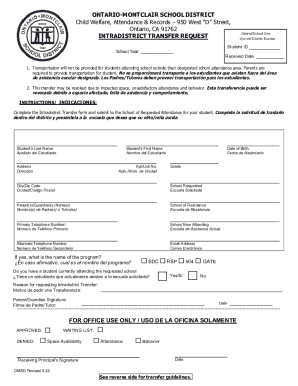
This guide provides clear, step-by-step instructions for filling out the Intradistrict Transfer Request form for the Ontario-Montclair School District. It is designed to help users navigate the process efficiently and accurately.
Follow the steps to complete your Intradistrict Transfer Request form online.
- Press the ‘Get Form’ button to access the Intradistrict Transfer Request form online. This will allow you to view the form in your preferred editor.
- Begin by filling in the student’s last name in the designated field labeled 'Student’s Last Name'. Ensure the name is spelled correctly to avoid any discrepancies.
- Enter the date of birth for the student in the 'Date of Birth' section. This helps verify the student's identity and age requirement.
- Provide the student’s first name in the 'Student’s First Name' field, ensuring it matches any official documents.
- Complete the 'Address' section by inputting the current residential address of the student.
- If applicable, fill in the 'Apt/Unit No.' to provide further detail on the student’s living situation.
- Select the grade the student will be enrolled in when attending the requested school.
- Indicate the 'City/Zip Code' to ensure accurate location information.
- In the 'School Requested' section, enter the name of the school that you wish for the student to attend.
- Complete the 'Parent(s)/Guardian(s) Name(s)' field with the names of the individuals responsible for the student.
- Input the name of the 'School of Residence' where the student currently resides.
- Provide a primary telephone number in the 'Primary Telephone Number' field for contact purposes.
- Enter the current 'School Now Attending', which is crucial for tracking the student’s educational history.
- If applicable, provide an alternate telephone number in the 'Alternate Telephone Number' section for additional contact.
- Fill in the 'Email Address' field to allow for digital communication regarding the transfer request.
- If the student is enrolled in a specialized program, select the appropriate program from the options provided.
- Indicate whether there is another student currently enrolled at the requested school by choosing 'Yes' or 'No'.
- In the 'Reason for requesting Intradistrict Transfer', clearly state the reasons for this request to provide necessary context for review.
- Sign the form in the 'Parent/Guardian Signature' field to confirm that all information provided is accurate.
- Finally, input the date of signing the form before submitting it to the School of Requested Attendance.
- Upon completion, you can choose to save changes made to the form, download it for your records, print a physical copy, or share it as needed.
Complete your Intradistrict Transfer Request online today to ensure a smooth transition for your student.
The mission statement of the Ontario-Montclair School District emphasizes providing a learning environment that promotes growth and success for all students. The district strives for excellence through continuous improvement and community involvement. If you want your child to thrive in such an environment, consider submitting a CA Ontario-Montclair School District Intradistrict Transfer Request.