________ __________________________________________________________________________________________________ __________________________________________________________________________________________________ E. STATEMENTS BY PREPARER By completing and signing this Sworn Written Statement for Claimant Accounting Support: (1) I swear and affirm to the Claims Administrator for the Deepwater Horizon Economic and Property Damages Settlement Program (“Settlement Program”) under penalty of perjury p.
Loading

Open form follow the instructions

Easily sign the form with your finger

Send filled & signed form or save
How to fill out the SWS-38 online
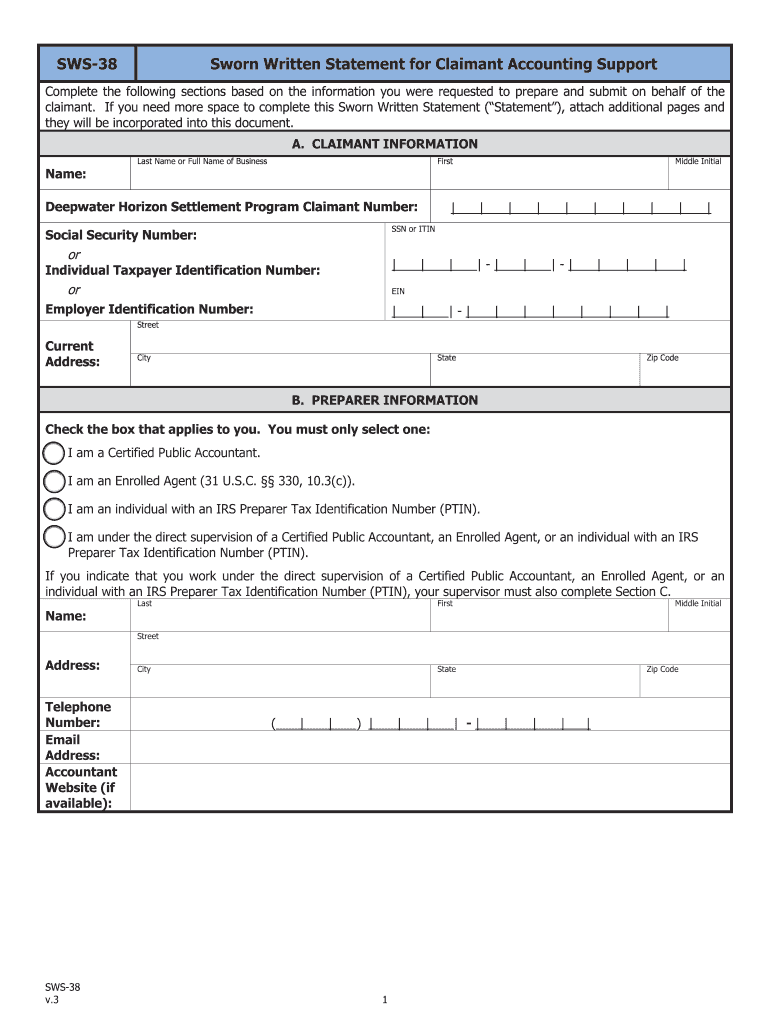
The SWS-38, or Sworn Written Statement for Claimant Accounting Support, is a crucial document for claimants involved in the Deepwater Horizon settlement program. This guide will help you understand how to complete the form online, ensuring that you provide all necessary information accurately and efficiently.
Follow the steps to successfully complete the SWS-38 online.
- Click the ‘Get Form’ button to access the SWS-38 form in your browser.
- In section A, enter the claimant's information, including last name or business name, first name, middle initial, and claimant number. Make sure to provide your Social Security Number or Individual Taxpayer Identification Number (ITIN) and Employer Identification Number (EIN) where applicable.
- Proceed to section B, and check the appropriate box that reflects your role as the preparer. Provide your name, address, telephone number, email address, and accountant website if available.
- Complete section C if you are supervised by another preparer. Fill in their information and check the relevant box that applies to them, along with their professional license details.
- In section D, indicate whether you have a written agreement with the claimant. Attach a copy of the contract if required, or describe the oral agreement's terms if applicable.
- In section E, read and confirm the statements by the preparer. Verify that all claimed information is true and correct, and ensure that you understand the implications of any inaccuracies.
- Finally, sign the form in section F, entering the date you signed it, and print or type your name as required.
- Once you have completed all sections, you can save your changes, download the form for your records, print a copy, or share it as necessary.
Complete your SWS-38 form online today to ensure your claim is processed efficiently.
Experience a faster way to fill out and sign forms on the web. Access the most extensive library of templates available.
Related content
Management of Municipal Roadway Soils. Municipal roadway soils, a subset of soils with...
Artwork Details ; Title: Maybach SW 38, 1937 (model car, 1:18 scale) ; Date. 1937 ;...
The Hasselblad SW has a 90° picture angle, a 38mm f/4.5 lens, interchangeable roll film...
Get answers to your most pressing questions about US Legal Forms API.
How do I file form 2553 electronically?
To file form 2553 electronically, you must first ensure that your organization meets all eligibility requirements. After confirming this, you can complete the form through the SWS-38 feature found on the uslegalforms platform, where you can also directly submit it to the IRS online. Keep an eye on your email for confirmation once the filing is processed. This streamlined process saves time and assures accuracy in your submission.
What happens when you file an SS8?
When you file an SS8, the IRS evaluates your working relationship status. This means they determine whether a worker is an independent contractor or an employee based on the details you provide. By using the SWS-38 feature on uslegalforms, you can navigate through this process efficiently, ensuring you include all necessary information. Understanding this classification is essential for compliance and tax obligations.
How do I file form 8850?
To file form 8850, you should first complete the form accurately, making sure all information reflects your situation. After filling out the form, submit it to your state workforce agency within 28 days of the employee's start date. Using the SWS-38 feature on the uslegalforms platform can simplify this process, as it provides guides and templates for accurate completion. Ensure you keep a copy for your records.
Use professional pre-built templates to fill in and sign documents online faster. Get access to thousands of forms.
If you believe that this page should be taken down, please follow our DMCA take down process here.