We use cookies to improve security, personalize the user experience, enhance our marketing activities (including cooperating with our marketing partners) and for other business use.
Click "here" to read our Cookie Policy. By clicking "Accept" you agree to the use of cookies. Read less
Read more
Accept
Loading
Form preview
  • US Legal Forms
  • Form Library
  • More Forms
  • More Multi-State Forms
  • 2.5 Notes - Dcf Wisconsin

Get 2.5 Notes - Dcf Wisconsin

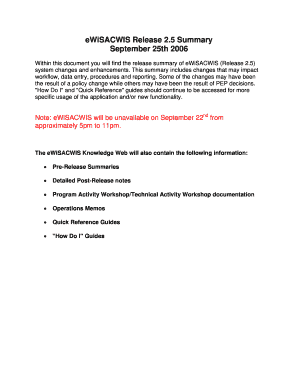
May impact workflow, data entry, procedures and reporting. Some of the changes may have been the result of a policy change while others may have been the result of PEP decisions. "How Do I" and "Quick Reference" guides should continue to be accessed for more specific usage of the application and/or new functionality. Note: eWiSACWIS will be unavailable on September 22nd from approximately 5pm to 11pm. The eWiSACWIS Knowledge Web will also contain the following information: Pre-Release Su.

How it works

  1. Open form

    Open form follow the instructions

  2. Easily sign form

    Easily sign the form with your finger

  3. Share form

    Send filled & signed form or save

How to fill out the 2.5 Notes - Dcf Wisconsin online

This guide provides a clear and structured approach to filling out the 2.5 Notes - Dcf Wisconsin form online. Whether you are a user with limited legal experience or familiar with digital document management, following these steps will help you complete the form accurately and effectively.

Follow the steps to fill out the form successfully.

  1. Click the ‘Get Form’ button to access the 2.5 Notes - Dcf Wisconsin form and open it for editing.
  2. Review the initial information provided on the form. Ensure that you understand the purpose of the 2.5 Notes and any relevant policies that may impact your entries.
  3. Begin filling out the required fields. This may include sections related to incident reporting, assessments, and approvals. Ensure that you provide complete and accurate information in each field.
  4. Check for any additional notes or instructions associated with specific sections of the form. This can help clarify the information needed.
  5. Once you have completed all necessary fields, review your entries for accuracy and completeness to avoid any errors.
  6. After confirming that all information is correct, save your changes to retain the completed form. You can then download, print, or share the form as needed.

Start filling out your documents online for a hassle-free experience.

Get form

Experience a faster way to fill out and sign forms on the web. Access the most extensive library of templates available.
Get form

Related content

2.5 Documentation of SIDS Training
If the applicant for certification is granted certification to care for children under one...
Learn more
Module 2 Expectations of Foster Parents
In Wisconsin, agencies are required to give specific forms to you when a child is placed...
Learn more
A Natural Attenuation Toolbox for Metals and...
Abstract. Site Screening and Technical Guidance for Monitored Natural Attenuation at DOE...
Learn more

Related links form

Powder Diffraction & Rietveld Refinement School - Durham University Nosocomial Infection Report Form Appendix A Final June 152012 BORANG PERMOHONAN PENGANUGERAHAN Application Form For - Www4 Utmspace Utm A Look Read And Choose The Correct Monster A B Or C

Questions & Answers

Get answers to your most pressing questions about US Legal Forms API.

Contact support

In Wisconsin, the maximum group sizes for school age programs vary depending on the program type, but they generally allow larger groups than daycare for younger children. Each program must adhere to specific staffing ratios to ensure safety and quality care. It's essential to be aware of these limits while planning your program. Resources like 2.5 Notes - Dcf Wisconsin provide clarity on group size regulations as well.

Opening a daycare in Wisconsin requires several crucial steps, including meeting state licensing requirements. You need to complete necessary background checks, provide training in childcare, and develop safety protocols. It is a good idea to compile your business plan and consider resources that outline the process, such as 2.5 Notes - Dcf Wisconsin, to help guide your journey.

The Wisconsin Shares program offers financial assistance to families who need help paying for child care services. This program helps eligible working families afford quality daycare, easing their childcare costs. Participants must navigate certain requirements to qualify, so reviewing the specifics in materials like 2.5 Notes - Dcf Wisconsin could be beneficial.

Unlicensed daycare in Wisconsin has specific regulations that dictate how many children you can care for and their ages. Caregivers can watch three children under the age of 7, and they must provide a safe environment. It’s essential to follow basic health and safety protocols even without a license. Exploring the 2.5 Notes - Dcf Wisconsin can help you understand these important unlicensed daycare rules.

In Wisconsin, you can watch up to three children under the age of 7 in your home without needing a license. However, if you care for more children or if they are older, you must comply with local licensing regulations. It's vital to stay informed about these rules to ensure a safe and compliant daycare environment. For more detailed guidelines, consider checking resources like 2.5 Notes - Dcf Wisconsin.

In Wisconsin, the number of children you can watch without a license is limited to 3 at any given time. If you plan to care for more than this, you will need to pursue licensing through the proper channels. Knowing these limits is essential for anyone considering child care options, especially in relation to the regulations set forth in the 2.5 Notes - Dcf Wisconsin.

The maximum amount parents can claim for daycare expenses on their taxes varies yearly, but understanding this can offer financial relief. Currently, families may claim up to $3,000 for one child and $6,000 for two or more children. For greater insights into these tax benefits, you might want to check the guidelines under the 2.5 Notes - Dcf Wisconsin and consider consulting with a tax professional.

The staff-to-child ratio in Wisconsin daycare settings depends on the ages of the children being cared for. For example, the ratio for infants is typically 1 staff member per 4 infants, while for toddlers, it’s often 1 staff member per 5 children. This ratio is designed to promote safety and attentive care, a crucial aspect noted in the 2.5 Notes - Dcf Wisconsin.

The number of children a licensed daycare can care for in Wisconsin varies based on the facility's staff qualifications and size. Typically, the guidelines dictate a specific staff-to-child ratio that influences how many children can be cared for safely. For parents, understanding these regulations is crucial, particularly when examining childcare through the lens of the 2.5 Notes - Dcf Wisconsin.

In Wisconsin, an unlicensed daycare can care for up to 3 children at a time without requiring a license. This is an essential consideration for parents who might be exploring various childcare options. For families seeking regulated care, reviewing the 2.5 Notes - Dcf Wisconsin can provide a clearer picture of what licensed daycares offer.

Get This Form Now!

Use professional pre-built templates to fill in and sign documents online faster. Get access to thousands of forms.
Get form
If you believe that this page should be taken down, please follow our DMCA take down processhere.

Industry-leading security and compliance

US Legal Forms protects your data by complying with industry-specific security standards.
  • In businnes since 1997
    25+ years providing professional legal documents.
  • Accredited business
    Guarantees that a business meets BBB accreditation standards in the US and Canada.
  • Secured by Braintree
    Validated Level 1 PCI DSS compliant payment gateway that accepts most major credit and debit card brands from across the globe.
Get 2.5 Notes - Dcf Wisconsin
Get form
Form Packages
Adoption
Bankruptcy
Contractors
Divorce
Home Sales
Employment
Identity Theft
Incorporation
Landlord Tenant
Living Trust
Name Change
Personal Planning
Small Business
Wills & Estates
Packages A-Z
Form Categories
Affidavits
Bankruptcy
Bill of Sale
Corporate - LLC
Divorce
Employment
Identity Theft
Internet Technology
Landlord Tenant
Living Wills
Name Change
Power of Attorney
Real Estate
Small Estates
Wills
All Forms
Forms A-Z
Form Library
Customer Service
Terms of Service
Privacy Notice
Legal Hub
Content Takedown Policy
Bug Bounty Program
About Us
Help Portal
Legal Resources
Blog
Affiliates
Contact Us
Delete My Account
Site Map
Industries
Forms in Spanish
Localized Forms
State-specific Forms
Forms Kit
Legal Guides
Real Estate Handbook
All Guides
Prepared for You
Notarize
Incorporation services
Our Customers
For Consumers
For Small Business
For Attorneys
Our Sites
US Legal Forms
USLegal
FormsPass
pdfFiller
signNow
airSlate WorkFlow
DocHub
Instapage
Social Media
Call us now toll free:
+1 833 426 79 33
As seen in:
  • USA Today logo picture
  • CBC News logo picture
  • LA Times logo picture
  • The Washington Post logo picture
  • AP logo picture
  • Forbes logo picture
© Copyright 1997-2025
airSlate Legal Forms, Inc.
3720 Flowood Dr, Flowood, Mississippi 39232
Form Packages
Adoption
Bankruptcy
Contractors
Divorce
Home Sales
Employment
Identity Theft
Incorporation
Landlord Tenant
Living Trust
Name Change
Personal Planning
Small Business
Wills & Estates
Packages A-Z
Form Categories
Affidavits
Bankruptcy
Bill of Sale
Corporate - LLC
Divorce
Employment
Identity Theft
Internet Technology
Landlord Tenant
Living Wills
Name Change
Power of Attorney
Real Estate
Small Estates
Wills
All Forms
Forms A-Z
Form Library
Customer Service
Terms of Service
Privacy Notice
Legal Hub
Content Takedown Policy
Bug Bounty Program
About Us
Help Portal
Legal Resources
Blog
Affiliates
Contact Us
Delete My Account
Site Map
Industries
Forms in Spanish
Localized Forms
State-specific Forms
Forms Kit
Legal Guides
Real Estate Handbook
All Guides
Prepared for You
Notarize
Incorporation services
Our Customers
For Consumers
For Small Business
For Attorneys
Our Sites
US Legal Forms
USLegal
FormsPass
pdfFiller
signNow
airSlate WorkFlow
DocHub
Instapage
Social Media
Call us now toll free:
+1 833 426 79 33
As seen in:
  • USA Today logo picture
  • CBC News logo picture
  • LA Times logo picture
  • The Washington Post logo picture
  • AP logo picture
  • Forbes logo picture
© Copyright 1997-2025
airSlate Legal Forms, Inc.
3720 Flowood Dr, Flowood, Mississippi 39232