We use cookies to improve security, personalize the user experience, enhance our marketing activities (including cooperating with our marketing partners) and for other business use.
Click "here" to read our Cookie Policy. By clicking "Accept" you agree to the use of cookies. Read less
Read more
Accept
Loading
Form preview
  • US Legal Forms
  • Form Library
  • Industry Forms
  • Industry Insurance & Medical Forms
  • Snohomish Health District Child Care Classroom Refrigerator Temperature Log 2014

Get Snohomish Health District Child Care Classroom Refrigerator Temperature Log 2014-2025

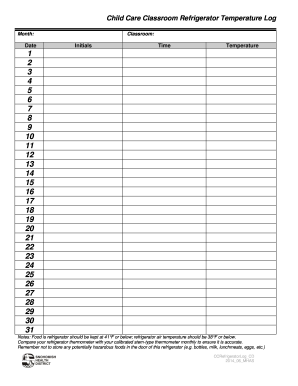
Child Care Classroom Refrigerator Temperature Log Month:DateClassroom:InitialsTimeTemperature1 2 3 4 5 6 7 8 9 10 11 12 13 14 15 16 17 18 19 20 21 22 23 24 25 26 27 28 29 30 31 Notes: Food is refrigerator.

How it works

  1. Open form

    Open form follow the instructions

  2. Easily sign form

    Easily sign the form with your finger

  3. Share form

    Send filled & signed form or save

How to fill out the Snohomish Health District Child Care Classroom Refrigerator Temperature Log online

Filling out the Snohomish Health District Child Care Classroom Refrigerator Temperature Log is an important part of maintaining food safety in child care facilities. This guide will help you navigate the online form with clear instructions for each section, ensuring that you accurately record refrigerator temperatures.

Follow the steps to complete the temperature log effectively.

  1. Click ‘Get Form’ button to obtain the form and open it in the editor.
  2. Select the month for which you are completing the log in the designated field. This helps identify the specific time period of the recorded temperatures.
  3. Enter the date for each entry in the provided space. This will help track daily temperatures and compliance with food safety standards.
  4. Identify your classroom in the space allocated. This will ensure that the log corresponds to the correct location within your facility.
  5. Record your initials in the designated area upon completing the temperature checks. This allows for accountability and follows up on who monitored the temperatures.
  6. Indicate the time at which the temperature reading is taken in the relevant section. Consistent times help maintain standard procedures.
  7. Input the temperature readings in the corresponding rows, ensuring that each number reflects the refrigerator's temperature at the noted times.
  8. Be attentive to the notes regarding safe food temperatures: food should be kept at 41°F or below; air temperature should be 38°F or below. Cross-check your readings against these guidelines.
  9. Monthly, compare your refrigerator thermometer with a calibrated stem-type thermometer to verify that it is accurate and functioning properly.
  10. It is important to note that potentially hazardous foods should not be stored in the refrigerator door, as this can lead to unsafe temperature fluctuations.
  11. Once all fields are filled out and reviewed, you can save your changes, download the form, print a copy for your records, or share it as necessary.

Complete your temperature log online today to ensure compliance with health standards and maintain a safe environment for children.

Get form

Experience a faster way to fill out and sign forms on the web. Access the most extensive library of templates available.
Get form

Related content

Model Child Care Health Policies - Cloudfront.net
by SS Aronson · Cited by 16 — in a daily log. (See Appendix Q: Refrigerator or Freezer...
Learn more
Child Care Center Model Health Policy
Nov 3, 2014 — Snohomish Health District. Children and staff who have a reportable...
Learn more
Advanced Energy Design Guide for K-12 School...
Programmable thermostats allow each zone to vary the temperature setpoint based on time of...
Learn more

Related links form

Manitoba Quit Claim Deed Form 488 Ct Cpat Preliminary Change Ownership Pdf Fillable Form

Questions & Answers

Get answers to your most pressing questions about US Legal Forms API.

Contact support

To determine the temperature of your refrigerator, place a thermometer inside and leave it for a few hours. After this time, take note of the reading. Maintaining a consistent record in the Snohomish Health District Child Care Classroom Refrigerator Temperature Log helps track any fluctuations and ensures proper food safety.

To check the refrigerator temperature, simply use a reliable thermometer placed in the main compartment. Make sure to check it at different times of the day for accuracy. Logging these readings with the Snohomish Health District Child Care Classroom Refrigerator Temperature Log provides a comprehensive view of your refrigerator's efficiency.

The best method to ensure temperature control is to regularly check your thermometer's readings and update your log accordingly. If temperatures fluctuate outside the recommended range, investigate and resolve the issue immediately. Using the Snohomish Health District Child Care Classroom Refrigerator Temperature Log can streamline this monitoring process.

You can determine if your refrigerator is cold enough by checking the thermometer and ensuring it reads within the recommended range. Feel the air inside; it should feel noticeably cool. Keeping regular track of these readings in your Snohomish Health District Child Care Classroom Refrigerator Temperature Log can prevent food spoilage.

To ensure accurate readings, place the thermometer in the center of the refrigerator, away from walls and food items. This location helps reflect the average temperature throughout the space. Regularly checking this position will help you maintain compliance with Snohomish Health District Child Care Classroom Refrigerator Temperature Log guidelines.

You should complete a temperature log for a refrigeration unit at least twice daily to ensure consistent monitoring. This practice helps identify temperature fluctuations and potential issues before they impact food safety. By diligently keeping up with the Snohomish Health District Child Care Classroom Refrigerator Temperature Log, you contribute to a safer environment for all.

A temperature control drawer in a refrigerator is a designated section that allows users to set a specific temperature for different types of food. This feature enhances food preservation by catering to the needs of delicate items like fruits and vegetables. Keeping track of this drawer's settings with a Snohomish Health District Child Care Classroom Refrigerator Temperature Log helps you maintain optimal conditions.

A refrigeration log is a documented record that tracks the operational performance of a refrigeration unit, focusing on temperature readings over time. This log serves as a vital tool for monitoring food safety and quality in various settings, including child care classrooms. Utilizing the Snohomish Health District Child Care Classroom Refrigerator Temperature Log provides a structured way to maintain safety and adhere to health guidelines.

Temperature control in a refrigerator refers to maintaining an optimal range of temperatures to preserve food quality and safety. It ensures that temperatures remain consistent and within safe limits to prevent growth of bacteria. Keeping an accurate Snohomish Health District Child Care Classroom Refrigerator Temperature Log helps you manage these temperatures effectively.

In the refrigerator log, you should note the temperature readings, the date, and the time of each entry. Additionally, include any incidents where the temperature falls outside the acceptable range. This information is vital for the Snohomish Health District Child Care Classroom Refrigerator Temperature Log. Such thorough documentation aids in maintaining food safety and health compliance.

Get This Form Now!

Use professional pre-built templates to fill in and sign documents online faster. Get access to thousands of forms.
Get form
If you believe that this page should be taken down, please follow our DMCA take down processhere.

Industry-leading security and compliance

US Legal Forms protects your data by complying with industry-specific security standards.
  • In businnes since 1997
    25+ years providing professional legal documents.
  • Accredited business
    Guarantees that a business meets BBB accreditation standards in the US and Canada.
  • Secured by Braintree
    Validated Level 1 PCI DSS compliant payment gateway that accepts most major credit and debit card brands from across the globe.
Get Snohomish Health District Child Care Classroom Refrigerator Temperature Log
Get form
Form Packages
Adoption
Bankruptcy
Contractors
Divorce
Home Sales
Employment
Identity Theft
Incorporation
Landlord Tenant
Living Trust
Name Change
Personal Planning
Small Business
Wills & Estates
Packages A-Z
Form Categories
Affidavits
Bankruptcy
Bill of Sale
Corporate - LLC
Divorce
Employment
Identity Theft
Internet Technology
Landlord Tenant
Living Wills
Name Change
Power of Attorney
Real Estate
Small Estates
Wills
All Forms
Forms A-Z
Form Library
Customer Service
Terms of Service
Privacy Notice
Legal Hub
Content Takedown Policy
Bug Bounty Program
About Us
Help Portal
Legal Resources
Blog
Affiliates
Contact Us
Delete My Account
Site Map
Industries
Forms in Spanish
Localized Forms
State-specific Forms
Forms Kit
Legal Guides
Real Estate Handbook
All Guides
Prepared for You
Notarize
Incorporation services
Our Customers
For Consumers
For Small Business
For Attorneys
Our Sites
US Legal Forms
USLegal
FormsPass
pdfFiller
signNow
airSlate WorkFlow
DocHub
Instapage
Social Media
Call us now toll free:
+1 833 426 79 33
As seen in:
  • USA Today logo picture
  • CBC News logo picture
  • LA Times logo picture
  • The Washington Post logo picture
  • AP logo picture
  • Forbes logo picture
© Copyright 1997-2025
airSlate Legal Forms, Inc.
3720 Flowood Dr, Flowood, Mississippi 39232
Form Packages
Adoption
Bankruptcy
Contractors
Divorce
Home Sales
Employment
Identity Theft
Incorporation
Landlord Tenant
Living Trust
Name Change
Personal Planning
Small Business
Wills & Estates
Packages A-Z
Form Categories
Affidavits
Bankruptcy
Bill of Sale
Corporate - LLC
Divorce
Employment
Identity Theft
Internet Technology
Landlord Tenant
Living Wills
Name Change
Power of Attorney
Real Estate
Small Estates
Wills
All Forms
Forms A-Z
Form Library
Customer Service
Terms of Service
Privacy Notice
Legal Hub
Content Takedown Policy
Bug Bounty Program
About Us
Help Portal
Legal Resources
Blog
Affiliates
Contact Us
Delete My Account
Site Map
Industries
Forms in Spanish
Localized Forms
State-specific Forms
Forms Kit
Legal Guides
Real Estate Handbook
All Guides
Prepared for You
Notarize
Incorporation services
Our Customers
For Consumers
For Small Business
For Attorneys
Our Sites
US Legal Forms
USLegal
FormsPass
pdfFiller
signNow
airSlate WorkFlow
DocHub
Instapage
Social Media
Call us now toll free:
+1 833 426 79 33
As seen in:
  • USA Today logo picture
  • CBC News logo picture
  • LA Times logo picture
  • The Washington Post logo picture
  • AP logo picture
  • Forbes logo picture
© Copyright 1997-2025
airSlate Legal Forms, Inc.
3720 Flowood Dr, Flowood, Mississippi 39232