Loading
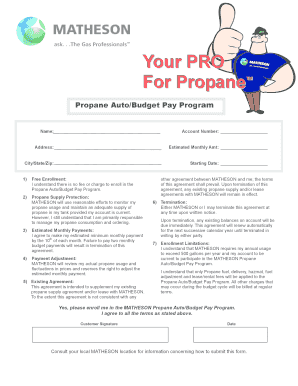
Get Your Pro
How it works
-

Open form follow the instructions
-

Easily sign the form with your finger
-

Send filled & signed form or save
How to fill out the Your PRO online
Completing the Your PRO form is essential for enrolling in the Propane Auto/Budget Pay Program. This guide provides step-by-step instructions to help you accurately fill out the form online.
Follow the steps to efficiently complete the Your PRO form.
- Click 'Get Form' button to access the document and open it in the editing tool.
- Enter your name in the designated field. This should match the name associated with your account.
- Input your account number to ensure proper identification within MATHESON's system.
- Provide your full address, including street address, city, state, and zip code in the respective fields.
- Fill in the estimated monthly amount you expect to budget for propane expenses.
- Enter the starting date you wish to begin participating in the program.
- Review the free enrollment section. Confirm your understanding that enrolling in the program incurs no fees.
- Acknowledge the propane supply protection by reviewing and understanding the terms.
- Agree to make your estimated minimum monthly payment by the 10th of each month as stated, ensuring your payments are completed timely.
- Understand and confirm the conditions surrounding payment adjustment with MATHESON.
- Recognize the existing agreement clause and understand it supplements any previous agreement with MATHESON.
- Review the termination policy to ensure you understand how to discontinue participation in the program.
- Acknowledge the enrollment limitations, confirming your annual usage meets the requirement and your account status.
- Indicate your consent to enroll in the program by checking the acknowledgment box at the end of the form.
- Provide your signature and the date to validate your enrollment before finalizing the document.
Complete your documents online today to ensure timely enrollment in the MATHESON Propane Auto/Budget Pay Program.
If you need to provide details about your profession, simply access the relevant section of your form using Your PRO. Enter the required information accurately, including your job title and any relevant qualifications. This clarity enhances your application, and using uslegalforms can further support you in ensuring all necessary details are captured correctly.