Loading
Get Fm Application To Vote By Absentee Ballot 2007-2026
How it works
-

Open form follow the instructions
-

Easily sign the form with your finger
-

Send filled & signed form or save
How to fill out the FM Application To Vote By Absentee Ballot online
This guide provides clear and supportive instructions for completing the FM Application To Vote By Absentee Ballot online. By following these steps, you can ensure that your application is filled out accurately and efficiently.
Follow the steps to fill out your application online
- Click ‘Get Form’ button to obtain the form and open it in the editor.
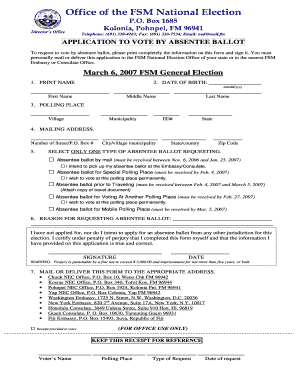
- In the first section, clearly print your full name including first, middle, and last names.
- Enter your date of birth in the format mm/dd/yyyy.
- Provide your polling place by listing the village, municipality, and educational district number (ED#).
- Fill out your mailing address, including the number of street/P.O. Box, city/village municipality, state/country, and zip code.
- Select one type of absentee ballot request by marking the appropriate box. Review the options carefully and choose the one that matches your situation.
- In the next section, explain the reason for requesting the absentee ballot. Be clear and concise.
- Sign and date the form at the bottom to certify that the information provided is true and correct.
- Review the completed form for accuracy, then save your changes. You can also choose to download, print, or share the form as needed.
Complete your FM Application To Vote By Absentee Ballot online today!