Loading
Get Au Silverton Primary School Enrolment Form 2025-2026
How it works
-

Open form follow the instructions
-

Easily sign the form with your finger
-

Send filled & signed form or save
How to fill out the AU Silverton Primary School Enrolment Form online
Completing the AU Silverton Primary School Enrolment Form online is a straightforward process designed to gather essential information about your child and their educational needs. This guide will walk you through each section of the form to ensure a smooth and efficient enrolment experience.
Follow the steps to successfully complete the enrolment form.
- Click the ‘Get Form’ button to obtain the form and open it in your preferred online editor.
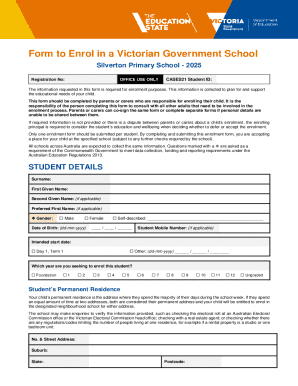
- Fill out the student details section, including the surname, first given name, second given name (if applicable), preferred first name (if applicable), gender, and date of birth. Ensure that the date is in the format of dd-mm-yyyy.
- Indicate the student’s intended start date by selecting either 'Day 1, Term 1' or providing a specific date.
- Specify the year level the student is seeking to enrol in by selecting one of the options from Foundation to Year 12.
- Provide the student’s permanent residence address, ensuring to indicate how often the student lives at that address (Always, Mostly, or Balanced).
- List any siblings currently enrolled at the school, along with their names and year levels, if applicable.
- Fill in the parent/carer details for both enrolling adults, including their titles, names, genders, relationship to the student, addresses, contact numbers, and job titles.
- Complete the additional fields regarding parent/carer details, including their country of birth, languages spoken at home, and any special contact conditions.
- Provide emergency contact information, ensuring that the listed individuals are aware they have been designated for this purpose.
- Fill out the student's demographics, including their country of birth, residency status, languages spoken at home, and any relevant information about their previous education.
- Complete any required medical details, including allergies, chronic conditions, and medication requirements during school hours.
- Answer questions regarding additional learning and support needs that may assist the student in participating fully in their education.
- Include any relevant information regarding court orders, activity restrictions, or other special circumstances that affect the student’s enrolment.
- Ensure the form is signed electronically by the enrolling adult(s) and confirm all information provided is accurate. Save changes, download, print, or share the completed form as needed.
Begin the enrolment process now by filling out the AU Silverton Primary School Enrolment Form online.