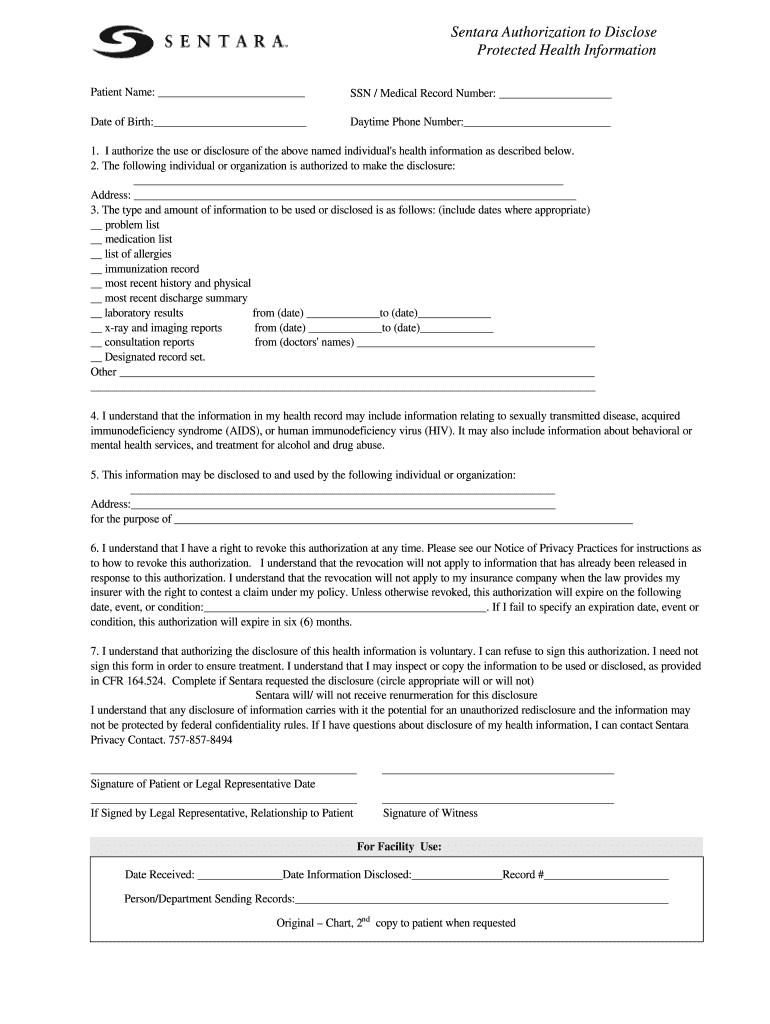
Sentara Authorization to Disclose Protected Health Information Patient Name: Date of Birth: SSN / Medical Record Number: Daytime Phone Number: 1. I authorize the use or disclosure of the above named.
Loading

Open form follow the instructions

Easily sign the form with your finger

Send filled & signed form or save
How to fill out the Sentara HIMROI001 online
Filling out the Sentara HIMROI001 form correctly is essential for the proper disclosure of health information. This guide provides clear, step-by-step instructions to assist users in completing the form accurately and confidently.
Follow the steps to complete the Sentara HIMROI001 form online.
- Press the ‘Get Form’ button to retrieve the Sentara HIMROI001 form and open it in your preferred editing application.
- Begin by entering the patient's name in the designated field. Make sure to input the full name as recorded in their official documents.
- Provide the patient's Social Security Number (SSN) or Medical Record Number in the respective section. This information is vital for identifying the individual's health records.
- Enter the patient's date of birth. Ensure the format is consistent with MM/DD/YYYY.
- Fill in the daytime phone number for the patient, so that they can be easily contacted if necessary.
- In section one, authorize the use or disclosure of health information by checking the appropriate boxes. Be clear about what information is to be disclosed.
- Indicate the individual or organization authorized to make the disclosure by providing their name and address in the specified fields.
- In section three, select the types and amount of information to be disclosed by checking the relevant boxes. Ensure to include any specific dates where necessary.
- Specify the recipient of the disclosed information in section five, providing their name and address, as well as stating the purpose of the disclosure.
- Acknowledge the expiration of the authorization in section six by specifying an expiration date or condition. If left blank, it will default to six months.
- Carefully read the consent terms regarding voluntary disclosure and your right to revoke this authorization at any time.
- Sign the form in the designated signature area and date it. If a legal representative is signing, also specify their relationship to the patient.
- If necessary, have a witness sign the form in the indicated space.
- Finally, save your changes. You can download, print, or share the form as needed, ensuring that all information is accurate and complete before submission.
Complete your Sentara HIMROI001 form online today to ensure your health information is disclosed accurately.
Experience a faster way to fill out and sign forms on the web. Access the most extensive library of templates available.
Get answers to your most pressing questions about US Legal Forms API.
How to fill out ACH enrollment form?
To complete an ACH enrollment form for Sentara HIMROI001, you will need to provide your bank account information, including the account number and the bank’s routing number. Be sure to indicate whether this is a checking or savings account. After filling in the required fields, sign the form to authorize electronic payments and submit it securely.
How to fill out patient registration form?
Filling out a patient registration form for Sentara HIMROI001 requires you to provide essential details like the patient's name, contact information, and insurance specifics. Additionally, disclose any pre-existing conditions or medications that could affect treatment. Taking the time to fill this out correctly will enhance your healthcare experience.
How to fill out a patient registration form?
To complete a patient registration form for Sentara HIMROI001, begin with the patient's personal information such as name, address, and insurance details. Next, include emergency contact details and any medical history relevant to the healthcare service. Review the form for accuracy before submission to ensure a smooth registration process.
How do I fill out a patient release form?
Filling out a patient release form for Sentara HIMROI001 involves writing the patient's name, date of birth, and the healthcare provider's details. Be sure to detail the information you wish to share, and include the recipient's contact information. Once complete, sign and date the form to validate it for processing.
How do I fill out an authorization form?
To fill out an authorization form for Sentara HIMROI001, start by gathering the necessary patient information, including full name, date of birth, and contact details. Next, clearly specify what information you authorize to be released, mentioning the purpose of the release. Ensure you sign and date the form, and keep a copy for your records before submitting it.
How can I get my Sentara MyChart activation code?
To obtain your Sentara MyChart activation code, you will typically receive it via email or postal mail after you register for the service. If you did not receive your code, you can contact the support team for assistance. Having your Sentara HIMROI001 information ready will help expedite the request.
Are Optima and Sentara the same company?
Optima and Sentara are interconnected, as Optima Health is a subsidiary of Sentara Healthcare. Both organizations work together to enhance healthcare services in Virginia. By understanding this relationship, you can better navigate your options regarding Sentara HIMROI001 and its benefits.
How can I access my Sentara MyChart?
You can easily access your Sentara MyChart by visiting the official Sentara website or downloading the Sentara MyChart app on your mobile device. Once there, you will need to log in with your username and password. If you are a new user, you may need to create an account using your activation code, which ties directly to your Sentara HIMROI001 account.
How do I give someone a HIPAA authorization?
To give someone HIPAA authorization, you must complete a specific form detailing who is authorized, what information can be shared, and the purpose for sharing it. Ensure that the patient’s signature is included, along with the date. The Sentara HIMROI001 tool offers convenient access to pre-approved HIPAA authorization forms, making this process straightforward and compliant.
How to fill out authorization for release of protected health information?
Filling out authorization for the release of protected health information requires you to clearly indicate the patient’s details, the information to be disclosed, and the intended recipient. It is essential to understand the requirements for the signature and date section. Using Sentara HIMROI001 can simplify this process by providing easy-to-follow instructions and templates specifically designed for this purpose.
Use professional pre-built templates to fill in and sign documents online faster. Get access to thousands of forms.
If you believe that this page should be taken down, please follow our DMCA take down process here.