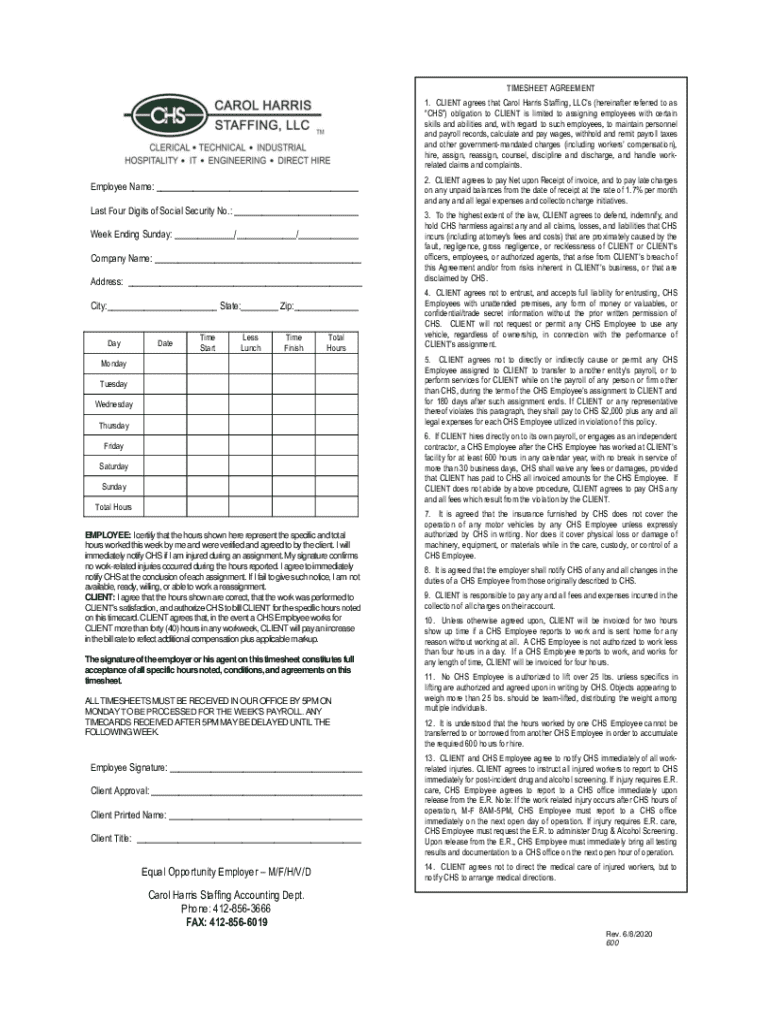
Ties and, with regard to such employees, to maintain personnel and payroll records, calculate and pay wages, withhold and remit payroll taxes and other government-mandated charges (including workers compensation), hire, assign, reassign, counsel, discipline and discharge, and handle workrelated claims and complaints. Employee Name: Last Four Digits of Social Security No.: Week Ending Sunday: / /.
Loading

Open form follow the instructions

Easily sign the form with your finger

Send filled & signed form or save
How to fill out the PA CHS Solutions Timesheet Agreement online
Filling out the PA CHS Solutions Timesheet Agreement is essential for accurate payroll processing. This guide provides a step-by-step approach to help you complete the form online efficiently.
Follow the steps to fill out the timesheet agreement correctly.
- Click the ‘Get Form’ button to access the PA CHS Solutions Timesheet Agreement. Once clicked, the form will open in a suitable online editor for you to complete.
- Begin by entering the employee's name in the designated field. Ensure that you provide the full name of the person who worked the hours being reported.
- In the next field, input the last four digits of the employee's social security number. This step is crucial for identification and payroll records.
- Provide the week ending date by filling in the month, day, and year. Use the calendar format to assist in clarity.
- Enter the company name, followed by the address, city, state, and zip code. This information identifies the location where services were rendered.
- Complete the daily log by entering each day of the week. For each day, fill in the date, time started, less lunch taken, time finished, and total hours worked.
- Calculate the total hours worked for the week and enter this figure in the appropriate section at the bottom of the daily log.
- Ensure that both the employee and the client representative sign the document to confirm accuracy and authorization. Include printed names and titles where applicable.
- After completing the form, review all entries for accuracy. Once verified, you can save changes, download, print, or share the completed document as needed.
Complete your PA CHS Solutions Timesheet Agreement online today for seamless payroll processing.
Experience a faster way to fill out and sign forms on the web. Access the most extensive library of templates available.
Related content
Dec 12, 2013 — DEFINITIONS AND ACRONYMS. 1.1DEFINITIONS. Listed below are the...
As a beginning PA student, you are entering the professional world of medicine. As a PA...
This compilation includes state, District of Columbia, and territory statutes as of...
Get answers to your most pressing questions about US Legal Forms API.
What is a PWA timesheet?
A PWA timesheet, or Personal Support Worker Agreement timesheet, is specific to care providers who offer support services. This type of timesheet is essential for capturing the unique hours and services related to personal care. Utilizing a PA CHS Solutions Timesheet Agreement can help streamline this process, ensuring clarity and compliance in your records.
What is the purpose of a timesheet?
The primary purpose of a timesheet is to accurately record the hours spent working on specific tasks or projects. This documentation supports accurate payment processing and provides a clear history of services rendered. Using a PA CHS Solutions Timesheet Agreement facilitates this process, benefiting all parties involved.
What is a PA in care?
A PA, or personal assistant, in the care sector refers to an individual who provides support and assistance to clients with daily activities. This can include personal care, meal preparation, and companionship. Understanding the role of a PA helps in recognizing the importance of accurate time tracking, particularly through a PA CHS Solutions Timesheet Agreement.
How do I fill my timesheet?
To fill your timesheet, gather the information reflecting your working hours for the designated period. Log this information directly into your designated platform, making sure to include breaks and any relevant notes. Accurate completion helps ensure fulfillment of a PA CHS Solutions Timesheet Agreement.
How do you properly fill out a timesheet?
To fill out a timesheet properly, ensure you input your hours accurately, reflecting start and end times for each task. Verify that you list your tasks clearly, associating them with their respective projects. Following these guidelines within a PA CHS Solutions Timesheet Agreement will help maintain transparency with your employer.
What are three types of timesheets?
The three common types of timesheets include weekly, bi-weekly, and monthly sheets. Weekly timesheets capture daily hours in a seven-day span, while bi-weekly ones cover two weeks to simplify payroll processing. Monthly timesheets provide a broader overview, useful for long-term project tracking, all of which can be effectively managed with a PA CHS Solutions Timesheet Agreement.
What is a PA timesheet?
A PA timesheet is a document used by personal assistants to record the hours they work for individuals requiring care. This timesheet serves as an essential tool for tracking service hours, ensuring accurate payments, and maintaining records for both caregivers and agencies. Using a PA CHS Solutions Timesheet Agreement streamlines this process, making it easier to manage.
How do you complete your timesheet?
To complete your timesheet, start by logging into the platform where you track your hours. Input the total hours worked for each day and ensure that you allocate time to the correct tasks or projects. Be mindful of deadlines, as submitting your PA CHS Solutions Timesheet Agreement promptly aids in timely payment.
Use professional pre-built templates to fill in and sign documents online faster. Get access to thousands of forms.
If you believe that this page should be taken down, please follow our DMCA take down process here.