Loading
Form preview
  • US Legal Forms
  • Other Templates
  • Industry Forms
  • Industry Insurance & Medical Forms
  • Sedi Ens Med Alt 2007

Get Sedi Ens Med Alt 2007-2026

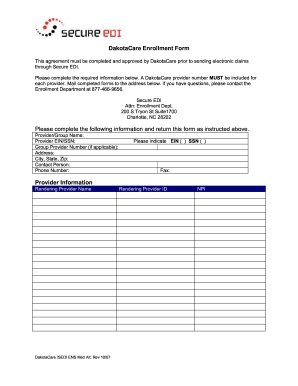
provider number MUST be included for each provider. Mail completed forms to the address below. If you have questions, please contact the Enrollment Department at 877-466-9656. Secure EDI Attn: Enrollment Dept. 200 S Tryon St Suite1700 Charlotte, NC 28202 Please complete the following information and return this form as instructed above. Provider/Group Name: Provider EIN/SSN: Group Provider Number (if applicable): Address: City, State, Zip: Contact Person: Phone Number: Please indicate EIN ( ).

How it works

  1. Open form

    Open form follow the instructions

  2. Easily sign form

    Easily sign the form with your finger

  3. Share form

    Send filled & signed form or save

How to fill out the SEDI ENS med alt online

The SEDI ENS med alt form is essential for enrolling with DakotaCare and facilitating electronic claims through Secure EDI. This guide will provide you with clear, step-by-step instructions to successfully complete the form online.

Follow the steps to fill out the SEDI ENS med alt form correctly.

  1. Click the ‘Get Form’ button to access the form and open it in your preferred online editor.
  2. Enter the provider or group name in the designated field. This should reflect the official name under which your services are provided.
  3. Input the provider EIN or SSN in the corresponding section. Make sure to choose the appropriate option between EIN and SSN.
  4. If applicable, enter the group provider number to associate your application with the correct provider group.
  5. Fill in the complete address, including city, state, and zip code where the provider or group is located.
  6. Provide the name of the contact person for this enrollment, along with their phone number for any follow-up communication.
  7. Include the fax number for receiving any correspondence related to this form, if applicable.
  8. Enter the rendering provider name, if different from the provider or group name.
  9. Input the rendering provider ID in the designated field, which may include specific identifiers assigned to the provider.
  10. Finally, enter the National Provider Identifier (NPI) to ensure correct identification within the health care system.
  11. Once all fields are completed, review your entries for accuracy before saving your changes, downloading a copy, printing the form, or sharing it as necessary.

Complete your SEDI ENS med alt form online today for efficient processing!

Get form

Experience a faster way to fill out and sign forms on the web. Access the most extensive library of templates available.
Get form

Related content

General Disclaimer One or more of the Following...
by NDJ Parada · 1982 — Neste trabalho procurou-se verificar a potenciaZidade de ima...
Learn more
Latin Grammar
by CE Bennett · Cited by 68 — Participles in -ans and -ens follow the declension of...
Learn more
20th Century Fox Home Entertainment/Warning...
Variant: There is an alternate variant in a Courier New-type font with rephrased wording...
Learn more

Related links form

2011 Ohio Telefile Form Southern Illinois Financial Aid Verfication Worksheet Dependent Students Form Permit For Disposition Of Human Remains Merchant Processing Application And Agreement - E - Business Express

Questions & Answers

Get answers to your most pressing questions about US Legal Forms API.

Contact support

A SEDI report presents detailed information about the trading activities of insiders within a specific timeframe. It includes data on stock purchases, sales, and option grants. By accessing a SEDI report, you can gain valuable insights into insider trading patterns, which can inform your investment decisions and market strategies.

Individuals required to file on SEDI include company insiders like directors, officers, and significant shareholders. These filings help maintain a level playing field in the financial markets by ensuring that all investors have access to timely information. Remember, SEDI ENS med alt is designed to support these individuals in fulfilling their disclosure obligations efficiently.

To register as a SEDI user, you need to visit the SEDI website and follow the on-screen instructions for creating an account. This process typically involves providing your personal and company details for verification. If you encounter any issues during registration, consider utilizing resources available on the uslegalforms platform to guide you through the process smoothly.

SEDI is used to streamline the filing and disclosure process for insiders of publicly traded companies. It serves as a centralized platform for reporting trades and ownership changes by insiders. With SEDI ENS med alt, users can easily track and access crucial information about insider activities, enhancing transparency and accountability in the market.

SEDI stands for the System for Electronic Disclosure by Insiders. This acronym encompasses a robust framework designed for secure insider reporting and disclosure of necessary information to regulators and the public. Knowing what SEDI stands for is important as you engage with securities markets and strive to adhere to compliance standards. Remember, SEDI ENS med alt is your trusted resource for navigating these complexities.

Insider reporting involves the disclosure of securities transactions made by individuals privy to non-public information about a company. This process is critical for maintaining transparency and protecting investors from potential fraud. Through SEDI ENS med alt, you can easily manage your insider reporting responsibilities, ensuring you meet all legal obligations efficiently. By doing so, you contribute to a fair and informed trading environment.

An SEDI business refers to any company or entity that uses the SEDI system to report insider trading activities and other securities information. These businesses must comply with specific regulatory requirements to ensure accurate and timely disclosures. By utilizing SEDI ENS med alt, companies can navigate these requirements smoothly. This compliance promotes trust and credibility in the marketplace.

The term SEDI stands for the System for Electronic Disclosure by Insiders. This system helps manage the reporting of insider trading activities efficiently and securely. Understanding the meaning of SEDI is essential for anyone engaging in securities, as it relates directly to legal and ethical trading practices. With SEDI ENS med alt, you'll gain deeper insights into insider transactions.

Examples of appropriate medication orders may include daily doses of an antibiotic, PRN orders for pain relief, or standing orders for chronic disease management. Each should clearly state dosage, administration route, and timing. Using SEDI ENS med alt can provide templates and guidance that help you create effective medication orders, enhancing patient safety.

A complete medication order should include the patient's name, medication name, dosage, route, frequency, and specific instructions if necessary. Clarity in this order is vital for patient safety and effective treatment. By leveraging SEDI ENS med alt, you can ensure that all these elements are captured accurately and efficiently.

Get This Form Now!

Use professional pre-built templates to fill in and sign documents online faster. Get access to thousands of forms.
Get form
If you believe that this page should be taken down, please follow our DMCA take down processhere.
Get SEDI ENS med alt
Get form
  • Adoption
  • Bankruptcy
  • Contractors
  • Divorce
  • Home Sales
  • Employment
  • Identity Theft
  • Incorporation
  • Landlord Tenant
  • Living Trust
  • Name Change
  • Personal Planning
  • Small Business
  • Wills & Estates
  • Packages A-Z
  • Affidavits
  • Bankruptcy
  • Bill of Sale
  • Corporate - LLC
  • Divorce
  • Employment
  • Identity Theft
  • Internet Technology
  • Landlord Tenant
  • Living Wills
  • Name Change
  • Power of Attorney
  • Real Estate
  • Small Estates
  • Wills
  • All Forms
  • Forms A-Z
  • Other Templates
  • Legal Hub
  • About Us
  • Help Portal
  • Legal Resources
  • Blog
  • Affiliates
  • Contact Us
  • Delete My Account
  • Site Map
  • Industries
  • Forms in Spanish
  • Localized Forms
  • State-specific Forms
  • Forms Kit
  • Real Estate Handbook
  • All Guides
  • Notarize
  • Incorporation services
  • For Consumers
  • For Small Business
  • For Attorneys
  • USLegal
  • FormsPass
  • pdfFiller
  • signNow
  • altaFlow
  • DocHub
  • Instapage
Form Packages
  • Adoption
  • Bankruptcy
  • Contractors
  • Divorce
  • Home Sales
  • Employment
  • Identity Theft
  • Incorporation
  • Landlord Tenant
  • Living Trust
  • Name Change
  • Personal Planning
  • Small Business
  • Wills & Estates
  • Packages A-Z
Form Categories
  • Affidavits
  • Bankruptcy
  • Bill of Sale
  • Corporate - LLC
  • Divorce
  • Employment
  • Identity Theft
  • Internet Technology
  • Landlord Tenant
  • Living Wills
  • Name Change
  • Power of Attorney
  • Real Estate
  • Small Estates
  • Wills
  • All Forms
  • Forms A-Z
  • Other Templates
Customer Service
  • Legal Hub
  • About Us
  • Help Portal
  • Legal Resources
  • Blog
  • Affiliates
  • Contact Us
  • Delete My Account
  • Site Map
  • Industries
  • Forms in Spanish
  • Localized Forms
  • State-specific Forms
  • Forms Kit
Legal Guides
  • Real Estate Handbook
  • All Guides
Prepared for you
  • Notarize
  • Incorporation services
Our Customers
  • For Consumers
  • For Small Business
  • For Attorneys
Our Sites
  • USLegal
  • FormsPass
  • pdfFiller
  • signNow
  • altaFlow
  • DocHub
  • Instapage
Social Media
Call us now toll free:
+1 833 426 79 33
As seen in:
© Copyright 1999-2026 airSlate Legal Forms, Inc. 17 Station Street, Suite 303, Brookline, MA 02445
  • Your Privacy Choices
  • Terms of Service
  • Privacy Notice
  • Content Takedown Policy
  • Bug Bounty Program