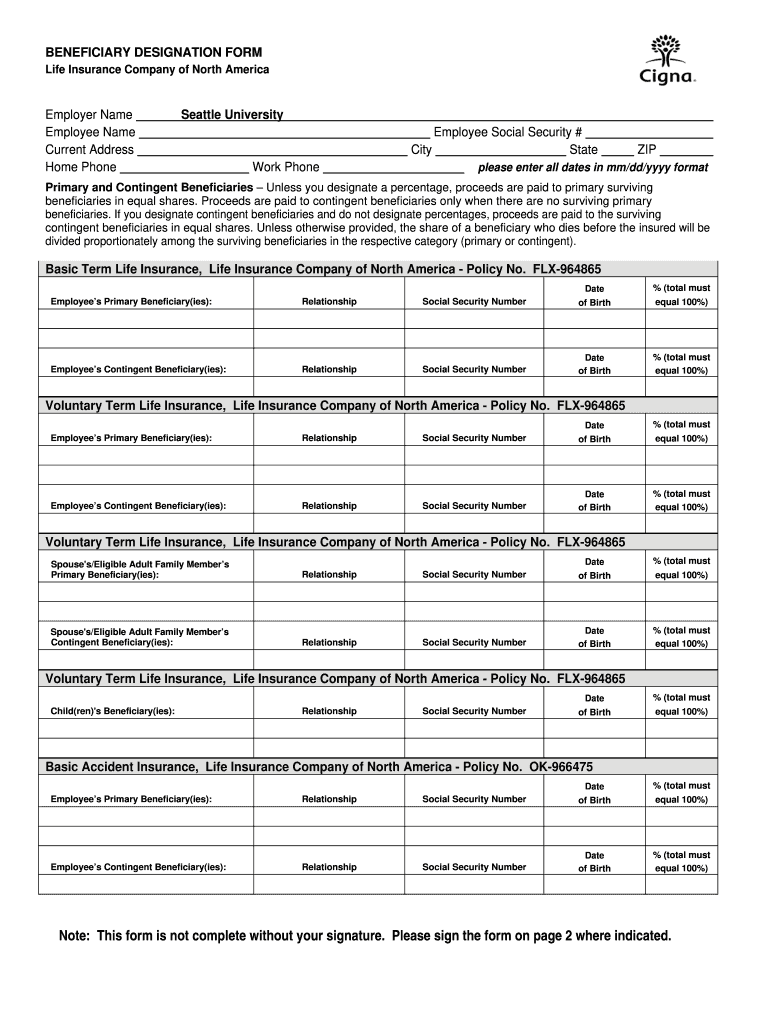
ZIP please enter all dates in mm/dd/yyyy format Primary and Contingent Beneficiaries – Unless you designate a percentage, proceeds are paid to primary surviving beneficiaries in equal shares. Proceeds are paid to contingent beneficiaries only when there are no surviving primary beneficiaries. If you designate contingent beneficiaries and do not designate percentages, proceeds are paid to the surviving contingent beneficiaries in equal shares. Unless otherwise provided, the share of a benefi.
Loading

Open form follow the instructions

Easily sign the form with your finger

Send filled & signed form or save
How to fill out the Seattle University Cigna Beneficiary Designation Form online
Filling out the Seattle University Cigna Beneficiary Designation Form is an important step in ensuring that your life insurance benefits are distributed according to your wishes. This guide will provide you with detailed instructions to assist you in completing the form accurately and efficiently, all online.
Follow the steps to complete your form online
- Press the ‘Get Form’ button to access the Seattle University Cigna Beneficiary Designation Form and open it.
- Begin filling in your personal information, including your employer name (Seattle University), employee name, current address, and contact numbers.
- Provide your employee social security number and additional details such as city, state, and ZIP code.
- Designate your primary and contingent beneficiaries for your Basic Term Life Insurance by entering their full names, relationships to you, social security numbers, and dates of birth. Ensure that the percentage designations total 100%.
- Repeat the process for your Voluntary Term Life Insurance, including both primary and contingent beneficiaries.
- If applicable, fill in the beneficiary information for your spouse's or eligible adult family member's life insurance and for your children’s beneficiaries as well.
- Complete the section for any additional insurance products like Basic and Voluntary Accident Insurance, making sure to follow the same format for beneficiaries.
- If you require additional space, attach a separate sheet of paper with the necessary details, sign it, and ensure it's clearly labeled with the corresponding policy number.
- Review all information for accuracy, then sign and date the form where indicated. This step is crucial, as the form is not valid without your signature.
- Once completed, proceed to save the changes, download, print, or share the completed form as needed.
Complete your Seattle University Cigna Beneficiary Designation Form online today to ensure your preferences are accurately recorded.
Experience a faster way to fill out and sign forms on the web. Access the most extensive library of templates available.
Related content
Mar 1, 2013 — Follow the instructions on the claim form and mail the form with required...
A beneficiary designation or change will become effective on the date You execute it...
Get answers to your most pressing questions about US Legal Forms API.
What are the requirements for a beneficiary?
A beneficiary designated on the Seattle University Cigna Beneficiary Designation Form must be a legal person, such as a family member, friend, or charity. It’s crucial that they are identifiable and reachable by the insurance provider. Additionally, some insurers may require that beneficiaries be a certain age to avoid complications in benefit distribution.
What must be followed when designating a beneficiary?
When completing the Seattle University Cigna Beneficiary Designation Form, it's essential to follow specific guidelines. This includes ensuring that the beneficiary's information is current and accurate, and that the form is signed and dated properly. Always consider any state-specific regulations that may apply, as they can impact your designation.
What is required for a beneficiary designation?
To complete the Seattle University Cigna Beneficiary Designation Form, you need to provide the full name, date of birth, and contact information of your chosen beneficiary. Additionally, include your own personal information as the policyholder, such as your social security number and address. Ensuring accurate details helps prevent any issues when the time comes to access benefits.
What is employee beneficiary designation?
Employee beneficiary designation is the process where employees select who will receive their benefits, as detailed on the Seattle University Cigna Beneficiary Designation Form. This designation applies to various employee benefits, including life insurance and retirement plans. It is essential for employees to understand how this impacts their loved ones. Proper designation helps ensure that your benefits make it to those who need them most.
What is the meaning of beneficiary designation?
Beneficiary designation is the act of naming a specific individual, group, or trust to receive your assets after your death, as indicated in your Seattle University Cigna Beneficiary Designation Form. This designation outlines your intentions, ensuring that your chosen beneficiaries receive the intended support. It serves as a vital component of your estate planning, reducing confusion and potential disputes. Properly designating beneficiaries can create a financially secure future for them.
Who do I put for beneficiary designation?
When filling out your Seattle University Cigna Beneficiary Designation Form, you should choose individuals or entities that reflect your personal and financial relationships. This can include family members, close friends, or trusts. It’s important to select someone who understands your wishes and can handle the responsibility. Think about their financial situation and how they may benefit from receiving your funds.
What does employee beneficiary designation mean?
Employee beneficiary designation specifically refers to the process of naming a beneficiary for benefits that employees receive, described in your Seattle University Cigna Beneficiary Designation Form. It identifies who will receive the benefits—like life insurance—after the employee's passing. This designation is crucial in ensuring that your benefits provide support to your loved ones. It’s a key part of your financial planning and provides peace of mind.
What is the standard beneficiary designation?
The standard beneficiary designation usually outlines who receives your benefits upon your death, as recorded on your Seattle University Cigna Beneficiary Designation Form. Typically, names are listed in a particular order, prioritizing immediate family members. This process avoids lengthy legal disputes and ensures that your wishes are honored. Understanding it helps you prevent any confusion later on.
What is standard beneficiary designation?
Standard beneficiary designation refers to the default naming of a beneficiary on your Seattle University Cigna Beneficiary Designation Form. This could include immediate family members, such as a spouse or children. Essentially, it is a way to ensure that your benefits go to the individuals you intend to support. It simplifies the distribution of benefits after your passing.
What beneficiary type should I choose?
Choosing the right beneficiary type is important for your Seattle University Cigna Beneficiary Designation Form. You can designate an individual, a trust, or an organization as your beneficiary. Consider your relationship with the potential beneficiary and their financial needs. It’s essential to select someone who can manage the benefits wisely.
Use professional pre-built templates to fill in and sign documents online faster. Get access to thousands of forms.
If you believe that this page should be taken down, please follow our DMCA take down process here.