Loading
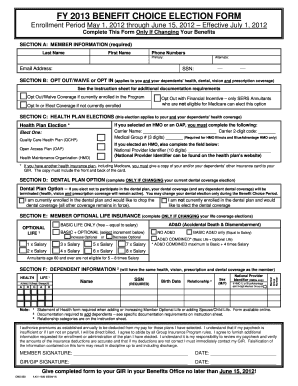
Get Fy 2013 Benefit Choice Election Form Enrollment Period May 1, 2012 Through June 15, 2012
How it works
-

Open form follow the instructions
-

Easily sign the form with your finger
-

Send filled & signed form or save
How to fill out the FY 2013 BENEFIT CHOICE ELECTION FORM Enrollment Period May 1, 2012 Through June 15, 2012 online
This guide will provide you with a clear set of instructions on how to effectively complete the FY 2013 BENEFIT CHOICE ELECTION FORM during the enrollment period. Follow these steps to ensure your choices regarding health benefits, dental coverage, and life insurance are accurately reflected.
Follow the steps to complete the form correctly.
- Click the ‘Get Form’ button to obtain the form and open it for editing.
- Provide your member information in Section A. Fill in your last name, first name, phone numbers (both primary and alternate), email address, and Social Security number. All fields are required.
- In Section B, decide whether to opt out/waive coverage or opt in. Mark the appropriate box based on your current enrollment status regarding health, dental, vision, and prescription coverage.
- Proceed to Section C to make health plan elections. Select one option among Quality Care Health Plan, Open Access Plan, or Health Maintenance Organization. If applicable, include the carrier name, the 2-digit carrier code, and, if choosing HMO, the 3-digit medical group number.
- For dental plan options in Section D, indicate whether you wish to drop your current dental coverage or enroll in it if you are not already participating.
- Section E pertains to optional life insurance. Choose whether to add, drop, or change your optional life insurance coverage and provide the necessary information as required.
- Complete Section F for dependent information only if you are making changes to dependent coverage. Provide required documentation to support any additions.
- Review your selections and, once finalized, sign and date the form in the provided space. Ensure all necessary documentation is included for dependents.
- Submit the completed form to your Group Insurance Representative (GIR) in your Benefits Office no later than June 15, 2012.
Start your enrollment by completing the required sections of the form online today.
Industry-leading security and compliance
US Legal Forms protects your data by complying with industry-specific security standards.
-
In businnes since 199725+ years providing professional legal documents.
-
Accredited businessGuarantees that a business meets BBB accreditation standards in the US and Canada.
-
Secured by BraintreeValidated Level 1 PCI DSS compliant payment gateway that accepts most major credit and debit card brands from across the globe.