Loading
Form preview
  • US Legal Forms
  • Form Library
  • Industry Forms
  • Industry Insurance & Medical Forms
  • Rbc 83738 2008

Get Rbc 83738 2008-2026

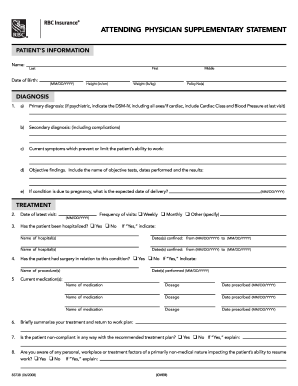
Ry diagnosis: (if psychiatric, indicate the DSM-IV, including all axes/if cardiac, include Cardiac Class and Blood Pressure at last visit) b) Secondary diagnosis: (including complications) c) Current symptoms which prevent or limit the patient’s ability to work: d) Objective findings. Include the name of objective tests, dates performed and the results: e) If condition is due to pregnancy, what is the expected date of delivery? (MM/DD/YYYY) TREATMENT 2. Date of latest visit: 3. Ha.

How it works

  1. Open form

    Open form follow the instructions

  2. Easily sign form

    Easily sign the form with your finger

  3. Share form

    Send filled & signed form or save

How to fill out the RBC 83738 online

The RBC 83738 form, also known as the attending physician supplementary statement, is an essential document required for processing claims related to patient health. This guide provides clear, step-by-step instructions on how to accurately fill out this form online, ensuring that all necessary information is provided.

Follow the steps to complete the RBC 83738 form online.

  1. Click the ‘Get Form’ button to obtain the RBC 83738 form and access it in your preferred editor.
  2. Fill in the patient’s information, including the last name, first name, middle name, date of birth (MM/DD/YYYY), height (in/cm), weight (lb/kg), and policy number(s). Ensure all information is accurate.
  3. Proceed to the diagnosis section. Provide the primary diagnosis, indicating if it is psychiatric by including the DSM-IV details, and note any secondary diagnosis or complications. Document current symptoms that limit the patient’s ability to work, along with objective findings such as test names, dates, and results.
  4. In the treatment section, state the date of the latest visit and indicate whether the patient has been hospitalized by selecting 'Yes' or 'No'. If hospitalized, list hospital names and the confinement dates.
  5. Detail any surgeries related to the condition by selecting 'Yes' or 'No' and indicating the procedure names and dates performed.
  6. List current medications, including the name of each medication, dosage, and the date prescribed.
  7. Summarize your treatment and return-to-work plan briefly.
  8. Indicate if the patient has been non-compliant with the treatment plan and identify any non-medical factors that might affect their ability to work.
  9. Outline activity restrictions and limitations, specifying what the patient should not do and what they cannot do. Include details about specific occupational duties impacted.
  10. Confirm whether you have been supervising the patient’s care and note any treatment received since the last statement, along with the patient's perception of its helpfulness.
  11. State your prognosis, selecting one of the options provided and including any necessary comments.
  12. Determine if the patient is a suitable candidate for trial employment in their current or any other occupation and provide further details or comments as needed.
  13. Attach any relevant medical records, consultation reports, test results, and hospital summaries that support the information provided.
  14. Complete the signature section, including the physician’s name, address, degree and specialty, and date.
  15. Finalize the form by saving changes, and prepare to download, print, or share the completed document according to your needs.

Begin completing your RBC 83738 form online today to ensure a smooth claims process.

Get form

Experience a faster way to fill out and sign forms on the web. Access the most extensive library of templates available.
Get form

Related content

e10vk
In September 2005, we acquired a mortgage origination platform from RBC Mortgage Company...
Learn more
fcm data april 2005
RBC CAPITAL MARKETS CORPORATION, Y, CME, 04/30/2005, 220,882,581, 23,293,059 ... 83,738...
Learn more

Related links form

Wisconsin Tax Form P 521 1098t Forms Luzerne County Community College Umdnj W2 Form Seemyw2

Questions & Answers

Get answers to your most pressing questions about US Legal Forms API.

Contact support

Yes, you can download your bank statement as a CSV file through your RBC online banking account. Simply log in, navigate to the statements section, and select the option to download as CSV. This functionality allows you to keep your financial records organized and is especially beneficial for managing your accounts related to RBC 83738.

You can obtain a CSV file from RBC by accessing your online banking portal. Once logged in, locate the transaction records for the account associated with RBC 83738. Select the CSV download option, and you will have your financial data ready for use, making it easier to manage and analyze.

To get a CSV file from online banking, log into your RBC account and navigate to the transaction history or account statement section. Look for an export or download option, and select CSV as the desired file format. This feature provides a convenient way to keep track of your finances, particularly with records linked to RBC 83738.

To file a dispute with RBC, start by collecting any supporting documents related to the transaction in question. You can initiate the dispute online through your RBC account or directly visit a branch for assistance. Ensure you reference RBC 83738 if that is related to your claim, as it helps in processing your dispute efficiently.

To get a CSV file, you can often generate one through various online services or financial tools. If you are using RBC, log into your online banking account and look for options that allow exportation of your transactions into CSV format. This is an effective way to manage your financial data, especially in relation to RBC 83738.

Filing a claim with RBC is straightforward. First, gather all necessary documents and information related to your claim. Then, you can either visit an RBC branch or use their online platform to submit your claim. Ensure you provide all required details to expedite the process, particularly when referencing RBC 83738.

To download a CSV file from a spreadsheet, open your spreadsheet program and locate the file menu. Choose the 'Save As' or 'Export' option and select CSV as the file format. Once completed, you can use this CSV file for various purposes, such as importing your data or managing your accounts, like RBC 83738.

The bank code for RBC, also known as RBC 83738, is essential for various transactions, especially when processing payments or wire transfers. Having the correct bank code ensures that funds are routed accurately. You can find this code on your bank statements or by directly contacting RBC customer service for assistance.

Yes, a red blood cell count of 3.7 is considered low for many individuals, potentially indicating an underlying health condition. It is essential to interpret this value in the context of your overall health and medical history. Tracking your RBC 83738 values helps in understanding your health patterns. Engaging with healthcare professionals provides clarity and guidance on next steps for your well-being.

A dangerously low level of red blood cells usually refers to counts below 3.0 million cells per microliter. At this level, individuals may experience severe symptoms that warrant immediate medical attention. Stay informed about your RBC 83738 readings and discuss any concerning results with your healthcare provider. Early intervention can prevent complications and support your health.

Get This Form Now!

Use professional pre-built templates to fill in and sign documents online faster. Get access to thousands of forms.
Get form
If you believe that this page should be taken down, please follow our DMCA take down processhere.
Get RBC 83738
Get form
  • Adoption
  • Bankruptcy
  • Contractors
  • Divorce
  • Home Sales
  • Employment
  • Identity Theft
  • Incorporation
  • Landlord Tenant
  • Living Trust
  • Name Change
  • Personal Planning
  • Small Business
  • Wills & Estates
  • Packages A-Z
  • Affidavits
  • Bankruptcy
  • Bill of Sale
  • Corporate - LLC
  • Divorce
  • Employment
  • Identity Theft
  • Internet Technology
  • Landlord Tenant
  • Living Wills
  • Name Change
  • Power of Attorney
  • Real Estate
  • Small Estates
  • Wills
  • All Forms
  • Forms A-Z
  • Form Library
  • Legal Hub
  • About Us
  • Help Portal
  • Legal Resources
  • Blog
  • Affiliates
  • Contact Us
  • Delete My Account
  • Site Map
  • Industries
  • Forms in Spanish
  • Localized Forms
  • State-specific Forms
  • Forms Kit
  • Real Estate Handbook
  • All Guides
  • Notarize
  • Incorporation services
  • For Consumers
  • For Small Business
  • For Attorneys
  • USLegal
  • FormsPass
  • pdfFiller
  • signNow
  • altaFlow
  • DocHub
  • Instapage
Form Packages
  • Adoption
  • Bankruptcy
  • Contractors
  • Divorce
  • Home Sales
  • Employment
  • Identity Theft
  • Incorporation
  • Landlord Tenant
  • Living Trust
  • Name Change
  • Personal Planning
  • Small Business
  • Wills & Estates
  • Packages A-Z
Form Categories
  • Affidavits
  • Bankruptcy
  • Bill of Sale
  • Corporate - LLC
  • Divorce
  • Employment
  • Identity Theft
  • Internet Technology
  • Landlord Tenant
  • Living Wills
  • Name Change
  • Power of Attorney
  • Real Estate
  • Small Estates
  • Wills
  • All Forms
  • Forms A-Z
  • Form Library
Customer Service
  • Legal Hub
  • About Us
  • Help Portal
  • Legal Resources
  • Blog
  • Affiliates
  • Contact Us
  • Delete My Account
  • Site Map
  • Industries
  • Forms in Spanish
  • Localized Forms
  • State-specific Forms
  • Forms Kit
Legal Guides
  • Real Estate Handbook
  • All Guides
Prepared for you
  • Notarize
  • Incorporation services
Our Customers
  • For Consumers
  • For Small Business
  • For Attorneys
Our Sites
  • USLegal
  • FormsPass
  • pdfFiller
  • signNow
  • altaFlow
  • DocHub
  • Instapage
Social Media
Call us now toll free:
+1 833 426 79 33
As seen in:
© Copyright 1999-2026 airSlate Legal Forms, Inc. 17 Station Street, Suite 303, Brookline, MA 02445
  • Your Privacy Choices
  • Terms of Service
  • Privacy Notice
  • Content Takedown Policy
  • Bug Bounty Program