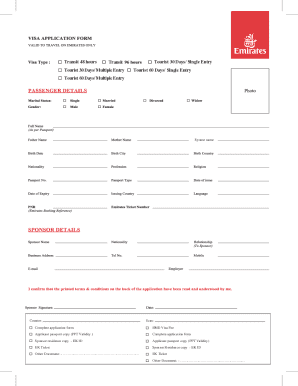
Pplication form EMD Visa Fee Applicant passport copy (PPT Validity ) Complete application form Sponsor residence copy - EK ID Applicant passport copy (PPT Validity) EK Ticket Sponsor Residence copy - EK ID Other Document: - . EK Ticket Other Document: - Validity After Entry Cost Extension Transit 48-Hours 48 hours from Arrival AED 40 Non extendable Transit 96-Ho.
Open form follow the instructions
Easily sign the form with your finger
Send filled & signed form or save
How to fill out the AE Emirates Visa Application Form online
Filling out the AE Emirates Visa Application Form online is a straightforward process that ensures you provide all necessary information for your visa request. This guide will assist you through each section of the form, ensuring that you submit a complete application.
Follow the steps to complete your AE Emirates Visa Application Form effectively.
- Click ‘Get Form’ button to acquire the application form and open it in your preferred web editor.
- Begin by entering your personal information. This includes your full name, nationality, date of birth, and passport details. Ensure all entries match your passport accurately.
- Indicate the duration and type of visa you are applying for, such as transit, tourist, single entry, or multiple entries.
- Add details of your sponsoring entity, if applicable. Provide the name, relationship, and Emirates ID of your sponsor.
- Upload necessary documents, including a copy of your passport, Emirates ID (if applicable), and your flight ticket details.
- Review your application for any errors or missing information to ensure everything is complete and accurate.
- Once satisfied with your application, you can save your changes, download a copy of the form, print it for your records, or share it as needed.
Complete your AE Emirates Visa Application Form online today for a smoother travel experience.
Experience a faster way to fill out and sign forms on the web. Access the most extensive library of templates available.
Related content
The mission of the U.S. Embassy is to advance the interests of the United States and to...
ICP Application · Enter your current nationality, as mentioned in your Emirates ID · As...
2024) to 17.5% (Claude 3.5 Sonnet, June 2024). OpenAI's internal CTF hacking competition...
Get answers to your most pressing questions about US Legal Forms API.
What documents are required for UAE visa?
When applying for a UAE visa, you need to submit several documents along with your AE Emirates Visa Application Form. Required documents typically include your passport, photographs, and proof of financial means. You may also need to show travel insurance or an invitation letter, depending on your visa category.
How to get a UAE E visa?
Obtaining a UAE E visa is a straightforward process. Start by filling out the AE Emirates Visa Application Form online, ensuring that you provide all necessary details and documentation. Upon approval, your e-visa will be emailed to you, which you can print and present upon arrival in the UAE.
Which documents are required for a UAE visa?
When applying for a UAE visa, it is essential to have several key documents ready. These include a completed AE Emirates Visa Application Form, a valid passport, recent passport-sized photographs, and travel itinerary. Depending on your situation, you may also need additional documentation such as proof of employment or a letter of invitation.
How to submit a visa application form?
To submit your visa application, you can use several methods, including online and in-person submissions. If you complete the AE Emirates Visa Application Form online, ensure that you upload all required documents. If submitting in person, visit a UAE embassy or a visa processing center to hand in your application.
How much bank statement is required for a UAE visa?
Typically, you need to show a bank statement that demonstrates sufficient funds for your stay in the UAE. This amount can vary, but generally, having a balance of around $1,000 or more is recommended. Including this information when you fill out the AE Emirates Visa Application Form can help facilitate your application.
What are the required documents for a visa?
To successfully complete the AE Emirates Visa Application Form, you need various documents. Common requirements include a valid passport, passport-sized photos, and proof of accommodation in the UAE. Additionally, depending on your visa type, you may need to provide financial statements or an invitation letter.
Do Brazilians need a visa to the UAE?
Yes, Brazilians need a visa to enter the UAE. To apply, you will need to complete the AE Emirates Visa Application Form. This form is crucial in initiating the visa process. Make sure you gather the required documents to submit along with your application for a smooth experience.
How to fill a visa form?
To fill a visa form, gather necessary documents and information, and follow the instructions carefully. For instance, the AE Emirates Visa Application Form provides a clear structure that helps in ensuring you don’t miss any important details. Take your time, complete the form accurately, and verify all entries to facilitate a smooth application process.
How to fill out a form for a visa?
Filling out a form for a visa involves providing accurate biographical data and travel intent. Use the AE Emirates Visa Application Form as a reference to understand the format and requirements which may be similar across different visa applications. Make sure to review all information before submission to avoid errors.
How to fill up a Brazil visa application form?
When filling up a Brazil visa application form, start by collecting information such as your flight itinerary and accommodation details. You can refer to the process used for the AE Emirates Visa Application Form as a guide for consistency. Always double-check your entries to confirm that everything aligns with your travel plans for a smoother approval.
Use professional pre-built templates to fill in and sign documents online faster. Get access to thousands of forms.
If you believe that this page should be taken down, please follow our DMCA take down process here.