Loading
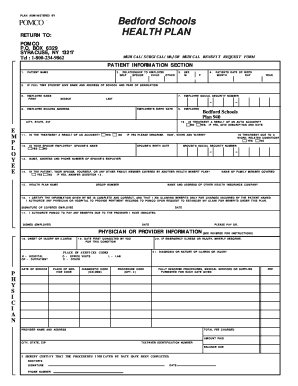
Get Pomco Bedford Schools Health Plan
How it works
-

Open form follow the instructions
-

Easily sign the form with your finger
-

Send filled & signed form or save
How to fill out the POMCO Bedford Schools Health Plan online
This guide provides clear and detailed instructions on how to complete the POMCO Bedford Schools Health Plan form online. By following these steps, you can ensure that your health benefit requests are submitted accurately and efficiently.
Follow the steps to complete the online health plan form.
- Click the ‘Get Form’ button to access the POMCO Bedford Schools Health Plan form and open it in the designated editor.
- In the Patient Information Section, complete items 1 through 10. This includes entering the patient's name, date of birth, relationship to the employee, and the employee's details such as name, social security number, and mailing address.
- If the patient is a full-time student, provide the name and address of the school and their year of graduation in the designated fields.
- Indicate whether the treatment is a result of an auto accident or another accident by selecting 'Yes' or 'No' and adding details if applicable.
- Complete items 12 through 15 regarding the spouse's employment, additional health benefit plans, and their associated details, ensuring to provide the spouse's employer information where necessary.
- Have the physician fill out the Physician or Provider Information section with relevant details about the treatment provided, including diagnosis and total fees charged.
- Review all entered information for completeness and accuracy to prevent delays in processing your claim. Ensure that the employee's social security number is included.
- After completing the form, you have the option to save changes, download the form, print it, or share it as needed.
Complete the POMCO Bedford Schools Health Plan form online to ensure timely processing of your health benefit requests.